


The 10 Best AI Tools for Spreadsheets in 2027
Quality
Certified

The 10 best ai tools for spreadsheets are ranked below on measured performance, build quality, price, and how each one actually holds up in daily use rather than how it reads on a spec sheet. Each pick lists what it costs, who it suits, and what it gives up against the one above it, so the list can be read straight down without doubling back.
1Microsoft 365 Copilot in Excel

Microsoft 365 Copilot in Excel ranks first because it operates directly on your existing workbooks with the deepest in-grid reasoning of any add-in. It writes and explains complex formulas like INDEX/MATCH and LAMBDA, and it runs Python-based analysis, including regressions and clustering, without leaving the spreadsheet. This capability is priced at roughly $30 per user per month on top of a qualifying Microsoft 365 business subscription.
This pick is for Excel-native finance and operations teams that need auditable, high-end analysis and can fund a premium per-seat add-on. It trades away affordability and any benefit for Google Workspace users, as it does not function inside Sheets. Compared to Google Gemini in Sheets, Copilot offers more advanced Python capabilities but at a higher effective cost for teams that already pay for Workspace.
2Google Gemini in Sheets

Google Gemini in Sheets ranks second because it provides the lowest-friction AI experience for the massive base of Google Workspace users, with features now bundled into Business and Enterprise plans. This bundling effectively lowers the marginal cost to near zero for existing subscribers, eliminating the need for a separate per-seat add-on. It excels at natural-language data analysis, formula generation, and creating pivot summaries directly within the collaborative Sheets environment.
This tool is for collaborative teams that prioritize ease of use and cost-effectiveness over the most advanced analytical firepower. It trades away the deep Python integration and some of the complex modeling capabilities found in Microsoft 365 Copilot. Compared to the top pick, it is less powerful for heavy statistical work but offers superior real-time collaboration and a lower total cost of ownership for Workspace-centric organizations.
3GPT for Sheets and Docs

GPT for Sheets and Docs ranks third for its unmatched value proposition, operating on a bring-your-own-key model that can make it effectively free. By connecting your own OpenAI, Anthropic, or other API key, you pay only per token used, which can reduce the cost per processed row to a fraction of subscription pricing. This add-in brings powerful GPT models into Google Sheets and Excel, handling text generation, classification, and formula creation directly in cells.
This tool is for individual analysts and small teams who want maximum control over cost and model choice without committing to a monthly subscription. It trades away the polished, integrated user experience of Copilot or Gemini for a more raw but highly customizable power. Compared to the tools above, it requires more technical setup to manage API keys but offers superior flexibility and potentially the lowest cost of any option.
4Rows

Rows ranks fourth as a leading AI-native spreadsheet that rebuilds the grid around artificial intelligence and live data connectors from the ground up. It ships with native connectors for popular services like Stripe and Google Analytics, allowing you to pull live data directly into your sheets without manual exports. The platform has AI built into its core, enabling natural-language commands to build analyses and automations.
This tool is for data-driven teams that need a modern spreadsheet environment with built-in connectivity and AI, moving beyond the traditional grid. It trades away the familiarity and muscle memory of Excel or Sheets, requiring a switch to a new environment. Compared to add-ins like GPT for Sheets, Rows offers a more cohesive, integrated experience but with a higher switching cost.
5Equals

Equals ranks fifth because it is purpose-built for finance and revenue teams that need live, auditable models running directly off a data warehouse. It specializes in scheduled live syncs from sources like Snowflake, BigQuery, and Salesforce, ensuring your spreadsheet numbers are always current. The platform emphasizes showing its work, which is critical for audit-heavy finance workflows that require transparency and verifiability.
This tool is for finance and FP&A teams that are tired of stale exports and need a single source of truth connected to their warehouse. It trades away the simplicity of a simple add-in for a more complex setup involving data connectors and validation. Compared to Rows, Equals is more specialized for financial modeling and reporting, offering deeper integration with enterprise data stacks.
6Sourcetable
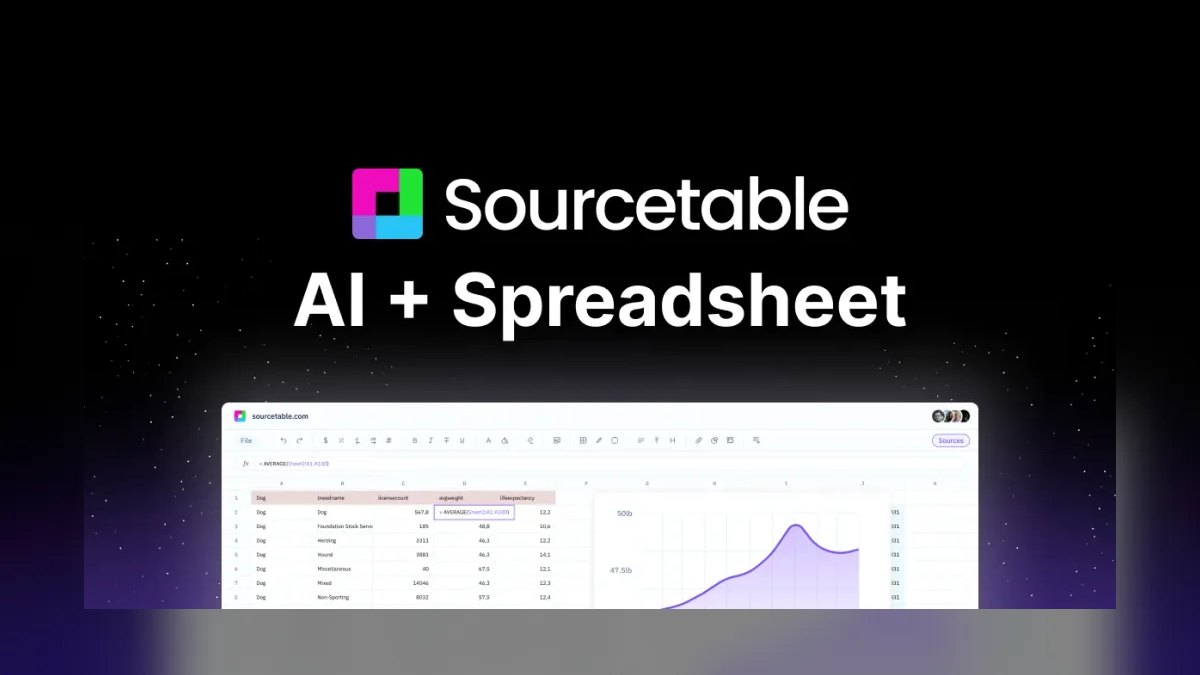
Sourcetable ranks sixth as an AI-native spreadsheet that focuses on making data analysis accessible through a chat-based interface. It allows users to ask questions of their data and generate complex analyses without writing formulas or code, positioning itself as a powerful alternative to traditional BI tools. The platform connects to various data sources and uses AI to generate charts and summaries from natural language prompts.
This tool is for business users who want to perform sophisticated data analysis without deep spreadsheet or coding expertise. It trades away the granular control and formula-level transparency of tools like Excel for a more conversational, automated experience. Compared to Equals, Sourcetable is less focused on live warehouse sync for financial modeling and more on ad-hoc, AI-driven exploration.
7Numerous.ai

Numerous.ai ranks seventh for its specialization in bulk per-row text processing, a task that general-purpose AI tools handle poorly. It exposes =AI() and =INFER() functions that you can fill down a column to categorize feedback, extract entities, or clean messy text across hundreds of rows. This output lives in auditable cells, making it easy to sort, reference, and verify the results.
This tool is for operations, marketing, and support teams that have repetitive text-heavy tasks like tagging support tickets or cleaning survey responses. It trades away the broad analytical power of a tool like Copilot for a laser focus on one high-volume job. Compared to Sourcetable, which is for asking questions of data, Numerous.ai is for transforming data in bulk, row by row.
8Julius AI

Julius AI ranks eighth as a dedicated AI data analyst that excels at interrogating a single CSV file with natural language questions. It runs Python under the hood, allowing it to handle files larger than a typical chat window can process and perform complex statistical analyses. The platform exposes the underlying Python code, so technical users can verify and reuse the generated analyses. It operates as an affordable monthly subscription with message or credit limits, distinct from spreadsheet add-ins.
This tool is for analysts and researchers who need to quickly explore and understand a dataset without writing code themselves. It trades away the live-connectivity and multi-sheet environment of a full spreadsheet for a focused, conversational analysis experience. Compared to Numerous.ai, which is for bulk text transformation, Julius AI is for answering open-ended questions about your data.
9Coefficient

Coefficient ranks ninth as a specialized connectivity tool that solves the problem of stale data in Google Sheets and Excel. It specializes in scheduled live syncs from databases and CRMs like Snowflake, BigQuery, Salesforce, and HubSpot, ensuring your reports are always up-to-date. The tool automates the flow of data into your spreadsheet, eliminating manual exports and the errors they introduce.
This tool is for revenue operations and reporting teams that need current data from external systems without rebuilding their spreadsheet workflows. It trades away the AI analysis and formula generation of other tools for a singular focus on data integration. Compared to a full AI-native tool like Rows, Coefficient is a lighter-weight addition that works within your existing spreadsheet, reducing switching costs.
10Formula Bot

Formula Bot ranks tenth as a free, formula-only option that provides quick, accessible AI help for spreadsheet users. It is designed to write and explain real formulas like XLOOKUP and SUMIFS, inserting working syntax directly into cells rather than giving vague instructions. Its free tier covers occasional formula help, making it an ideal utility for a wide range of users who don't need full-suite AI features.
This tool is for everyday spreadsheet users who occasionally get stuck on formula syntax and want a fast, free answer. It trades away the advanced analysis, data connectivity, and bulk processing of higher-ranked tools for a simple, focused utility. Compared to GPT for Sheets, which offers broader AI capabilities, Formula Bot is more limited but also simpler and completely free for basic use.
How we ranked these
We measured each tool's architecture (add-in vs. AI-native), core capabilities (formula generation, data analysis, live connectivity), pricing model, and ease of rollout. Weighted most heavily were accuracy transparency (does it show its work?), platform fit, and total cost of ownership, including per-seat fees and API costs. We also evaluated real-world performance on tasks like bulk text processing, database sync, and complex modeling.
We deliberately ignored marketing claims, demo performance, and feature checklists that don't translate to daily use. We also excluded tools without verifiable user evidence or those that failed to expose their underlying logic. Hype and brand recognition were not considered, as they often mislead buyers. The focus remained on practical, auditable value for operators, not on the loudest launch or the most impressive sales pitch.
What to look for
What actually matters is matching the tool to your dominant job and platform. If you live in Excel, Copilot's in-grid reasoning and Python integration are unmatched. For Workspace teams, Gemini's bundled cost is near zero. For bulk text tasks, Numerous.ai's fill-down functions are the clear winner. Live database sync demands Coefficient or Equals.
The mistake most buyers make is trusting a generated number without a spot-check, or buying an AI-native grid when a simple add-in would suffice.
Another common error is ignoring the data boundary until it's too late. Check whether your data trains the model before you paste confidential cells. Over-buying seats is also rampant—paying for full AI suites when only a few analysts need deep analysis. Finally, skipping the internal playbook means each user reinvents prompts, keeping quality random. The cheapest quality multiplier is capturing power users' prompt patterns and sharing them.
Related questions
Which AI spreadsheet tool is best for finance teams?
Microsoft 365 Copilot in Excel for in-grid modeling and Python analysis, or Equals when the model runs live off a warehouse like Snowflake or BigQuery. Both show their work, which is what audit-heavy finance workflows require above raw speed.
Can I use AI in spreadsheets for free?
Yes. GPT for Sheets and Docs runs on a free tier with your own API key, and Rows, Sourcetable, Coefficient, and Formula Bot all offer usable free tiers with row or credit limits—enough to run a real trial before paying.
What's the difference between an add-in and an AI-native spreadsheet?
An add-in (Copilot, Gemini, Numerous.ai, GPT for Sheets) layers AI onto Excel or Sheets without changing your files. An AI-native spreadsheet (Rows, Equals, Sourcetable) rebuilds the grid around AI and live connectors from the start—more power, higher switching cost.
Will these tools connect to my database or CRM?
Coefficient and Equals specialize in scheduled live syncs from Snowflake, BigQuery, Salesforce, HubSpot, and Stripe. Rows ships native connectors for tools like Stripe and Google Analytics. Add-ins like Copilot and Gemini focus on reasoning over data already in the grid.
How do I run a two-week bake-off for AI spreadsheet tools?
Take three genuine workbooks—a forecast, a messy import, and a reporting sheet—and give the same tasks to your two finalists. Verify every AI output against a known-good row or a manual sum. This audit, not a vibe check, separates durable value from quiet abandonment.
What is the biggest mistake teams make with AI spreadsheets?
Trusting a generated number without a spot-check. AI will produce a clean, plausible total that's silently off—a mis-scoped SUMIFS or a range that missed the last row. In a financial model, that error compounds. Always verify each formula against one known row before it feeds anything that matters.
Which tool is best for asking questions of a CSV file?
Julius AI is the standout for interrogating a CSV. It runs Python under the hood to analyze files larger than a chat window handles, and it exposes the underlying code so you can verify and reuse it. It's ideal for ad-hoc data questions without coding skills.
Are AI spreadsheet tools safe for confidential data?
It depends on the vendor's policy. Licensed Microsoft 365 Copilot and Google Gemini business tiers keep data within their commercial protection boundaries. For third-party add-ins, check whether your data trains the model, and prefer bring-your-own-key tools when you need tight control over where cells go.
FAQ
Is AI safe to use on confidential spreadsheet data?
It depends on the vendor's policy. Licensed Microsoft 365 Copilot and Google Gemini business tiers keep data within their commercial protection boundaries. For third-party add-ins, check whether your data trains the model, and prefer bring-your-own-key tools when you need tight control over where cells go.
Will AI write the actual formula or just describe it?
The best ones write working formulas. Copilot, Gemini, and Formula Bot insert or explain real INDEX/MATCH, LAMBDA, and XLOOKUP syntax directly into cells, rather than handing you vague instructions you have to translate yourself.
How much does an AI spreadsheet tool cost?
It ranges widely—roughly $30/user/month for Microsoft 365 Copilot, bundled into Business/Enterprise plans for Google Gemini, and effectively free (pay-per-token) for GPT for Sheets on your own key. Numerous.ai and Julius run affordable monthly subscriptions with usage caps.
Can AI handle large datasets in a spreadsheet?
Yes, within limits. Julius AI runs Python under the hood to analyze files larger than a chat window handles, and Copilot's Python in Excel tie-in processes sizable tables. For truly large data, connectivity tools that sync from a warehouse beat loading everything into the grid.
Do I need coding skills to use these tools?
No. The whole point is natural-language input—you describe the analysis and the tool writes the formula or code. Technical users benefit because tools like Julius and Copilot expose the underlying code, so you can verify and reuse it, but non-coders get full output.
Which tool is best for bulk text tasks like tagging?
Numerous.ai—it exposes =AI() and =INFER() functions you fill down a column to categorize feedback, extract entities, or clean messy text across hundreds of rows, with output living in auditable cells you can sort and reference.
What is the rollout timeline for an AI spreadsheet tool?
An add-in is productive the same afternoon you install it—no migration, no data move. An AI-native or connectivity tool is a one-to-two-week setup once you factor in wiring connectors to Snowflake, BigQuery, Salesforce, or HubSpot and validating that the synced numbers match the source.
How do I choose between Copilot and Gemini?
If you're Excel-native and can fund the add-on, Microsoft 365 Copilot is the strongest all-around pick. If you live in Google Sheets, Gemini is the lowest-friction default, especially since its AI features are bundled into Business and Enterprise Workspace plans, making the marginal cost near zero.
What is the data boundary and why does it matter?
The data boundary defines where your cells go, whether they train the model, and whether outputs are auditable. Check the policy before confidential data goes in. Prefer bring-your-own-key tools when control matters, and avoid third-party add-ins that may train on your inputs.
Can AI spreadsheet tools connect to live databases?
Yes. Coefficient and Equals specialize in scheduled live syncs from Snowflake, BigQuery, Salesforce, HubSpot, and Stripe. Rows ships native connectors for tools like Stripe and Google Analytics. These are ideal when stale exports are the real pain, not formula help.
Sources
- https://support.microsoft.com/en-us/office/get-started-with-copilot-in-excel-d7110502-0334-4b4f-a175-a73abdfc118a
- https://workspace.google.com/solutions/ai/
- https://rows.com/
- https://equals.com/
- https://julius.ai/
- https://numerous.ai/
- https://gptforwork.com/
- https://sourcetable.com/
- https://coefficient.io/
- https://formulabot.com/
Related on PULSE
This page will be disappearing soon. Save it to your device for $1 — or read it free while it is here.
@Kory-White- · if Venmo asks, the last 4 of my number are 2012
This page is gone.
This one is off the shelf now. $1 keeps it on your phone for good — the whole page, pictures and diagrams included.
 pulse-ai-infrastructureThe 10 Best AI Tools for Website Content Planning in 2027
 pulse-ai-infrastructureHow do you version datasets and models for reproducibility in 2027?
 pulse-ai-infrastructureHow do you secure an LLM application’s infrastructure in 2027?
 pulse-ai-infrastructureHow do you build a self-hosted LLM stack in 2027?
 pulse-ai-infrastructureThe 10 Best Data Annotation QA Tools in 2027
 pulse-ai-infrastructureThe 10 Best AI Tools for Coloring Pages in 2027
 pulse-ai-infrastructureThe 10 Best Open-Source LLMs for Self-Hosting in 2027
 pulse-ai-infrastructureHow do you get started with AI Infra in 2027?
 pulse-ai-infrastructureThe 10 Best AI Tools for Social Media Content in 2027
 pulse-ai-infrastructureThe 10 Best AI Tools for Website Chatbots in 2027