
“Join a team that runs on pipeline.” — LinkedIn Banner
 Curated byKory White · Fractional CRO · Maryland
 PULSEKNOWLEDGE LIBRARY
Quality
Certified
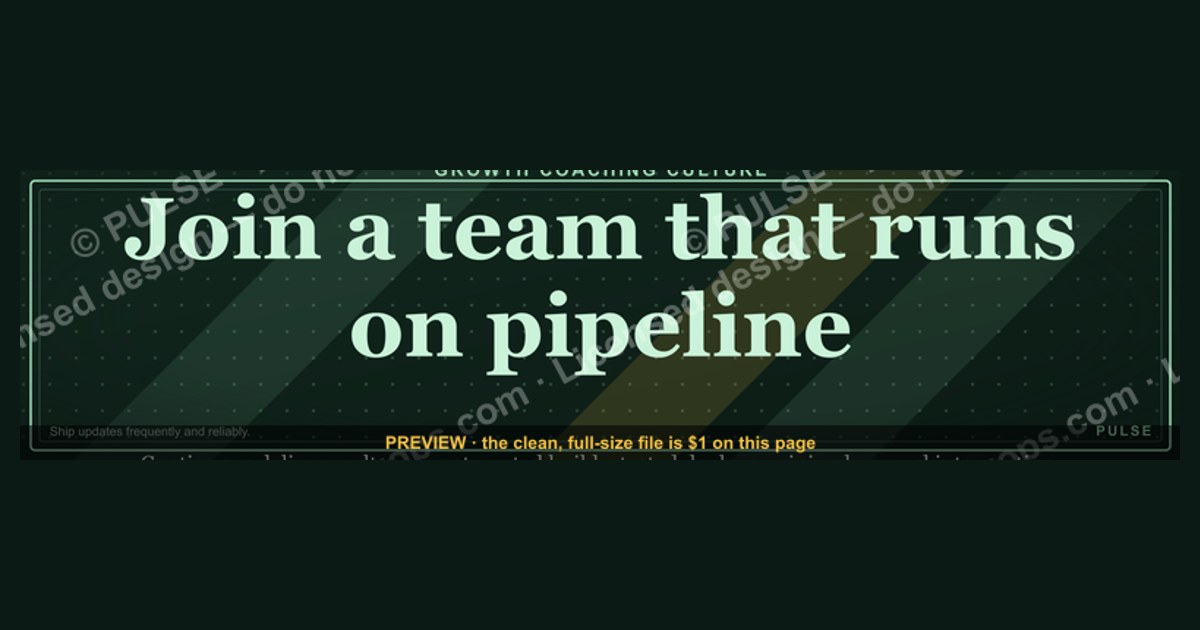
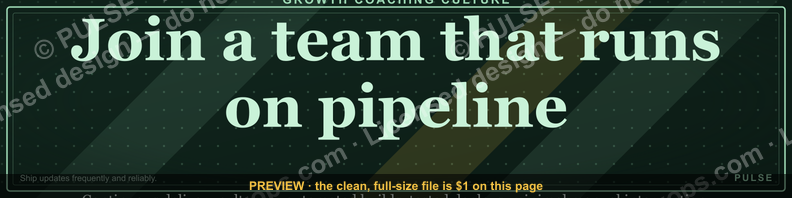
This is a LinkedIn profile banner graphic, 1584 by 396 pixels, that reads "Join a team that runs on pipeline." in bold type on a dark background. It signals to recruiters, candidates, and peers that your revenue organization is pipeline-led, and it belongs on the cover image slot of a LinkedIn profile or company page.
The two ways to run this banner: personal profile versus company page
The same 1584x396 artwork can live in two very different places, and the decision changes almost everything about how you deploy it. The first option is a personal LinkedIn profile cover image. Every LinkedIn member gets one cover slot above their headline, and it renders at a 4:1 aspect ratio on desktop. The second option is a LinkedIn company page cover image, which uses the same aspect ratio but sits above the page's tagline and follower count rather than above a person's headline.
On a personal profile, the banner does individual-level signaling. A RevOps manager, a VP of Sales, or an SDR leader who sets "Join a team that runs on pipeline." as their cover is effectively turning their own profile into a recruiting surface. The people who see it are profile visitors — recruiters sourcing candidates, candidates researching a hiring manager before an interview, peers checking who someone is before a call. The banner is doing work in a context where the viewer already chose to look at that person. That is a high-intent audience, but a narrow one. A typical individual profile might get a few dozen to a few hundred cover impressions a week, and most of those come from people who clicked through from somewhere else.

On a company page, the banner does organizational signaling. It sits above the tagline and appears to anyone who lands on the page from a job post, a shared post, an ad, or a search result. The audience is broader and colder. Someone who clicks a job listing for a RevOps analyst role lands on the company page, sees the banner, and gets an immediate framing: this is a pipeline-driven shop, not a relationship-driven or brand-driven one. That framing matters because "runs on pipeline" is a specific claim about how the revenue engine is measured, forecast, and compensated.
The two placements are not mutually exclusive, but they compete for attention in different ways. A personal profile banner is seen by people who already know the person's name. A company page banner is seen by people who are evaluating the company as an entity. If your goal is to attract inbound candidates who already follow your leaders, the personal profile version does more per impression. If your goal is to convert job-post traffic into applicants, the company page version does more per impression. Most teams that use this banner seriously run it in both places, with the personal version customized per leader and the company version standardized.
There is a third, less obvious placement: the banner can be used as a shared asset in a hiring campaign. Recruiters who run LinkedIn ads or InMail sequences can attach the same artwork as a creative asset, so the visual identity carries from the ad into the profile the candidate then visits. That consistency is worth more than either placement alone, because it makes the "runs on pipeline" claim feel like a deliberate employer brand rather than a one-off graphic.
The trade-off between the two main options is reach versus control. Personal profiles give you reach through the individual's network and a level of authenticity a company page cannot fake — a real person chose to put that line on their own profile. Company pages give you control: one asset, one message, updated centrally, no dependency on whether each leader remembers to change their cover. If your RevOps team has five leaders and only two update their covers, the personal-profile strategy produces an inconsistent signal. If you standardize on the company page, you get consistency but lose the human endorsement.
How to decide between them
The decision hinges on three variables: who you are trying to reach, how much coordination you can sustain, and whether the banner is a one-time campaign or a permanent fixture. The flowchart below walks through the logic.
The first branch is the one most teams get wrong. They pick a placement based on where the graphic looks best rather than where the audience actually is. If your hiring funnel runs through job posts, the company page is where the banner earns its keep, because that is the page a candidate sees after clicking "apply." If your hiring funnel runs through outbound recruiting, the personal profile is where it earns its keep, because that is the page a sourced candidate checks after receiving an InMail.

The second branch is about operational reality. A personal-profile rollout requires every leader to download the PNG, open their profile, click the cover slot, upload, and save. That is a five-minute task, but it is a five-minute task multiplied by however many people you are asking, and some fraction will not do it. If you cannot get above roughly 70 percent adoption, the inconsistency hurts more than the reach helps, because a candidate who sees the banner on one leader's profile and not another's reads it as a personal statement rather than a team standard. In that case, the company page is the safer home.
The third branch is about message competition. A company page cover is prime real estate. If it currently carries a product launch, a funding announcement, or a customer logo wall, swapping in a recruiting banner trades one message for another. That trade is sometimes correct — recruiting banners often outperform product banners for page-view-to-follower conversion because they speak to a broader audience — but it should be a deliberate test, not an impulse. Run the pipeline banner for 30 days, compare follower growth and job-click rates against the prior 30 days, and keep it only if the numbers hold.

Concrete numbers behind each option
The numbers that matter for this banner fall into three buckets: the ones baked into the file, the ones that describe how LinkedIn renders it, and the ones that describe what it costs to run.
Start with the file itself. The graphic is 1584 by 396 pixels. That is LinkedIn's recommended cover image size, and it is a 4:1 aspect ratio. The reason that ratio matters is that LinkedIn crops cover images differently across surfaces. On desktop, the cover renders at roughly 1584 by 396. On mobile, the visible area is narrower and shorter, and the left and right edges can be clipped. If your banner puts critical text near the extreme left or right edge, mobile viewers may not see it. The safe zone for text is roughly the center 1200 pixels horizontally, which leaves about 190 pixels of bleed on each side. Vertically, keep text within the center 300 pixels to survive the mobile crop.
File size is the next constraint. LinkedIn's cover upload accepts images up to 8 MB, and PNG is the right format for this banner because it carries flat color and crisp type without the compression artifacts JPEG introduces around letter edges. A 1584x396 PNG with a solid background and a single line of text typically lands between 40 KB and 150 KB, well under the limit. If you export at 2x for retina displays — 3168 by 792 — you get sharper type on high-density screens, and the file still stays comfortably under 8 MB.

Now the rendering numbers. On a personal profile, the cover image sits behind the profile photo, which overlaps the lower-left portion of the cover. That overlap means the bottom-left corner of your banner is partially obscured by the circular profile picture. Any text placed there will be hidden. Keep the "Join a team that runs on pipeline." line in the upper or right portion of the frame, or center it vertically with enough clearance that the profile photo does not clip it. On a company page, the logo overlaps the lower-left in a similar way, so the same rule applies.
Then the cost numbers. The banner itself is free to produce if you have a designer or a template tool. The real cost is the time to deploy and maintain it. A personal-profile rollout to ten leaders is roughly an hour of coordination plus five minutes each, so under two hours total. A company page swap is five minutes. If you commission custom artwork, freelance design for a single banner typically runs in the low hundreds of dollars, and a small set of variants — different colors, different role-specific wording — scales roughly linearly. None of these are large numbers, which is why the banner is a cheap experiment: the downside is a few hours of coordination, and the upside is a measurable lift in candidate quality or page engagement.
The numbers you should not invent are performance claims. There is no reliable public figure for how much a recruiting banner lifts applications, because the effect depends on the role, the market, the page's existing traffic, and the rest of the employer brand. Treat any specific percentage as unverified unless you measured it yourself on your own page. The honest position is that the banner is a low-cost signal whose value you confirm with your own before-and-after data.
Implementation details and sequencing
Deploying this banner well is a short sequence, but the order matters. The diagram below shows the flow from asset preparation to measurement.
Step one is exporting the asset correctly. Build it at 1584 by 396, keep all text inside the center safe zone, and export as PNG. If you are producing variants, name them clearly — for example, a base version and a version with a role-specific line — so nobody uploads the wrong one.
Step two is the headline. The banner is the cover image; the headline is the line of text directly beneath your name or your page name. These two elements are read together, and a banner that says "Join a team that runs on pipeline." pairs badly with a headline that says something generic like "Helping companies grow." The headline should complete the thought. For a personal profile, something like "RevOps leader building a pipeline-led revenue engine" or "Hiring SDRs and RevOps analysts" works because it turns the banner's invitation into a specific next step. For a company page, the tagline beneath the cover should name the category — "Revenue operations for B2B SaaS" — so the banner's claim lands in a concrete context.
Step three is the upload. On a personal profile, the member clicks the cover image, chooses upload, selects the PNG, and saves. On a company page, an admin goes to the page's admin view, selects "Edit page," and updates the cover image. In both cases, preview on both desktop and mobile before you call it done, because the crop differs and text that looks fine on desktop can be clipped on a phone.
Step four is verification. If you rolled out to multiple personal profiles, check each one. A leader who uploaded a stretched or cropped version undermines the standardization you were trying to create. A quick screenshot from each profile, reviewed side by side, catches most problems.
Step five is measurement. Pick one or two metrics and check them at 30 days. For a company page, page views, follower growth, and job-click rate are the obvious ones. For a personal profile, profile views and InMail reply rate are the ones that move when a recruiting signal is working. Compare against the prior 30 days, and be honest about noise: a single month is a weak signal, so if the numbers are flat, extend the test rather than declaring failure.
Step six is iteration. If the banner holds, consider variants. A version for engineering recruiting might read differently from a version for sales recruiting, even though both carry the pipeline message. Keep the core phrase intact so the brand stays consistent, and vary only the supporting line or the color.
Related questions
What size should a LinkedIn banner be?
LinkedIn recommends 1584 by 396 pixels for cover images, a 4:1 ratio. Export as PNG for crisp text, keep file size under 8 MB, and keep critical text within the center safe zone so mobile cropping does not hide it.
Can I use the same banner on a personal profile and a company page?
Yes. The dimensions are identical, so one asset works in both slots. The difference is the surrounding context: a personal profile pairs the banner with a headline, a company page pairs it with a tagline and follower count.
What should the headline under the banner say?
It should complete the banner's invitation. For a personal profile, name the role and the hiring need. For a company page, name the category and the audience. Avoid generic phrases that repeat the banner instead of extending it.
Does a recruiting banner actually help hiring?
It can, but the effect is not guaranteed and there is no universal benchmark. The banner works best when it is paired with a clear headline, active job posts, and a page that already gets traffic. Measure your own before-and-after rather than assuming a lift.
How often should I update the banner?
Treat it as a semi-permanent asset. Update it when the message changes — a new hiring push, a rebrand, a shift in the roles you are recruiting — rather than on a fixed schedule. Quarterly review is reasonable; monthly churn is not.
FAQ
What exactly does this LinkedIn profile banner say? It carries the line "Join a team that runs on pipeline." in bold type on a dark background. The wording is the whole message: it invites the viewer to consider joining an organization where pipeline is the operating system, not an afterthought. The graphic is 1584 by 396 pixels and is designed for the cover image slot.
Why use the word "pipeline" instead of "sales" or "growth"? Pipeline is more specific. "Join a team that runs on sales" is vague; "runs on pipeline" says the team is measured by pipeline creation, pipeline coverage, and pipeline velocity. That specificity attracts candidates who understand revenue operations and filters out those who do not, which is usually the point of a recruiting banner.
Where do I upload this on LinkedIn? On a personal profile, click the cover image area and choose upload. On a company page, an admin opens the page's edit view and updates the cover image. Both accept the same 1584x396 PNG. Preview on desktop and mobile before saving, because the crop differs.
Will the text get cut off on mobile? It can, if you place text near the left or right edge. LinkedIn crops cover images more aggressively on mobile. Keep the wording inside roughly the center 1200 pixels horizontally and the center 300 pixels vertically, and it will survive both crops.
Can I change the colors or wording for my own team? Yes, and you probably should. Keep the core phrase so the message stays consistent, then vary the background color, the typeface, or a supporting line to match your brand or the specific roles you are hiring. A sales-recruiting variant and an engineering-recruiting variant can share the same headline phrase.
Is this banner free to use? The page offers the graphic as a free PNG download. You can upload it to LinkedIn at no cost. If you want custom variants, you can edit the file yourself in any image tool or commission a designer, but the base asset costs nothing.
Sources
- LinkedIn Help — Cover image and profile photo guidelines: https://www.linkedin.com/help/linkedin/answer/a563659
- LinkedIn Help — Edit your company page: https://www.linkedin.com/help/linkedin/answer/a546808
- LinkedIn Talent Solutions — Employer branding resources: https://business.linkedin.com/talent-solutions
- LinkedIn Marketing Solutions — Company page best practices: https://business.linkedin.com/marketing-solutions
- HubSpot — LinkedIn banner size and image guide: https://blog.hubspot.com/marketing/linkedin-banner-size
- Canva — LinkedIn banner design templates and dimensions: https://www.canva.com/linkedin-banners/templates/
- Sprout Social — LinkedIn image sizes and specs: https://sproutsocial.com/insights/linkedin-image-sizes/
- Hootsuite — LinkedIn profile and cover photo guide: https://blog.hootsuite.com/linkedin-image-sizes/
Related on PULSE
- LinkedIn banner dimensions and safe zones for RevOps teams
- Writing a headline that pairs with a recruiting banner
- Employer branding for revenue operations roles
- Using pipeline language in job posts and InMail
- Measuring the impact of a profile or page cover change
- Building a pipeline-led revenue culture
This page will be disappearing soon. Save it to your device for $1 — or read it free while it is here.
@Kory-White- · if Venmo asks, the last 4 of my number are 2012
 graphicRevOps Manager — LinkedIn Banner
 graphic“Great reps wanted.” — LinkedIn Banner
 graphic“Champions are made before the call.” — LinkedIn Banner
 graphic“Selling expertise and outcomes.” — LinkedIn Banner
 graphicMake it predictable. — LinkedIn Wallpaper
 graphicHow to build a champion champion plan in 2027?
 graphicHow to design a LinkedIn banner that converts viewers into leads in 2027?
 graphicRight market, right motion. — LinkedIn Wallpaper
 graphicPipeline Conversion Rate Funnel — Infographic in 2027
 graphicHow to build a champion seller playbook in 2027