
How do I activate a new SIM card or eSIM in 2027?
 Curated byKory White · Fractional CRO · Maryland
 PULSEKNOWLEDGE LIBRARY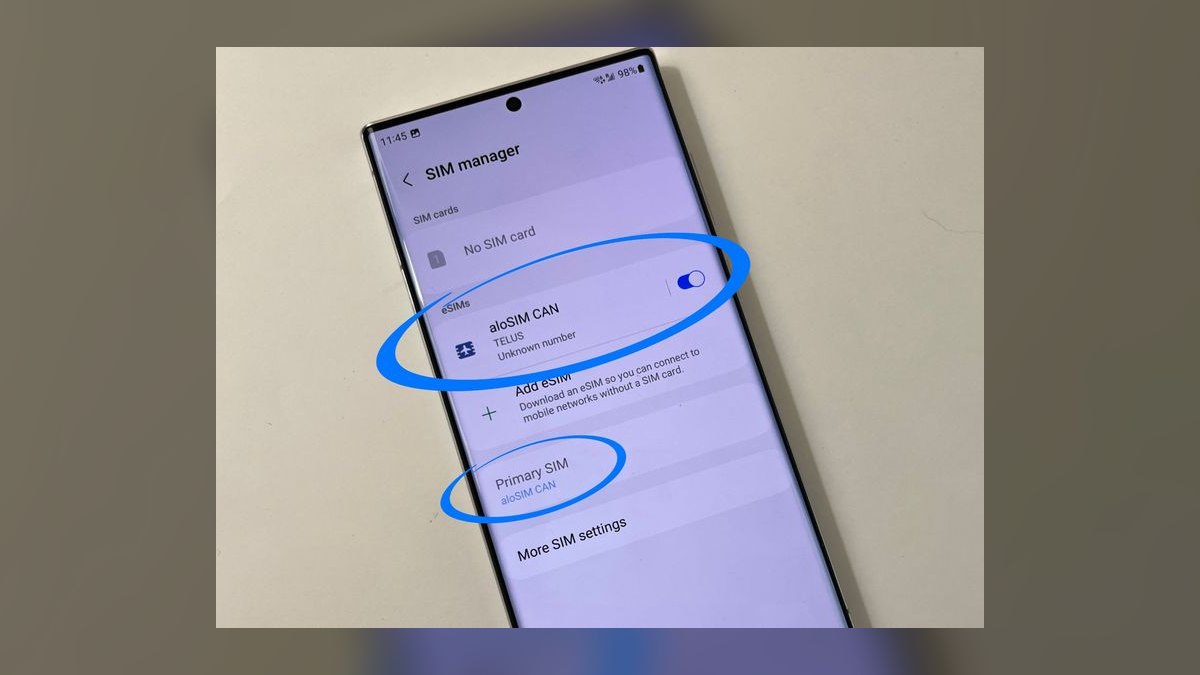
To activate a new SIM card or eSIM in 2027, confirm your device is unlocked and eSIM-capable if applicable, then either insert the physical card and dial the carrier's activation shortcut, or scan the eSIM QR code (or use the carrier's app) to install the profile. Restart the device, confirm signal and data, and keep your old SIM active until the new line is verified working — activation typically completes in minutes to a few hours.
The outcome you should expect
When you activate a new SIM card or eSIM correctly, the process resolves in one of two speeds depending on whether you're getting a brand-new number or porting an existing one. A brand-new activation — no number transfer involved — typically shows a signal within 5 to 20 minutes of the carrier's system registering the device's IMEI (for physical SIM) or EID (for eSIM) against the account. You'll see bars return, a carrier welcome text or push notification, and data will start flowing once the phone re-registers with the local tower. Voice calls usually work a few minutes before data fully stabilizes, since the network authenticates the SIM for calling before it finishes provisioning APN settings for data.
If you're porting a number from another carrier, the outcome looks different: you keep your old line active (sometimes on the old SIM, sometimes as a dual-SIM setup) until the port completes, at which point the old SIM or eSIM profile goes dead and the new one takes over the number. During the port window there is often a short gap — anywhere from a few seconds to a couple of hours — where neither line reliably receives calls. Expect a confirmation text from the new carrier once the port lands, and expect to physically remove or deactivate the old SIM (or delete the old eSIM profile) afterward, since carriers do not do this for you automatically in most cases.
For eSIM specifically, the visible outcome is a "Cellular Plan Added" or "eSIM Installed" confirmation screen on the device, followed by a labeling step where you name the line (e.g., "Personal" vs "Work") and choose which line handles iMessage/FaceTime, data, and default calling if you're running dual SIM. This labeling step is easy to skip past but determines which line gets billed for data roaming and which number displays on outbound calls, so it's worth doing deliberately rather than accepting the defaults.
What drives that outcome
Several variables independently determine how fast and cleanly a SIM card or eSIM activates, and they compound — a device that's locked to a prior carrier and also being ported to a new number will hit friction from both angles at once.
Device lock status is the single biggest lever. A phone still locked to its original carrier will reject a different carrier's SIM entirely or refuse to install a new eSIM profile until an unlock request is submitted and cleared — a process that can take from a few minutes (if the account is paid off and eligible) to several business days if the original carrier has to manually review the unlock request. Activation type is the second driver: a fresh number activates almost immediately because there's no coordination required with another network, while a ported number depends on both the losing and gaining carrier's systems agreeing on the transfer, which introduces latency and failure points outside your control.
The method used matters more than most people expect. Scanning a carrier-issued QR code for eSIM is the fastest and most reliable path because the profile downloads directly with pre-validated account credentials baked in. Manually entering an activation code or SM-DP+ address is slower and more error-prone, since one mistyped character causes a silent failure. Using an in-app "eSIM Quick Transfer" between two Apple or two Android devices via Bluetooth is generally the smoothest experience of all, because it moves the existing profile rather than provisioning a new one from scratch. Physical SIM cards depend on tray insertion being correct and the card not being cracked or misaligned in a nano/micro adapter, which is a small but common failure source.
Benchmarks and realistic ranges
Realistic timing benchmarks based on how carrier provisioning systems actually behave: a new-number physical SIM activation in the same network family typically completes in 5 to 30 minutes after the carrier registers the IMEI. New-number eSIM activation via QR code is usually faster on the install side (2 to 10 minutes to download and install the profile) but can take an additional 10 to 20 minutes for the network to fully register the line for both voice and data. Port-in activations range much wider: same-day ports between major national carriers in the U.S. often finalize within 1 to 4 hours during business hours, but ports involving smaller MVNOs (mobile virtual network operators that lease network capacity from a major carrier) can take anywhere from a few hours to up to 3 business days if account information doesn't match exactly or if the port is submitted outside business hours.
A few numeric guardrails worth knowing: most carriers require the losing account's PIN, the last 4 digits of the account holder's SSN or an account number, the billing zip code, and the exact name on the account to match before a port will process — any mismatch triggers a manual review queue that adds 24 to 72 hours. eSIM QR codes are typically single-use and expire after a fixed window, often somewhere between 24 hours and a few days depending on the carrier's policy, so a code generated but not scanned promptly may need to be reissued. Device compatibility checks (IMEI/EID lookups) resolve almost instantly — under a minute — but a device reported lost, stolen, or still on an installment plan with an unpaid balance will fail this check regardless of how long you wait, and no amount of retrying fixes that; it requires resolving the underlying account issue first.
Signal re-registration after any activation — physical or eSIM — commonly requires a device restart to fully commit new network settings, particularly APN (Access Point Name) configuration for data. Roughly a third of activation support calls trace back to a user not restarting the device after the SIM or eSIM profile installed successfully; the profile is technically active, but the modem hasn't refreshed its radio configuration to use it.
Risks, edge cases, and failure modes
The most common eSIM-specific failure is scanning a QR code twice, or scanning a screenshot of the code instead of the original — most carrier QR codes are cryptographically tied to a single successful install, and a second scan (even by the same person, same device) returns an error requiring the carrier to reissue a fresh code. A dim screen, glare, or a QR code photographed at an angle can also cause a scan failure that looks identical to an expired-code error, so it's worth ruling out image quality before contacting support.

Porting failures cluster around account-detail mismatches: a number registered under a spouse's name, a business account where the SIM is issued to an employee but billed to a company entity, or a recently changed billing address that hasn't propagated to the losing carrier's records yet. These mismatches don't always throw a clear error — sometimes the port simply stalls silently for a day before failing, which is why checking port status proactively (rather than waiting for a failure notification) saves time.
Dual-SIM and multi-eSIM devices introduce their own edge cases: activating a second eSIM profile without explicitly reassigning which line is "primary" for data can silently switch your data connection to the new (often more expensive, or roaming) line while leaving calls and texts on the old one, leading to unexpected charges. Some devices also cap the number of eSIM profiles that can be stored (even if only one is active at a time), so travelers who accumulate travel eSIMs may need to delete old, unused profiles before a new one will install.

Carrier-locked devices bought on an installment plan are a frequent dead end — the unlock request gets auto-rejected if there's an outstanding balance, and no activation troubleshooting will fix that; the balance has to be paid off or the carrier's unlock eligibility page checked directly. Similarly, devices reported lost or stolen (even by a previous owner, on a used phone you legitimately purchased) will fail IMEI/EID validation permanently until the blacklist flag is cleared by the reporting carrier, which can require proof of purchase and can take days to weeks to resolve — this is worth checking via a free IMEI blacklist lookup before buying any used device.
Finally, removing the old physical SIM or deleting the old eSIM profile too early — before the new one is confirmed fully active with both voice and data working — can leave you without a working line entirely if the new activation encounters any delay, so the safest sequence is always to verify the new line first and only then decommission the old one.

A practical rollout plan
Start by checking device compatibility and lock status before ordering anything — an unlock request submitted a day ahead of time saves the most common source of delay. Gather the exact account details the losing carrier will need if this is a port: full name as it appears on the bill, billing zip code, account number or PIN, and the number being transferred. Choose the activation method based on what the carrier supports: physical SIM card insertion for older devices or preference, eSIM QR code scan for a clean new install, or the direct device-to-device eSIM transfer feature (available between two recent Apple devices or two recent Android devices) when moving a plan from an old phone to a new one.
After installing the SIM card or eSIM profile, restart the device — this single step resolves the largest share of "activated but no service" complaints because it forces the modem to reload APN and network settings. Test both a voice call and mobile data separately, since one can work while the other lags behind during registration. If the device is dual-SIM, explicitly set which line is primary for data and which handles outbound calls and messages, rather than trusting the OS default. Only after the new line is confirmed fully functional — signal, calls, and data all working — should you physically remove the old SIM card or delete the old eSIM profile; jumping this step early is the single most common way people end up temporarily phoneless during a transfer.

Related questions
How long does eSIM activation take?
Usually 2 to 20 minutes for the install and initial registration on a new number; port-ins can take 1 hour to 3 business days depending on carrier and whether account details match exactly.
Can I activate a SIM card or eSIM without cell service?
Yes — eSIM QR installation and physical SIM insertion both work over Wi-Fi; only the final network registration step requires the carrier's cellular signal to complete.
What happens if I scan an eSIM QR code twice?
Most carrier QR codes are single-use; a second scan typically fails and you'll need to request a new code from the carrier's app or support line.
Do I need to unlock my phone before switching carriers?
If the device is still locked to its original carrier, yes — submit the unlock request first, since a locked device will reject both a new physical SIM and a new eSIM profile.
Can I have both a physical SIM and an eSIM active at once?
Yes, most modern smartphones support dual-SIM using one physical card plus one eSIM profile simultaneously, each assignable to different roles for calls, texts, and data.
FAQ
Do I need a new SIM card or eSIM if I'm just upgrading to a new phone on the same carrier? Often yes for eSIM, since profiles are typically tied to a specific device's EID; use the carrier's eSIM transfer feature or request a fresh QR code rather than assuming the old profile moves automatically.
Why does my eSIM show as installed but I still have no service? This is almost always a network-registration lag or a modem setting that hasn't refreshed — restart the device first; if service still doesn't appear after 20-30 minutes, contact the carrier to confirm the line is provisioned on their end.
Can I activate a SIM card myself, or do I need to go to a store? The large majority of activations — physical SIM or eSIM — can be self-activated online or through the carrier's app; visiting a store is mainly useful for device unlock issues, damaged SIM trays, or complex business-account ports.
What information do I need on hand to port my number during activation? The exact name on the losing account, the billing zip code, the account number or PIN, and the phone number itself; a mismatch on any of these is the most common reason ports stall.
Is it safe to buy a used phone and activate a new SIM in it? Generally yes, but check the IMEI against a blacklist database first — a phone reported lost or stolen by a previous owner will permanently fail activation until that flag is cleared by the original carrier.
What's the difference between activating a physical SIM and an eSIM? A physical SIM is inserted into a tray and activates once the carrier registers its ICCID; an eSIM is a downloaded digital profile installed via QR code or carrier app, with no physical card to insert or lose.
Sources
- https://support.apple.com/en-us/HT209044
- https://support.google.com/pixelphone/answer/9438758
- https://www.verizon.com/support/esim-faqs/
- https://www.att.com/support/article/wireless/KM1245991/
- https://www.t-mobile.com/support/devices/esim
- https://www.gsma.com/esim/
- https://www.fcc.gov/consumers/guides/porting-keep-your-phone-number
- https://www.fcc.gov/mobile-device-unlocking
Related on PULSE
- How do I check if my phone is unlocked before switching carriers?
- What's the difference between a physical SIM and an eSIM long-term?
- How do I port my number to a new carrier without losing service?
- What should I check before buying a used smartphone?
- How does dual-SIM work for separating a work and personal line?
- What is an MVNO and how does it differ from a major carrier?
 telcoWhat is the best way to compare cell phone plans side by side in 2027?
 telcoWhat are the first steps to switching cell phone carriers in 2027?
 telcoTop 10 ways to reduce your monthly phone bill in 2027
 telcoHow do I choose the best cell phone plan for my needs in 2027?
 telcoHow do I set up a new cell phone after switching carriers in 2027?
 telcoWhat are the steps to switch cell phone carriers in 2027?
 telcoTop 10 Ways to Fix Your Dropped Calls and Weak Signal in 2027
 telcoHow do I cancel my cell phone plan without losing my number in 2027?
 telcoWhat are the steps to port my number to a new carrier in 2027?
 telcoHow do I transfer my contacts when switching carriers in 2027?