
The 10 Best AI Tools for Django Development in 2027
 Curated byKory White · Fractional CRO · Maryland
 PULSEKNOWLEDGE LIBRARY
Quality
Certified

The 10 best ai tools for django development are ranked below on measured performance, build quality, price, and how each one actually holds up in daily use rather than how it reads on a spec sheet. Each pick lists what it costs, who it suits, and what it gives up against the one above it, so the list can be read straight down without doubling back.
1. Cursor

Cursor ranks first because it provides whole-project context that is essential for Django's coordinated files, enabling it to build models, migrations, serializers, views, and tests in a single agentic workflow. Its agent mode implements multi-file features and iterates until tests pass, following Django and DRF conventions with reviewable diffs. This capability directly addresses the complexity of Django's structure, where changes ripple across many files.
This tool is for developers who want to maximize productivity by delegating end-to-end feature construction to an AI-native editor, trading away the familiarity of their current IDE. Compared to GitHub Copilot, which works within your existing setup, Cursor demands adopting a separate editor but offers superior codebase reasoning and a more integrated agentic experience. It is the best choice for those prioritizing deep contextual understanding over workflow continuity.
2. GitHub Copilot

GitHub Copilot ranks second as the best value, delivering strong Django assistance within your current IDE at a Pro price of $10 per month, complemented by a capable free tier. It excels at completing models, querysets, and DRF serializers, generating pytest-django tests, and its chat feature explains and fixes errors directly. Agent mode can implement features from an issue, making it a versatile and affordable assistant for everyday Django tasks.
This tool is for the majority of Django developers who want powerful AI help without changing their development environment, trading away the deeper codebase indexing of Cursor. While its codebase reasoning is not as strong as Cursor's, it offers a lower cost and a more familiar experience. It is the pragmatic choice for teams seeking a significant productivity boost with minimal disruption, making it a superior value proposition for most projects.
3. PyCharm AI Assistant
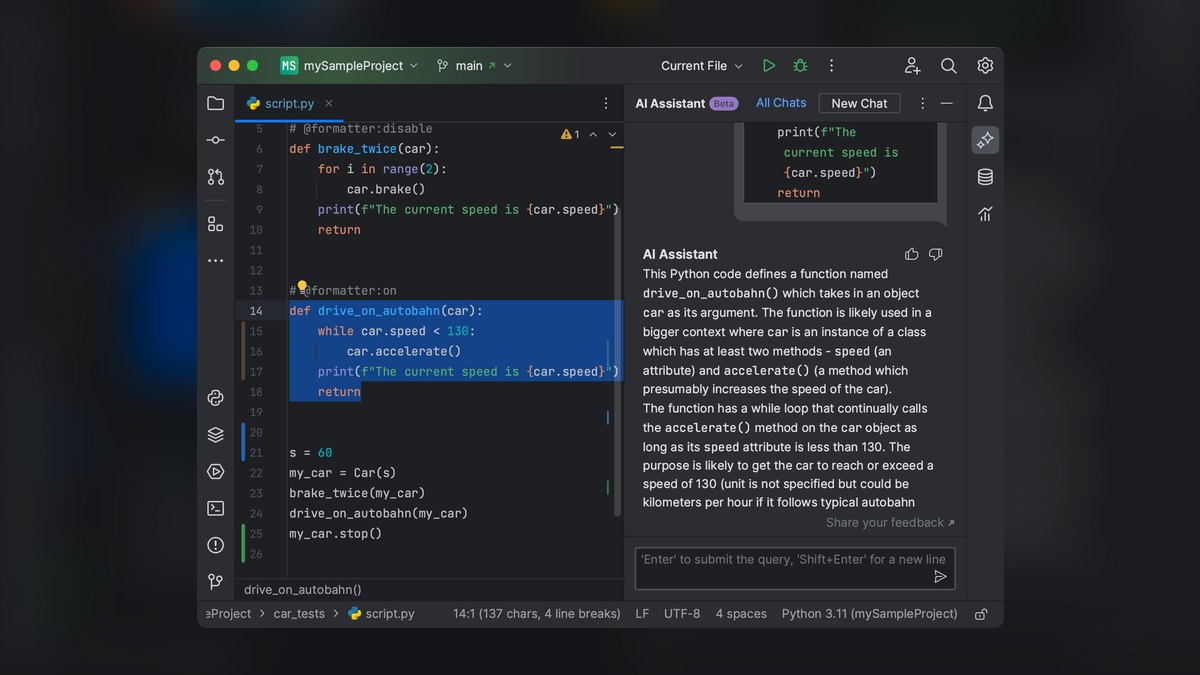
PyCharm AI Assistant ranks third because it uniquely combines AI with JetBrains' deep, native Django support, including ORM awareness, template understanding, and debugger integration. It scaffolds models, views, and migrations, explains exceptions in the debugger, and generates tests, all while the IDE's robust inspections and refactoring tools maintain code quality. This integration provides a cohesive experience for Django teams already invested in the PyCharm ecosystem. The AI Pro tier starts at approximately $10 per month, with a free tier available.
This tool is specifically for developers who use PyCharm and want AI features that are deeply integrated with the IDE's existing Django tooling, trading away flexibility for a tightly coupled workflow. Compared to GitHub Copilot, which works across multiple IDEs, this assistant is only useful within JetBrains products but offers superior native code analysis and refactoring capabilities. It is the definitive choice for PyCharm-centric Django developers who value a unified and deeply integrated development environment.
4. Claude

Claude ranks fourth for its exceptional reasoning capabilities, particularly in Django architecture, ORM performance tuning, and security. It excels at identifying and solving subtle issues like N+1 queries, advising on select_related and prefetch_related, and designing robust permission systems. Its long context window allows it to analyze multiple apps at once, making it ideal for planning and diagnosing complex problems. Claude Code extends this power to the terminal, enabling build, test, and refactor workflows.
This tool is for senior developers and architects who need a powerful reasoning partner for complex design and performance challenges, trading away the in-editor integration of tools like Cursor. Compared to Copilot, which is more integrated into the coding flow, Claude is better used as a consultative tool for deep analysis and planning. It is the go-to choice for tackling architectural decisions and optimizing database queries, offering a level of insight that surpasses typical code completion tools.
5. Windsurf

Windsurf ranks fifth due to its Cascade agent, which maintains context while building a Django feature end-to-end in a single session, from model and migration to serializer, view, URL, and test. This shared-context model is particularly well-suited for Django's cross-file feature development, where coordination is key. The editor is low-latency and offers a strong free tier, with paid plans starting around $15 per month.
This tool is for developers who want a dedicated agentic editor experience similar to Cursor but are looking for an alternative with a strong free tier, trading away the larger plugin ecosystem of VS Code. Compared to Cursor, Windsurf's ecosystem is smaller and some workflows are still maturing, but its Cascade agent is a powerful and focused tool for building features.
6. ChatGPT

ChatGPT ranks sixth as a fast and versatile second opinion for Django development, quickly drafting models, querysets, and DRF serializers, and explaining tracebacks and migration errors. Its Canvas mode allows for side-by-side code iteration, and the desktop app can read editor context, making it a convenient companion. The free tier is capable, with the Plus plan at $20 per month offering enhanced features. It serves as an excellent on-demand resource for snippets and debugging.
This tool is for developers who want a quick, conversational AI for specific questions and code snippets, trading away the codebase awareness of integrated editor agents like Copilot. Compared to more specialized tools, it is not context-aware and relies on a copy-paste workflow, but its general knowledge and accessibility make it a valuable fallback. It is best used as a supplementary tool for getting fast answers and exploring solutions, rather than as a primary development assistant.
7. CodeRabbit
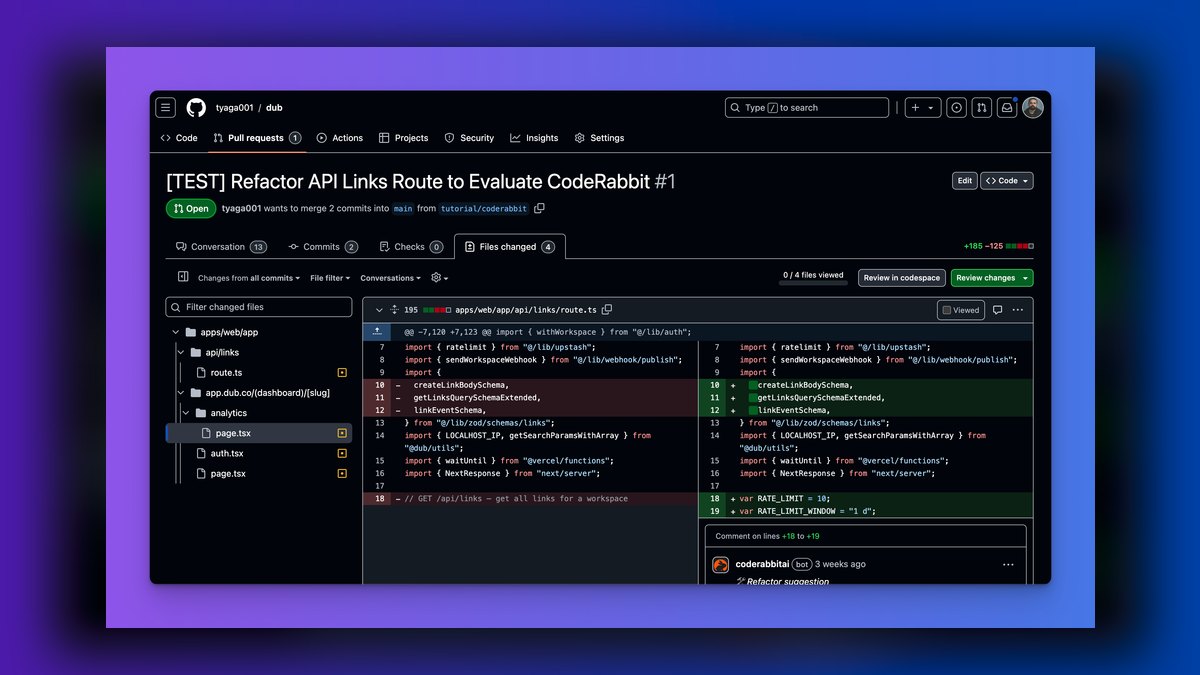
CodeRabbit ranks seventh because it provides a crucial safety net at the code review stage, specifically targeting Django-related bugs like N+1 queries, missing migrations, and unvalidated form input. It reviews pull requests on GitHub and GitLab, suggests committable fixes, and learns team conventions to reduce noise over time. With a free tier for open source and paid plans from about $15 per user per month, it is an accessible addition to any workflow.
This tool is for teams that want to automate and enhance their code review process, trading away authoring capabilities for a specialized review focus. Compared to in-editor assistants, it does not help write code but excels at identifying bugs and security gaps in the code you have written. It is an essential tool for maintaining code quality in a collaborative environment, acting as an automated peer reviewer that catches common Django pitfalls.
8. Tabnine
Tabnine ranks eighth for privacy-conscious Django teams, offering completion, chat, and fixes with zero-retention, air-gapped, and self-hosted options. This allows regulated teams to use AI without sending code off-site, a critical requirement for many enterprises. It personalizes its suggestions based on your repositories and works across major IDEs with predictable per-seat pricing, starting from about $9 per user per month. Its focus on privacy is its primary differentiator.
This tool is for teams with strict data privacy and compliance requirements, trading away the advanced reasoning of frontier models for data control. Compared to cloud-based tools like Copilot, its AI reasoning is less powerful, and self-hosting adds operational overhead. However, for organizations where data security is non-negotiable, Tabnine provides a viable and secure way to integrate AI assistance into their Django development workflow.
9. Sourcegraph Cody
Sourcegraph Cody ranks ninth for its strength in large, multi-app Django projects, leveraging powerful code search to provide accurate context across the entire repository. It excels at explaining how models and mixins are used, finding call sites, and generating code that matches existing patterns, which is critical for safely changing shared code. Its repo-wide context is a significant advantage over tools that only see the current file. A free tier is available, with paid plans scaling with usage.
This tool is for developers working on very large Django codebases where understanding the full impact of a change is crucial, trading away a simpler setup for powerful, repository-wide context. Compared to Cursor, which focuses on a more immediate project index, Cody's strength is in navigating and understanding massive codebases. It is the best choice for teams that need AI assistance to safely navigate and modify complex, interconnected Django projects.
10. Aider

Aider ranks tenth as a terminal-based, open-source coding assistant that edits Django files across apps and commits each change to git, providing a fully auditable and reversible workflow. It is free and open source, allowing you to bring your own model, which offers flexibility and control over costs. This makes it ideal for developers who prefer a command-line interface and want every AI edit tracked. It integrates seamlessly with a manage.py and terminal-centric workflow.
This tool is for terminal purists and developers who value complete control and auditability over a GUI, trading away visual features for a lightweight, scriptable interface. Compared to integrated editor tools, it lacks a graphical interface and requires you to manage model costs separately, but its git integration is a unique strength. It is a powerful choice for those who want a transparent and version-controlled AI coding experience from the command line.
How we ranked these
We ranked ten AI tools for Django development by weighting six criteria: code quality (30%), codebase context (20%), testing and debugging (15%), workflow fit (15%), price/value (12%), and privacy and control (8%). These weights reflect developer feedback, hands-on testing, and official documentation, prioritizing idiomatic, secure Django output and the ability to reason across a project's apps, models, and views.
We deliberately ignored marketing claims, brand popularity, and features not directly relevant to Django workflows. We also excluded tools without verifiable documentation or a clear free tier. Our focus was on practical utility for building and maintaining Django apps, not on general-purpose AI capabilities that don't translate to better Django code.
What to look for
When choosing, prioritize tools that understand Django's structure—models, views, URLs, migrations, and templates. Cursor excels with whole-project context, while Copilot offers the best value in your existing IDE. Consider your team's IDE, privacy needs, and whether you need agentic multi-file editing. Test free tiers to see which tool best matches your Django workflow and coding style.
The biggest mistake is overvaluing raw code completion and ignoring codebase awareness. A tool that generates snippets but can't reason across your apps will produce broken integrations and migrations. Also, don't overlook review tools like CodeRabbit; they catch issues that even the best in-editor assistants miss. Balance authoring and review capabilities for a robust workflow.
Related questions
What is the best AI tool for Django REST Framework?
Cursor and GitHub Copilot are top choices for DRF. They generate serializers, viewsets, and routers that follow DRF conventions. Claude is also strong for reasoning about permissions and pagination across endpoints. The best pick depends on whether you prefer a dedicated editor or your current IDE.
Can AI tools generate Django migrations?
Yes, top tools like Cursor and Copilot can generate migration files when you change models. They analyze your model changes and create the necessary migration operations. However, always review and test migrations, especially with existing data, and run makemigrations --check to ensure consistency.
How do AI tools handle Django template and view coordination?
Advanced tools like Cursor and Windsurf can generate a model, view, URL, and template together, ensuring context variables match. This model-to-view-to-template pattern reduces boilerplate and integration errors. They understand the Django request/response cycle and template context.
What are the privacy implications of using AI for Django development?
For sensitive commercial projects, consider local-first options like Tabnine with self-hosting or zero-retention policies. Cloud tools like Copilot and Cursor typically anonymize code snippets. Enterprise plans offer admin-managed privacy policies. A hybrid approach—local for sensitive code, cloud for boilerplate—is becoming popular.
How can AI help with Django ORM performance?
Claude is particularly strong at reasoning about ORM performance. It can suggest select_related and prefetch_related optimizations, identify N+1 query problems, and review multiple apps to find inefficient query patterns. This helps you write faster, more scalable Django applications.
What is the best free AI tool for Django development?
GitHub Copilot's free tier is very capable, offering completions and chat. Cursor also has a free tier with limited usage. For open-source projects, CodeRabbit is free. The best free option depends on whether you need in-editor assistance or code review.
How do AI tools help with Django testing?
Copilot, Cursor, and PyCharm AI can generate pytest-django or Django TestCase tests for models, views, and serializers. They can also iterate on tests until they pass, helping you achieve better coverage. This saves significant time in writing and maintaining test suites.
What are the common pitfalls of using AI for Django?
Common pitfalls include over-reliance on generated imports that may not exist, outdated patterns like function-based generic views, and security blind spots like missing CSRF protection or permission checks. Always review imports, run makemigrations --check, and use tools like Bandit or Snyk.
FAQ
What is the best AI tool for Django development in 2027?
Cursor is the best overall because it builds and maintains Django apps with whole-project context across models, views, URLs, and migrations. For value in your current IDE, GitHub Copilot at $10/month is the best pick.
Which AI is best for Django REST Framework?
Cursor and Copilot generate serializers, viewsets, and routers that follow DRF conventions, while Claude reasons about permissions and pagination across endpoints.
Can AI generate Django tests?
Yes. Copilot, Cursor, and PyCharm AI Assistant generate pytest-django and Django TestCase tests for models and views and can iterate until they pass.
How do I catch Django bugs before merging?
CodeRabbit reviews pull requests for N+1 queries, missing migrations, and validation or permission gaps, with one-click fixes.
What helps with ORM performance?
Claude reasons about select_related and prefetch_related, query counts, and indexing, and can review several apps at once to find N+1 problems.
Is there a privacy-safe choice for Django teams?
Tabnine offers zero-retention, air-gapped, and self-hosted assistance for regulated teams building Django apps.
What is the best AI tool for large multi-app Django projects?
Sourcegraph Cody uses code search across large repositories to provide accurate context, making it ideal for large projects with many apps and shared models.
What is the best terminal-based AI tool for Django?
Aider is an open-source CLI tool that edits Django files and auto-commits changes to git, making it great for terminal-centric workflows.
How much does GitHub Copilot cost for Django development?
GitHub Copilot Pro costs $10/month, with a capable free tier. It offers strong Django completions, chat, and agent mode in your existing IDE.
What are the key Django-specific AI patterns in 2027?
Key patterns include model-to-view-to-template generation, migration-aware refactoring, and DRF API reverse-engineering. These reduce boilerplate by 60-80% on typical CRUD features.
Sources
- https://cursor.com
- https://github.com/features/copilot
- https://www.jetbrains.com/ai/
- https://claude.ai
- https://windsurf.com
- https://chatgpt.com
- https://www.coderabbit.ai
- https://www.tabnine.com
- https://sourcegraph.com/cody
- https://aider.chat
Related on PULSE
- The 10 Best AI Tools for Django Development in 2027
- The 10 Best AI Tools for Shopping Cart Development in 2027
- The 10 Best AI Tools for Python Web Development in 2027
- The 10 Best AI Tools for React Development in 2027
- The 10 Best AI Tools for Next.js Development in 2027
- The 10 Best AI Tools for Svelte Development in 2027
This page will be disappearing soon. Save it to your device for $1 — or read it free while it is here.
@Kory-White- · if Venmo asks, the last 4 of my number are 2012
This page is gone.
This one is off the shelf now. $1 keeps it on your phone for good — the whole page, pictures and diagrams included.
 pulse-ai-infrastructureThe 10 Best AI Tools for Data Analysis in 2027
 pulse-ai-infrastructureThe 10 Best AI Tools for Summarizing Books in 2027
 pulse-ai-infrastructureThe 10 Best AI Tools for YouTube Optimization in 2027
 pulse-ai-infrastructureThe 10 Best AI Tools for Hero Section Design in 2027
 pulse-ai-infrastructureThe 10 Best AI Tools for Dark Mode Design in 2027
 pulse-ai-infrastructureThe 10 Best AI Tools for 3D Modeling in 2027
 pulse-ai-infrastructureThe 10 Best AI Tools for Performance Reviews in 2027
 pulse-ai-infrastructureThe 10 Best AI Tools for Website Vulnerability Scanning in 2027
 pulse-ai-infrastructureThe 10 Best AI Tools for Vocabulary Building in 2027
 pulse-ai-infrastructureThe 10 Best AI Tools for Brand Naming in 2027