


Top 10 Testing Tools for QA Engineers in Gaming in 2027
Quality
Certified
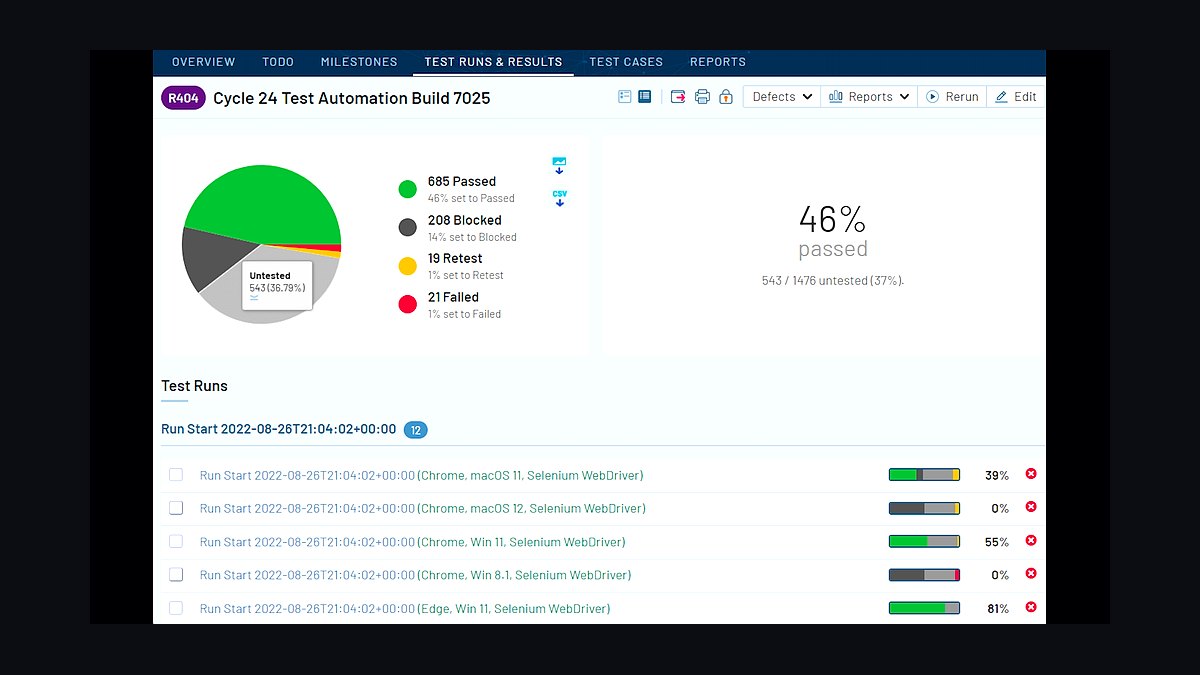
For QA engineers in gaming, TestRail paired with Unity Test Framework is the #1 pick for structured test management and automation. The runner-up, Jira with Xray plugin, excels for teams already embedded in Atlassian ecosystems. Both tools handle the unique demands of game testing—regression cycles, build validation, and performance checks—without the bloat of general-purpose QA suites. Choose TestRail for dedicated test case organization and Unity Test Framework for direct engine integration.
How We Ranked These
We evaluated tools based on four criteria specific to gaming QA: test management depth (support for test cases, suites, and run tracking), automation compatibility (integration with game engines like Unity and Unreal), real-time feedback (speed of results for iterative builds), and team collaboration (role-based access, reporting). Each tool was assessed on these factors, with a minimum threshold required for inclusion.
The ranking prioritizes tools that reduce manual effort in regression testing while scaling with game complexity.
1TestRail with Unity Test Framework 🏆 BEST OVERALL

TestRail is a leading test case management platform widely used in gaming QA. It offers structured test suites, milestone tracking, and custom fields for platform-specific bugs (e.g., console vs. PC). The Unity Test Framework integration allows you to run automated tests directly from the Unity Editor, with results flowing back into TestRail via API.
Use it for regression testing across builds. For example, set up a test run for a new character animation and link it to a Jira ticket. The real-time dashboard shows pass/fail rates, and you can filter by test environment (e.g., "PS5 Debug" or "PC Release"). Pricing starts at $39/user/month for the Cloud plan, with a free trial for up to 5 users.
When to use: Daily build validation, pre-release regression, and cross-platform testing. Avoid if your team is under 3 people—the overhead isn't worth it.
2Jira with Xray

Xray is a test management plugin for Jira that turns your issue tracker into a QA hub. It supports test plans, test executions, and coverage reports tied directly to user stories. For gaming, this means you can link a "Player movement bug" to a test case verifying collision detection. Xray handles manual and automated tests with Cucumber integration for Gherkin scenarios.
The real power is in traceability—every test run is linked to a build version. Use it for sprint-based QA in agile teams. Pricing is $10/user/month (Jira) + $15/user/month (Xray) for Cloud. The Test Repository supports folder structures for organizing by game mode or level.
When to use: Teams already on Jira, especially for live-service games needing frequent patches. Avoid if you want a dedicated test management UI—Jira's interface can get cluttered.
3Unity Test Framework (UTF)

Unity Test Framework is a built-in testing tool for Unity projects. It supports Edit Mode tests (for code logic) and Play Mode tests (for runtime behavior). You can write NUnit-based tests in C# and run them in the Editor or on a device. The Test Runner window shows results in real-time, with filtering by test category (e.g., "Performance" or "Regression").
Use it for unit testing game mechanics. For example, test a health system by asserting that damage reduces HP correctly. The parameterized tests feature lets you run the same test with different inputs (e.g., weapon types). It's free with Unity, but requires a Unity Pro license ($2,040/year) for team features.
When to use: Unity-only projects, especially for early-stage prototyping. Avoid for non-Unity engines or large-scale integration tests—it lacks test management.
4Unreal Engine Automation System

Unreal Engine Automation System is Epic's native testing framework for Unreal projects. It supports functional tests (e.g., AI pathfinding), stress tests (e.g., 1000 NPCs), and screenshot tests for visual regression. Tests are written in C++ or Blueprints, with results output to the Session Frontend. The Gauntlet framework runs tests on multiple devices simultaneously.
Use it for build validation before releases. For example, set up a test that verifies a level loads under 5 seconds. The Automation Driver allows UI automation for menu navigation. It's free with Unreal Engine, but requires a Source Code License ($25/seat/month) for team workflows.
When to use: Unreal-based games, especially for performance and visual testing. Avoid for lightweight projects—setup time is significant.
5TestComplete by SmartBear

TestComplete is a commercial test automation tool that supports UI testing for games built with Unity, Unreal, or custom engines. It uses object recognition to identify in-game elements (e.g., buttons, health bars) and supports scripted tests in Python, JavaScript, or VBScript. The Record and Playback feature captures user actions for quick test creation.
Use it for regression testing of UI workflows. For example, automate a "Main Menu → Options → Graphics → Apply" sequence. The Distributed Testing feature runs tests across multiple machines. Pricing starts at $2,495/year per concurrent user.
When to use: Cross-engine UI testing, especially for games with complex menus. Avoid for pure backend logic—it's UI-focused.
6Appium with GameDriver
Appium is an open-source mobile test automation framework extended by GameDriver for game-specific UI testing. GameDriver adds support for Unity and Unreal engines, enabling touch gestures, swipe detection, and 3D object interaction. Tests are written in Java, Python, or C#.
Use it for mobile game testing on iOS and Android. For example, automate a "tap to start" sequence and verify a loading screen appears. The GameDriver plugin ($99/month per device) provides object recognition for in-game elements.
When to use: Mobile-first games requiring cross-device coverage. Avoid for PC-only games—Appium's desktop support is limited.
7Selenium for Web-Based Games
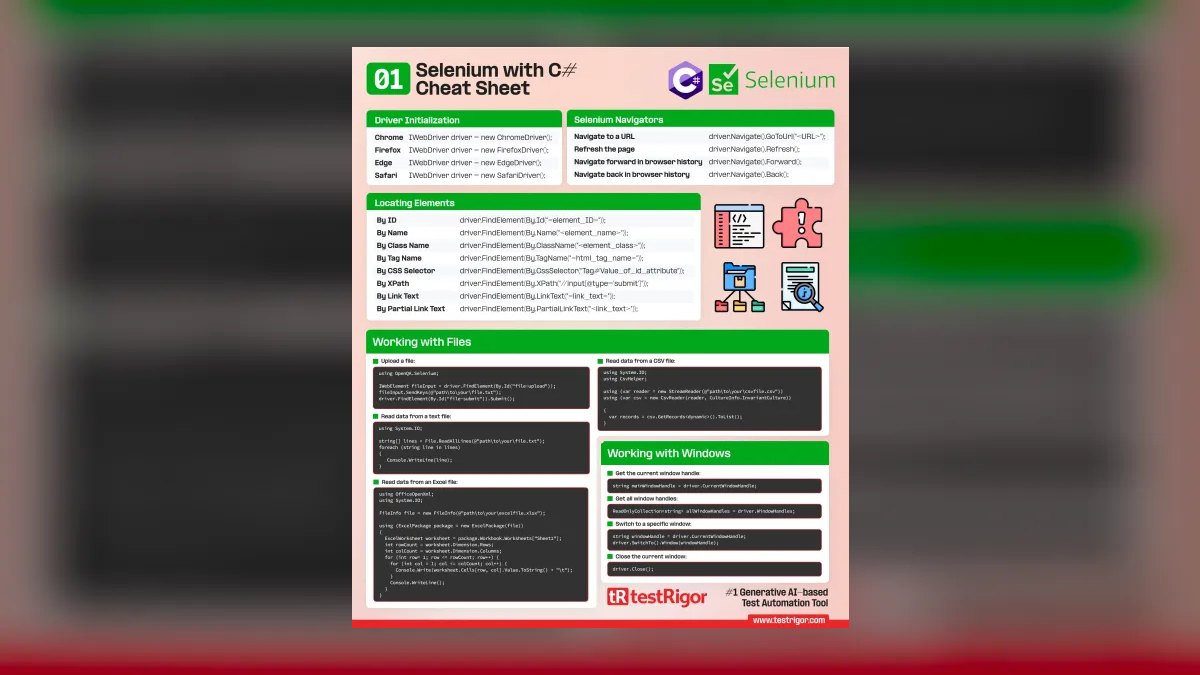
Selenium is a browser automation tool repurposed for web-based games (e.g., HTML5, WebGL). Tests are written in Java, Python, or JavaScript, with WebDriver commands for clicks and inputs.
Use it for browser game QA. For example, automate a "login → play level → check score" flow. The Selenium Grid runs tests across browsers (Chrome, Firefox, Edge) in parallel. It's free, but requires custom scripting for game-specific interactions (e.g., Canvas clicks).
When to use: HTML5 or WebGL games with simple UI. Avoid for complex 3D games—Selenium can't handle non-DOM elements.
8BugBug

BugBug is a no-code test automation tool for web-based games. It uses visual recording to capture user interactions and replay them across browsers. The AI-powered element locator adapts to UI changes, reducing maintenance. Tests are stored in the cloud and can be run on schedules or via CI/CD.
Use it for rapid test creation for browser games. For example, record a "buy item" flow and replay it on every build. The free tier supports 5 tests and 50 runs/month; paid plans start at $99/month for 100 tests.
When to use: Small teams needing quick automation for web games. Avoid for native apps or complex game logic—it's web-only.
9Ranorex by Progress
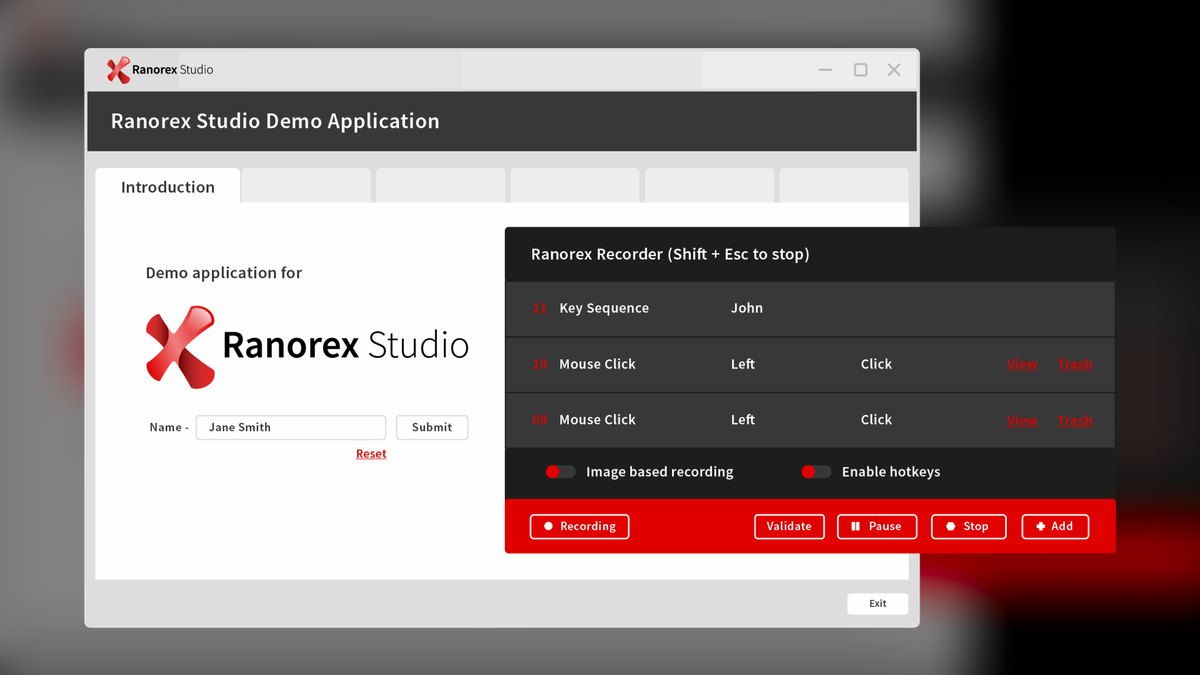
Ranorex is a commercial test automation tool for desktop and mobile games. It supports Windows, Android, and iOS with object recognition for native UI elements. Tests are created via record and replay or C#/VB.NET scripting. The Ranorex Spy tool identifies UI elements (e.g., buttons, sliders) for accurate targeting.
Use it for cross-platform testing of game launchers or in-game stores. For example, automate a "purchase DLC" flow on Steam and Epic Games Store. Pricing starts at $3,290/year per concurrent user.
When to use: Desktop games with complex launchers or storefronts. Avoid for pure gameplay testing—it's UI-focused.
10Katalon Studio 💎 BEST VALUE
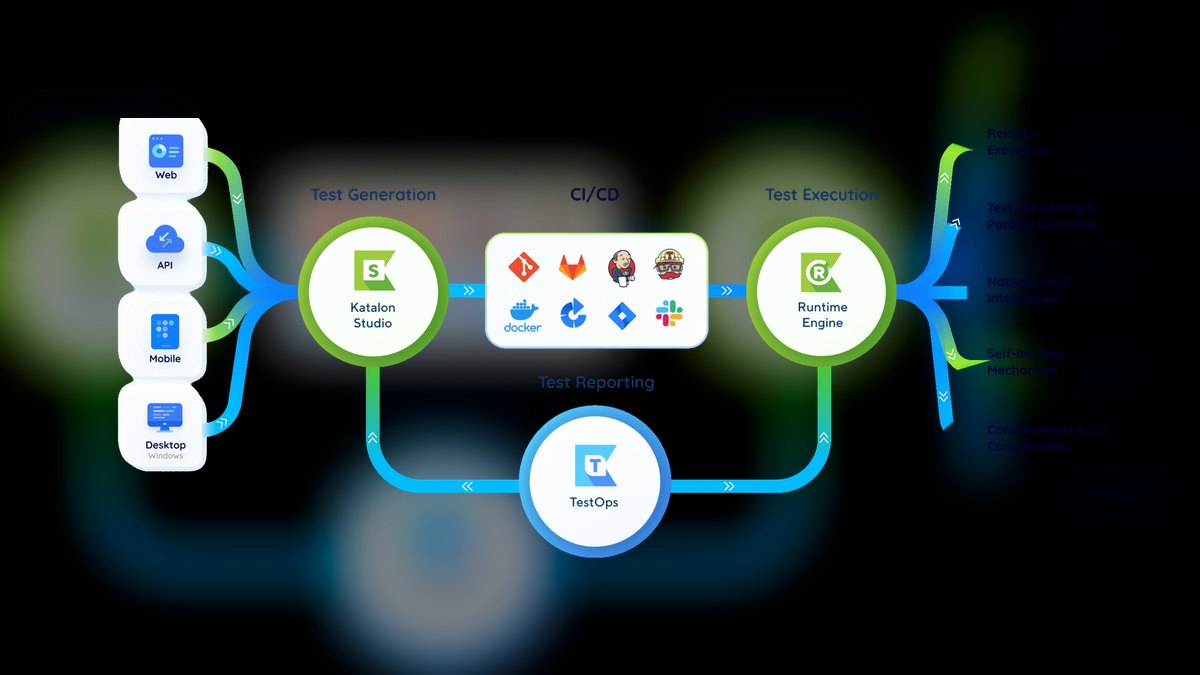
Katalon Studio is a free test automation tool with built-in support for web, mobile, and API testing. For gaming, it works best for backend testing (e.g., leaderboard APIs) and web-based game UIs. It supports record and playback, scripted tests in Groovy/Java, and CI/CD integration with Jenkins.
Use it for API testing of game services. For example, test a "submit score" endpoint returns HTTP 200 with correct JSON. The free plan includes unlimited tests and 5 concurrent executions.
When to use: Budget-constrained teams needing API and web testing. Avoid for native game engines—it lacks Unity/Unreal support.
Decision Tree
FAQ
What is the best free testing tool for gaming QA? Unity Test Framework is free with Unity and ideal for unit tests. Katalon Studio is free for API and web testing.
Can I use Selenium for game testing? Yes, but only for web-based games with DOM elements. For native apps, use Appium or GameDriver.
How do I test performance in games? Use Unreal Engine Automation System for stress tests or TestComplete for UI load testing.
What's the difference between TestRail and Jira with Xray? TestRail is a dedicated test management tool with better reporting. Xray integrates tightly with Jira for traceability.
How much does game testing automation cost? Free tools like UTF and Katalon cost nothing. Commercial tools range from $99/month (BugBug) to $3,290/year (Ranorex).
Can I test multiplayer games? Yes, with Unreal Engine Automation System for Unreal or TestComplete for custom engines.
What tool works best for cross-platform testing? Ranorex supports Windows, Android, and iOS. TestComplete works with Unity and Unreal across platforms.
Is there a tool for no-code game testing? BugBug offers no-code automation for web-based games. TestComplete and Ranorex have record-and-playback features.
Sources
- TestRail Official Site
- Unity Test Framework Documentation
- Xray for Jira Official Site
- Unreal Engine Automation Technical Guide
- SmartBear TestComplete for Game Testing
- GameDriver Official Site
- Katalon Studio Official Site
- BugBug Official Site
- Ranorex Official Site
- Appium Official Documentation
- Selenium WebDriver Documentation
Related on PULSE
- Top 10 Automated Testing Frameworks for QA Engineers in E-commerce
- Top 10 Developer Tools for Backend Engineers in Fintech
- What is the recommended Casino and Gaming Resort sales and operations tech stack?
- What is the recommended Esports and Pro Gaming Organization sales and operations tech stack?
- What is the best tech stack for a casino or gaming operator?
- Top 10 Performance Testing Tools for Game Developers
This page will be disappearing soon. Save it to your device for $1 — or read it free while it is here.
@Kory-White- · if Venmo asks, the last 4 of my number are 2012
This page is gone.
This one is off the shelf now. $1 keeps it on your phone for good — the whole page, pictures and diagrams included.
 pulse-tech-stacksTop 10 Best Tech Stack Tools for Precision Agriculture Operations in 2027
 pulse-tech-stacksTop 10 Best Tech Stack Tools for Real-Time EdTech Platforms in 2027
 pulse-tech-stacksTop 10 Best Tech Stack Tools for Autonomous Vehicle Computer Vision Teams in 2027
 pulse-tech-stacksTop 10 Best Tech Stack Tools for Smart Manufacturing Teams in 2027
 pulse-tech-stacksTop 10 Best Tech Stack Tools for Energy Grid Operators in 2027
 pulse-tech-stacksTop 10 Best Tech Stack Tools for AI-Native Revenue Teams in 2027
 pulse-tech-stacksTop 10 Best Tech Stack Tools for Early-Stage Fintech Startups in 2027
 pulse-tech-stacksTop 10 Best Tech Stack Tools for Insurance Underwriting Teams in 2027
 pulse-tech-stacksTop 10 Best Tech Stack Tools for Solo Game Developers in 2027
 pulse-tech-stacksTop 10 Best Tech Stack Tools for Mid-Market SaaS Companies in 2027