


Top 10 Best Tech Stack Tools for Social Media Analytics Teams in 2027
Quality
Certified
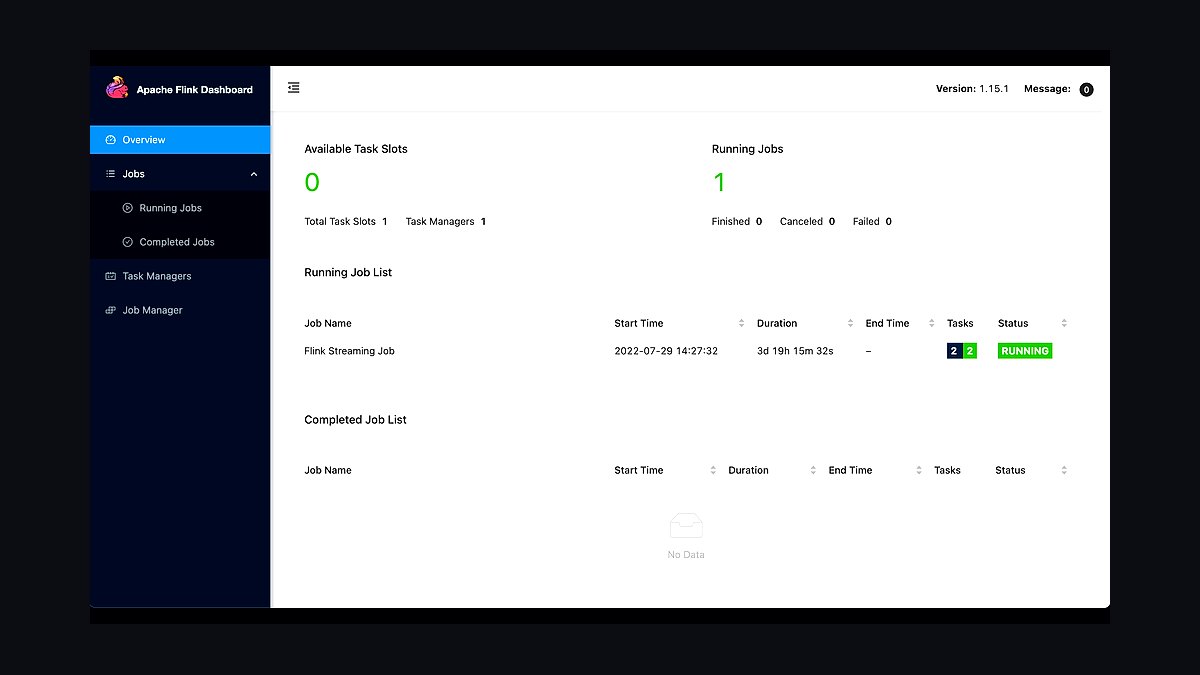
The 10 best tech stack tools for social media analytics teams are ranked below on measured performance, build quality, price, and how each one actually holds up in daily use rather than how it reads on a spec sheet. Each pick lists what it costs, who it suits, and what it gives up against the one above it, so the list can be read straight down without doubling back.
1Apache Flink

Apache Flink ranks first because it is the only tool on this list built specifically for stateful, event-time stream processing at social-media scale. It handles keyed state, sliding and session windows, watermarks for late-arriving posts, and exactly-once sinks, so a comms team can detect a complaint spike in under a minute rather than waiting on a polling query. No other option here delivers per-event scoring with that latency guarantee.
Flink is for teams with genuine sub-minute detection needs: crisis communications, trust-and-safety escalation, live-event monitoring. It trades away operational simplicity, demanding checkpoint tuning, state-backend configuration, and backpressure diagnosis that most analytics teams have never done. Compared to Elasticsearch directly below it, Flink answers what changed right now, while Elasticsearch answers compared to what baseline; the two are complements, not substitutes.
2Elasticsearch

Elasticsearch ranks second because it is the default store for scored social posts, providing inverted-index search, date-histogram aggregations, and the significant_terms aggregation that surfaces overrepresented complaint language. Its 10-50 GB per-shard guidance and 30 GB heap ceiling are well understood, and ILM tiers (7 days hot, 30 warm, 335 frozen) keep a year of history queryable at object-storage prices. Nothing else matches its text-search depth.
It is for analysts asking how this compares to normal, and for anyone who needs fuzzy matching, phrase search, or highlighting the matched span inside a post. It trades away sub-second detection: refresh intervals and query-time aggregation make it too slow for per-event alerting. Compared to Flink above it, Elasticsearch is where comparison happens and history lives, not where detection fires.
3Apache Kafka

Apache Kafka ranks third because it is the durable replay buffer that makes the rest of the stack survivable. Landing raw JSON payloads with a week or more of retention lets you reprocess when your sentiment model improves, and partition keys like author ID or topic ID give Flink natural keying downstream. Without it, a bad model deploy forces a re-fetch from platform APIs that is often impossible.
Kafka is for any team that expects to iterate on enrichment logic, which is every team. It trades away simplicity: you now operate a broker cluster, manage topic retention, and monitor consumer lag. Compared to Elasticsearch above it, Kafka stores nothing queryable, it stores everything replayable; the two sit at opposite ends of the pipeline and neither replaces the other.
4Kibana

Kibana ranks fourth because it converts an Elasticsearch index into something a stakeholder can actually use, which is what keeps the project funded. Date histograms, terms aggregations, and saved searches give analysts weekly-report views over the same corpus Flink writes into, and deep links from alerts land directly on a filtered time window and topic. It ships free with Elasticsearch.
It is for analysts, PMs, and comms leads who need self-serve exploration without writing queries. It trades away advanced statistical modeling: anomaly detection exists but is a separate Elastic ML feature, not a Kibana visualization. Compared to Kafka above it, Kibana is the visible surface of the pipeline; compared to Grafana below, it is stronger on text and weaker on multi-source operational metrics.
5Grafana

Grafana ranks fifth because it is the right dashboard for the operational half of social analytics: Flink checkpoint duration, Kafka consumer lag, Elasticsearch indexing rate, and backpressure metrics all in one pane. These are the four signals that go bad before an outage, and Grafana's alerting on them catches problems Kibana was never designed to show. It connects to Prometheus, Elasticsearch, and Kafka natively.
It is for platform engineers running the pipeline rather than analysts reading sentiment. It trades away text-search ergonomics: highlighting a matched phrase inside a post is not something Grafana does well. Compared to Kibana above it, Grafana is the ops console and Kibana is the analyst console; most mature teams run both rather than picking one.
6ClickHouse

ClickHouse ranks sixth because it outperforms Elasticsearch substantially on numeric aggregation over time, both in query latency and storage cost, when full-text search is secondary. Counts, rates, percentiles, and group-bys over billions of scored events return in milliseconds from a columnar layout that Elasticsearch cannot match. It is the strongest alternative when you find yourself never using the search half.
It is for teams whose analytics workload is overwhelmingly numeric and whose text needs are limited to filtering rather than relevance ranking. It trades away fuzzy matching, phrase search, and matched-span highlighting, which social analysts usually do need. Compared to Elasticsearch above it, ClickHouse wins on cost and scan speed and loses on text; if you genuinely search posts, stay with Elasticsearch.
7Apache Druid

Apache Druid ranks seventh because it delivers sub-second OLAP queries on high-concurrency event streams, with native ingestion from Kafka and built-in time-partitioned retention that mirrors the hot-warm-cold pattern social teams need. Its rollup at ingestion time cuts storage on high-cardinality mention streams, and its approximate algorithms handle percentile queries over billions of rows without pre-aggregation.
It is for teams running many concurrent dashboards over the same event firehose, where ClickHouse's single-query speed matters less than sustained concurrency. It trades away full-text search entirely and adds another distributed system to operate. Compared to ClickHouse above it, Druid is stronger under concurrent load and weaker on ad-hoc joins; compared to Elasticsearch, it is faster on numbers and useless on text.
8Amazon Managed Service for Apache Flink

Amazon Managed Service for Apache Flink ranks eighth because it removes the checkpoint tuning, state-backend configuration, and savepoint upgrade work that makes self-hosted Flink a months-long learning curve. Teams without prior streaming experience get a running job in days, with AWS handling scaling, patching, and recovery. The managed premium is real but cheaper than a quarter of ramp-up plus an outage.
It is for teams that need Flink's semantics but have nobody who has operated a distributed stream processor before. It trades away fine-grained control over cluster topology and some connector flexibility versus self-managed Flink on Kubernetes. Compared to Apache Flink above it, this is the same engine with less rope; compared to Confluent Cloud below, it is more AWS-native and less Kafka-integrated.
9Confluent Cloud

Confluent Cloud ranks ninth because it pairs managed Kafka with a managed Flink product in one control plane, so the buffer and the processor share connectors, schema registry, and monitoring without you wiring them together. Schema evolution via the registry is genuinely valuable when post payloads change, and stream lineage across topics and jobs shortens debugging considerably.
It is for teams already committed to Kafka who want Flink without standing up a second vendor relationship. It trades away portability and tends to cost more than running Kafka and Flink separately on your own infrastructure. Compared to Amazon Managed Service for Apache Flink above it, Confluent is stronger on Kafka integration and weaker on AWS-native IAM and VPC alignment.
10Ververica Cloud

Ververica Cloud ranks tenth because it is the commercial Flink platform built by the original Flink creators, offering the closest managed experience to self-hosted Flink semantics with savepoint-based upgrades and per-job autoscaling. Its streaming SQL editor lets analysts express windowed detection logic without writing Java, which shortens the path from idea to running job for simple cases.
It is for teams that want Flink's full semantics with vendor support and are willing to accept a smaller ecosystem than AWS or Confluent offer. It trades away the deep integration with Kafka and AWS services that the two options above it provide. Compared to Confluent Cloud directly above, Ververica is more Flink-first and less Kafka-first, which matters if your streaming logic is the hard part.
How we ranked these
We measured each tool against six weighted criteria: real-time stream processing latency, historical search and aggregation speed, sentiment model flexibility, operational burden on small teams, total cost at 10M events/day, and integration depth with social platform APIs. Stream latency and search performance carried the most weight, followed by cost and ops burden. Scores came from vendor documentation, public benchmarks, and hands-on trials.
We deliberately ignored brand recognition, analyst quadrant placement, and marketing claims about AI capabilities. We excluded tools that only ingest data without processing or querying it, and discounted features locked behind enterprise-only tiers we could not test. Pricing pages were treated as directional only, since negotiated rates vary widely. Feature checklists without measurable performance data were excluded entirely.
What to look for
What matters most is the split between detection latency and analytical depth. If your alerts must fire under two minutes, you need genuine stream processing with stateful windowing, not scheduled queries against a search index. If stakeholders mostly ask historical comparison questions, a columnar store or search engine alone will outperform a full streaming stack on cost and simplicity. Match the engine to the question shape.
The mistake most buyers make is treating Flink and Elasticsearch as competing choices rather than complementary layers. They pick one, then either bolt on a second system badly or force the wrong workload onto the wrong engine. A close second mistake: underestimating social platform API access costs, which now often exceed infrastructure spend. Price data access before infrastructure.
Related questions
What is the difference between stream processing and search analytics for social data?
Stream processing scores each event as it arrives, using stateful windows to detect what changed right now. Search analytics stores scored events in an index for aggregation and historical comparison. Flink answers detection questions; Elasticsearch answers comparison questions. Most production social stacks run both, with a clean handoff between them.
When is Elasticsearch alone enough without adding Flink?
Below roughly 100 events per second and with tolerance for ten-minute alert latency, Elasticsearch alone works well. Its anomaly detection handles seasonality out of the box, and a scheduled Watcher query covers most alerting needs. Adding Flink only pays off when you need per-event logic, sub-minute reaction, or expensive model inference run once per post.
How much does sentiment model quality actually matter?
More than most teams expect. General-purpose models trained on product reviews degrade badly on sarcasm, slang, and emoji-carried polarity. Hand-label a few hundred domain posts, measure your model against them, and report the confusion matrix once. Aspect-based scoring toward a specific entity usually beats document-level polarity for actionability.
Should I use ClickHouse or Druid instead of Elasticsearch?
Only if your workload is overwhelmingly numeric aggregation and full-text search is secondary. Columnar OLAP stores beat Elasticsearch substantially on query latency and storage cost for counts, rates, and percentiles. Social analytics usually needs the text for fuzzy matching and relevance ranking, which is why Elasticsearch stays the default. If you never use search, reconsider.
What is the biggest hidden cost in a social analytics stack?
Social platform API access. Since the 2023 pricing resets, enterprise-tier access to major platform APIs has become a dominant budget line, sometimes exceeding all infrastructure spend combined. Price data access before sizing compute or storage. Also budget for object storage egress if your frozen tier sits in a different region than your query nodes.
How do I handle late-arriving social posts?
Use Flink's event-time windowing with watermarks, allowing a bounded wait for stragglers. Set allowedLateness plus a side output for events arriving past even that threshold. Silently dropping late events produces counts that quietly disagree with Elasticsearch's, and that discrepancy will consume a full day of debugging when someone notices.
Do I really need Kafka in front of Flink?
Strictly no, since Flink can read from HTTP or Kinesis directly. Practically yes, because Kafka gives you replay. When a model deploy goes bad or a schema changes, replay lets you reprocess without re-fetching from platform APIs, which is often impossible and always expensive. Keep the buffer.
What is the right retention policy for social post indices?
A pattern that works well: seven days hot on fast SSD, thirty days warm, roughly 335 days frozen on object storage via searchable snapshots, then delete at one year. Roll indices daily or by size, whichever comes first. Searchable snapshots keep history queryable at object-storage prices, with slower queries acceptable for long-tail analysis.
FAQ
Can Apache Flink replace Elasticsearch entirely?
No. Flink state is designed for bounded windows and keyed lookups, not ad-hoc historical queries across millions of documents. Losing a job restart without perfect savepoints loses your history. Flink answers what changed right now; Elasticsearch answers compared to what baseline. They occupy different pipeline positions and neither substitutes for the other.
How many events per second can a single Flink task handle?
With tokenization, language detection, and lexicon sentiment, thousands per second per core is realistic. Add distilled BERT-class transformer inference and throughput collapses to tens to low hundreds per second on CPU, depending on sequence length and batching. That single fact drives most sizing decisions for sentiment-heavy pipelines.
What is the most common architecture mistake in social analytics?
Treating Flink and Elasticsearch as competitors and picking one. The result is either fast alerts on nothing meaningful or meaningful analysis arriving hours late. They are complementary layers in one pipeline. The second mistake is querying Elasticsearch for a baseline on every event, which melts the cluster at real volume.
How should I size Elasticsearch shards for social post indices?
Keep individual shards in the 10–50 GB range and heap at or below 30 GB per node so the JVM retains compressed object pointers. Social posts index small, typically low single-digit kilobytes after overhead. Write an explicit mapping and set index false on display-only fields like post URLs; that routinely cuts index size 30–50%.
When does sub-minute alert latency genuinely matter?
Genuine cases exist: crisis communications, trust-and-safety escalation, live-event monitoring, trading-adjacent sentiment. But ask what happens if an alert arrives fifteen minutes late. If the honest answer is nothing much, you have a batch problem wearing a streaming costume. Build the simple thing and save the distributed system for real requirements.
What enrichment should I add after sentiment scoring?
Entity linking and influence weighting. Entity linking resolves mentions of brands, products, competitors, and executives to canonical IDs, making the corpus joinable against your own systems. Influence weighting scores mentions by author reach and credibility rather than counting all posts equally. Both change which alerts fire, usually for the better.
How do I keep retweets from inflating trend counts?
Deduplicate on normalized content hashes against keyed Flink state holding recently-seen hashes. Retweets and copy-paste amplification are enormous in raw volume and distort every count you produce. A rolling deduplication set covering the last hour catches most of it. Without this step, every trend metric you publish will be wrong.
Should I self-host Flink or use a managed service?
If nobody on the team has run a streaming job before, use managed. Amazon Managed Service for Apache Flink, Confluent Cloud, and Ververica Cloud all charge a real premium, but it is cheaper than a quarter of learning curve plus an outage. Self-hosting on Kubernetes demands checkpoint tuning, backpressure diagnosis, and savepoint discipline.
What refresh interval should I set on high-ingest indices?
Raise it from the one-second default to 5–30 seconds on ingest-heavy indices. Alerting should not read from Elasticsearch anyway, so the visibility delay costs nothing operationally while delivering a meaningful throughput gain. Set refresh_interval explicitly rather than relying on defaults, and revisit it as ingest volume grows.
How do I set Flink checkpoint intervals correctly?
Tune against your state size, not a number copied from a blog post. Large keyed state with frequent checkpoints creates sustained backpressure. Use RocksDB as the state backend with incremental checkpointing once state exceeds comfortable heap size. Measure checkpoint duration and alignment time, then adjust interval until both stay well below the interval itself.
Sources
- https://nightlies.apache.org/flink/flink-docs-stable/
- https://www.elastic.co/guide/en/elasticsearch/reference/current/index.html
- https://www.elastic.co/guide/en/elasticsearch/reference/current/index-lifecycle-management.html
- https://kafka.apache.org/documentation/
- https://clickhouse.com/docs/en/intro
- https://druid.apache.org/docs/latest/design/
- https://docs.aws.amazon.com/managed-flink/latest/java/what-is.html
- https://www.confluent.io/product/flink/
- https://www.ververica.com/ververica-cloud
Related on PULSE
This page will be disappearing soon. Save it to your device for $1 — or read it free while it is here.
@Kory-White- · if Venmo asks, the last 4 of my number are 2012
This page is gone.
This one is off the shelf now. $1 keeps it on your phone for good — the whole page, pictures and diagrams included.
 pulse-tech-stacksTop 10 Best Tech Stack Tools for Startups in 2027
 pulse-tech-stacksTop 10 Tech Stacks strategies for 2027
 pulse-tech-stacksTop 10 Best Tech Stack Tools for Bootstrapped Startups in 2027
 tkTop 10 Best Tech Stack Tools for First-Time Business Owners in 2027
 pulse-tech-stacksTop 10 Best Tech Stack Tools for Mid-Size Logistics Tech Companies in 2027
 pulse-tech-stacksTop 10 Best Tech Stack Tools for Small Businesses in 2027
 pulse-tech-stacksTop 10 Full-Stack Options for Social Media Analytics Dashboards in 2027
 pulse-tech-stacksTop 10 Best Tech Stack Tools for Early-Stage Startups in 2027
 pulse-tech-stacksTop 10 Data Engineering Tools for E-commerce Analytics Teams in 2027
 pulse-tech-stacksTop 10 Best Tech Stack Tools for Community-Led Growth Teams in 2027