


The 10 Best AI Tools for Project Management in 2027
Quality
Certified

For most professional teams in 2027, Asana is the best AI project management tool overall — its AI Studio lets you build no-code "AI teammates" that triage intake, draft status updates, and auto-assign work against real project structure, not just a chat box bolted onto a task list.
The strongest runner-up is ClickUp, whose ClickUp Brain bundles writing, search, and automation into one of the lowest per-seat prices in the category, making it the best value pick. Choose Asana if you run cross-functional programs and want AI that respects your workflows, rules, and reporting; choose ClickUp if you want maximum capability per dollar; and look at Atlassian Jira with Rovo if your work is software delivery.
Below, all ten are ranked on AI usefulness, accuracy, integration depth, price, and how much real project work the AI can actually move.
#
How We Ranked These
Five criteria decided the order. AI usefulness weighed most: does the AI do real project work — assigning, scheduling, summarizing, drafting plans — or just answer questions? Accuracy and grounding measured whether the AI reads your actual tasks, fields, and history rather than hallucinating. Integration depth counted native connections to Slack, Microsoft Teams, GitHub, and your data sources. Price-to-value compared per-seat cost against what the AI unlocks, including whether AI is bundled or a paid add-on.
Finally, operator fit judged how well each tool serves a working manager who needs reporting, dependencies, and capacity planning — not a solo note-taker. Tools were tested against their published 2027 plan tiers and documented AI capabilities.
1Asana 🏆 BEST OVERALL

Asana earns the top spot because its AI does project management, not just text generation. AI Studio, launched on Asana's Work Graph, lets you compose "AI teammates" using a visual no-code builder: an incoming bug report can be auto-classified, given a priority, assigned to the right engineer, and have a draft summary posted to the project — all triggered by Asana's rules engine. Because the AI reads the Work Graph's connected model of tasks, projects, goals, and ownership, its outputs are grounded in your real structure rather than guessed.
Asana is best for cross-functional program managers running launches, marketing calendars, or operations across many teams. Smart status drafts a project update from recent activity, smart summaries condense long comment threads, and smart goals help phrase measurable objectives tied to portfolios. Pricing runs roughly $10.99/user/month on the Starter plan and $24.99 on Advanced (annual billing), with AI Studio metered by usage credits on top — a model that rewards teams who automate high-volume intake.
The depth of portfolios, workload capacity views, and timeline dependency mapping is what keeps Asana ahead for operators. Over 300 integrations including Slack, Microsoft Teams, Salesforce-free workflows, and a two-way Jira sync mean the AI sees work that originates elsewhere. For teams that want AI to reduce coordination overhead at scale, nothing else is as complete.
2ClickUp 💎 BEST VALUE

ClickUp delivers the most AI capability per dollar. ClickUp Brain is included across paid plans and combines an AI writer, project-aware Q&A ("AI Knowledge Manager"), and AI Automations that trigger actions from natural-language rules. Brain MAX, ClickUp's desktop super-app, adds voice input and lets the assistant route a single prompt to different underlying models for writing versus reasoning.
ClickUp is best for budget-conscious teams that want everything in one place: tasks, docs, whiteboards, goals, chat, and dashboards under a single login. The Unlimited plan sits around $7/user/month and Business around $12, with Brain available as a roughly $7/user add-on or bundled in higher tiers — materially cheaper than buying a separate AI seat elsewhere. AI StandUps auto-compile what each person did from their actual task activity, removing a recurring meeting.
The trade-off is density: ClickUp's surface area is enormous, and onboarding takes discipline. But for a manager who wants custom fields, sprint tooling, time tracking, and AI summaries without stacking three subscriptions, the value is hard to beat.
3monday.com

monday.com pairs a famously approachable, color-blocked interface with a growing AI layer marketed as monday AI and AI "digital workforce" blocks. You can drop an AI action into any automation recipe — summarize an item, categorize incoming requests, detect sentiment in a customer reply, or generate a first-draft task breakdown — directly inside the board you already use.
It's best for operations and marketing teams who value visual clarity and want AI embedded in workflows rather than in a separate panel. Pricing is per-seat in tiers: Basic near $9, Standard near $12, and Pro near $19 per seat per month (annual), with AI actions metered by credits. The monday work management and monday dev products share the platform, so cross-team rollups stay consistent.
Strengths are dashboards, board automations, and the easiest learning curve in this list. Limitations show up in deep dependency and resource management, where Asana and Smartsheet go further.
4Atlassian Jira (with Rovo)

For software delivery, Jira plus Atlassian Intelligence and the Rovo AI platform is the strongest choice. Rovo Agents can be configured to groom backlogs, draft acceptance criteria, summarize sprints, and answer questions across Confluence, Jira, and connected tools via Rovo Search. Atlassian Intelligence also turns plain English into JQL queries, so non-experts can filter issues without learning the syntax.
It's best for engineering and DevOps teams already on the Atlassian stack. Jira's Standard plan is roughly $7.53/user/month and Premium near $13.53, with Rovo capabilities increasingly bundled into paid editions. Native Bitbucket and GitHub links let the AI reason over commits and pull requests tied to issues.
Jira remains issue- and sprint-centric, so non-software teams find it heavy. But for agile delivery with traceability from epic to deploy, the AI here is grounded in genuinely structured data.
5Notion

Notion combines docs, databases, and project boards, and Notion AI now reaches across all of it — including connected apps. With Notion AI you can ask questions answered from your workspace plus integrated Slack, Google Drive, and GitHub content, generate project briefs, and auto-fill database properties with AI autofill (summaries, categories, key takeaways per row).
Notion is best for teams that treat documentation and project tracking as one thing — startups, product teams, and knowledge-heavy groups. Paid plans run around $10/user/month (Plus) to $15–18 (Business), with AI bundled into Business and Enterprise rather than sold separately as it once was. Notion Projects adds timelines, dependencies, and sprint properties to the flexible database core.
The flexibility is the appeal and the risk: Notion rewards teams willing to design their own system. For rigid capacity planning or Gantt-grade scheduling, dedicated tools below are firmer.
6Wrike

Wrike is built for scale, and Wrike Work Intelligence layers AI across its enterprise feature set. The AI offers project risk prediction that flags work likely to miss deadlines based on historical patterns, AI-generated subtasks from a brief, smart replies, and document content generation inside the work item.
Wrike is best for larger marketing, professional-services, and PMO teams that need request intake forms, resource management, time tracking, and proofing in one platform. Team plans start near $10/user/month and Business near $24.80, with the heavier AI and analytics concentrated in higher tiers. Custom item types and blueprints let an organization standardize how projects launch.
Its depth is also its weight — Wrike is more than small teams need. But for agencies billing hours and managing dozens of concurrent client projects, the predictive AI earns its keep.
7Smartsheet
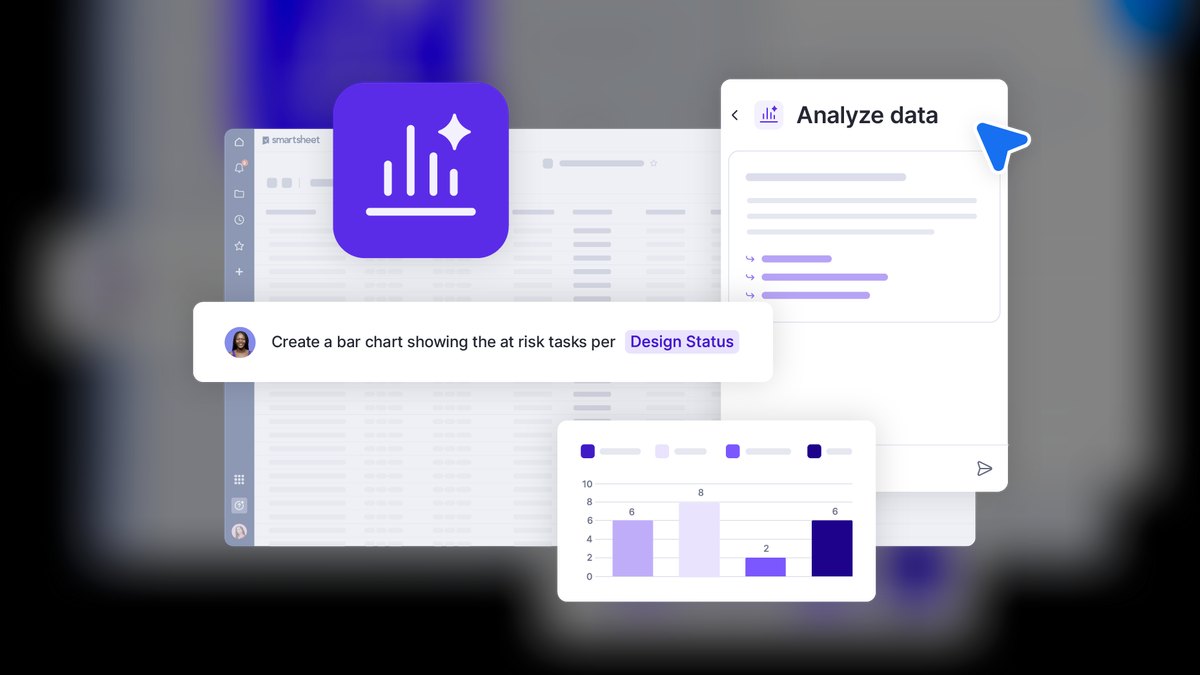
Smartsheet speaks the language of spreadsheet-native operators while adding real project structure. Its AI features generate formulas, summarize sheet data, and surface insights through Smartsheet AI, and the platform's strength remains large-grid project plans, critical path scheduling, and rollup reporting across hundreds of sheets.
It's best for construction, manufacturing, IT, and enterprise PMOs that live in grids and need governance. Pro pricing is around $9/user/month and Business near $19, with dashboards, WorkApps, and Control Center for portfolio standardization at the top end. Dynamic View and granular permissions make it safe to share one sheet across vendors and clients.
Smartsheet's AI is more analytical assistant than autonomous agent, which suits teams that want help reading data, not a bot reassigning their tasks. For grid-driven project control with audit trails, it's a category leader.
8Microsoft Planner (with Copilot)
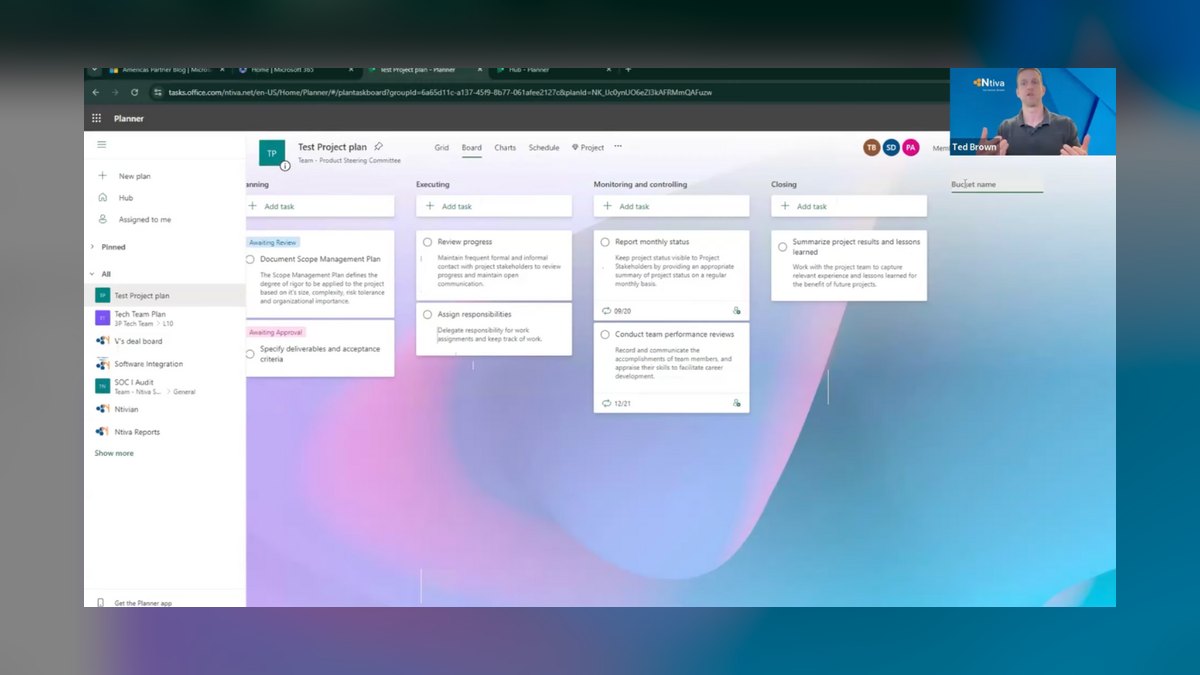
Microsoft Planner — now the merged home for the old Planner, Microsoft To Do, and Microsoft Project capabilities inside Teams — is the natural pick for Microsoft 365 shops. Copilot in Planner can build a project plan from a goal, generate tasks and buckets, recommend assignments, and answer status questions, drawing on the same Microsoft Graph that powers Copilot across Office.
It's best for organizations standardized on Teams, Outlook, and SharePoint who want project work where their files and meetings already live. Project Plan 1 sits near $10/user/month, while Microsoft 365 Copilot is a separate license around $30/user/month — the gateway to the strongest AI features. Premium plans unlock goals, sprints, and dependency timelines.
The catch is that the best AI requires that pricey Copilot add-on, and Planner's standalone power trails dedicated tools. But for IT teams minimizing vendor sprawl, the Graph-grounded AI and zero new logins are compelling.
9Motion

Motion takes a different angle: AI that runs your calendar. Its engine auto-schedules tasks into open time blocks based on priority and deadline, reshuffling automatically when a meeting runs long or a task slips. The AI Project Manager can generate a project plan from a prompt and place every task on real calendars across the team.
Motion is best for individuals and small teams drowning in task-versus-calendar conflict — founders, consultants, and busy managers who want a system that decides what to work on next. Pricing runs around $19/user/month annually (higher monthly), positioning it as a premium personal-productivity layer rather than a cheap seat.
Where Motion is weaker is heavyweight portfolio reporting and cross-team governance; it optimizes throughput, not PMO oversight. For protecting focus time and never manually rescheduling again, the scheduling AI is genuinely distinctive.
10Airtable
Airtable turns a flexible database into AI-powered apps. Airtable AI fields can summarize, categorize, translate, or extract from any record, and Cobuilder / Omni let you describe an app in plain English and have Airtable assemble the schema, interfaces, and automations. The result is project trackers tailored to a team's exact data model.
It's best for operations and product teams who outgrew spreadsheets but want to design custom workflows — content pipelines, product roadmaps, inventory-linked projects. Team pricing is around $20/user/month and Business near $45, reflecting its app-platform ambitions over simple task lists.
Airtable shines when no off-the-shelf board fits your process. It asks more setup investment than a ready-made PM tool, but the AI-built apps reward teams who want structure on their own terms.
FAQ
What is the single best AI project management tool in 2027? Asana for most professional teams, because AI Studio automates real project actions — triage, assignment, status updates — grounded in your actual work structure rather than a detached chatbot.
Which AI project tool offers the best value? ClickUp. ClickUp Brain bundles writing, project-aware search, and automation at roughly $7/user/month, undercutting tools that charge a separate AI seat.
Is AI included in these plans or an extra cost? It varies. Notion and ClickUp bundle AI into paid tiers; Asana AI Studio meters by usage credits; Microsoft 365 Copilot is a separate ~$30/user license; monday.com and Wrike meter AI actions by credits.
Can these AI tools auto-assign and schedule work? Yes for Asana, monday.com, Jira (Rovo), and especially Motion, whose engine auto-schedules tasks onto calendars and reshuffles when plans change.
Which is best for software engineering teams? Jira with Atlassian Intelligence and Rovo, thanks to backlog grooming, plain-English JQL, and grounding in Confluence, GitHub, and Bitbucket.
Do I need clean data for the AI to work? Largely yes. AI quality depends on well-structured tasks, fields, and ownership — run a short pilot before rollout to see how the AI performs on your real backlog.
Bottom Line
If you want the most capable, best-grounded AI across general project management, choose Asana and build automated AI teammates with AI Studio. If budget rules, ClickUp delivers the most AI per dollar through ClickUp Brain. Software teams should pick Jira with Rovo; Microsoft 365 organizations get the easiest path with Planner and Copilot; and individuals fighting their calendar should try Motion.
Match the tool to your work type and data discipline, pilot for two weeks, and let measured results — not the demo — make the call.
Related on PULSE
- The 10 Best AI Tools for Inventory Management in 2027
- The 10 Best AI Tools for Calendar Management in 2027
- The 10 Best AI Tools for Password Management in 2027
- The 10 Best AI Tools for Expense Management in 2027
- The 10 Best Secrets Management Tools for LLM Applications in 2027
- The 10 Best Prompt Management Tools in 2027
Sources
- Asana AI Studio overview
- ClickUp Brain
- monday.com AI features
- Atlassian Rovo
- Notion AI
- Wrike Work Intelligence
- Smartsheet AI
- Microsoft Copilot in Planner
- Motion AI scheduling
- Airtable AI
*Best AI project management tools 2027 — Asana AI Studio, ClickUp Brain, monday AI, Jira Rovo, Notion AI, Wrike, Smartsheet, Microsoft Planner Copilot, Motion, and Airtable ranked for AI task automation, scheduling, and value.*
People also search for: best ai tools for project management 2027 · top ai tools for project management 2027 · top rated ai tools for project management 2027 · top ranked ai tools for project management 2027 · highest rated ai tools for project management 2027 · ai tools for project management reviews 2027
This page will be disappearing soon. Save it to your device for $1 — or read it free while it is here.
@Kory-White- · if Venmo asks, the last 4 of my number are 2012
This page is gone.
This one is off the shelf now. $1 keeps it on your phone for good — the whole page, pictures and diagrams included.
 pulse-ai-infrastructureThe 10 Best Secrets Management Tools for LLM Applications in 2027
 pulse-ai-infrastructureThe 10 Best Streaming Data Platforms for AI in 2027
 pulse-ai-infrastructureHow do you build a self-hosted LLM stack in 2027?
 pulse-ai-infrastructureThe 10 Best AI Tools for Website Chatbots in 2027
 pulse-ai-infrastructureWhat is the role of an embedding model in AI infrastructure in 2027?
 pulse-ai-infrastructureThe 10 Best LLMOps Platforms in 2027
 pulse-ai-infrastructureThe 10 Best AI Tools for Content Repurposing in 2027
 pulse-ai-infrastructureThe 10 Best LLM Fine-Tuning Platforms in 2027
 pulse-ai-infrastructureHow do you version datasets and models for reproducibility in 2027?
 pulse-ai-infrastructureThe 10 Best AI Tools for Docker for Web Apps in 2027