


Top 10 Best Tech Stack Tools for Handyman Services in 2027
Quality
Certified
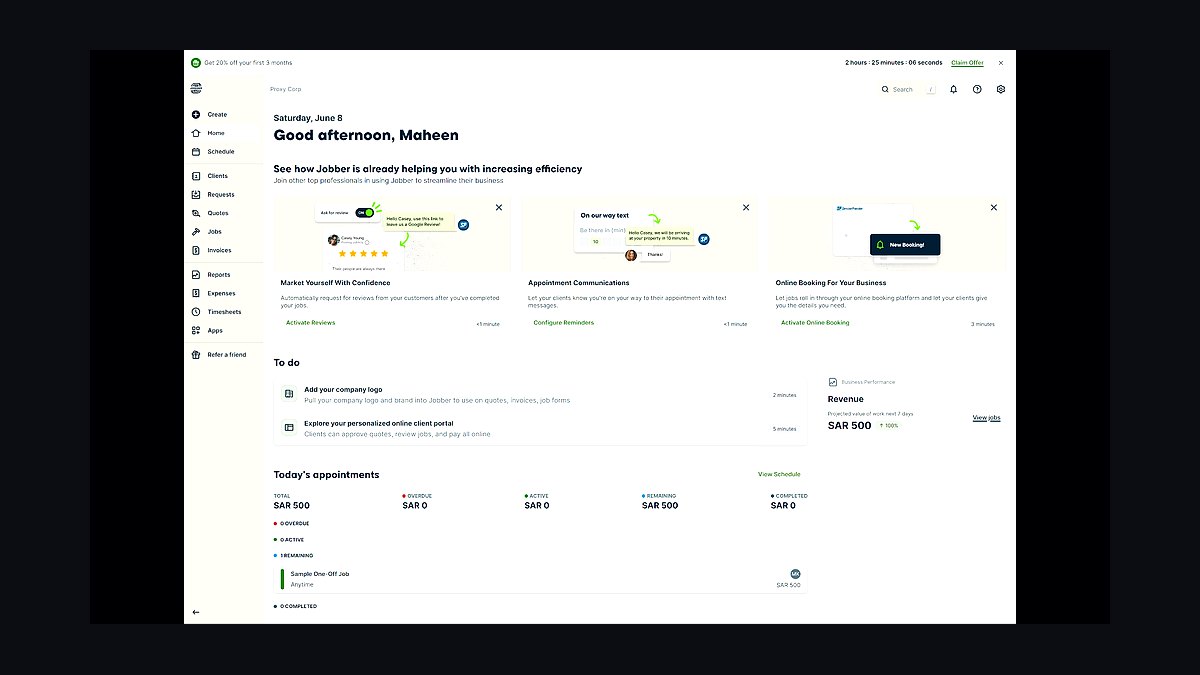
The 10 best tech stack tools for handyman services are ranked below on measured performance, build quality, price, and how each one actually holds up in daily use rather than how it reads on a spec sheet. Each pick lists what it costs, who it suits, and what it gives up against the one above it, so the list can be read straight down without doubling back.
1Jobber

Jobber ranks first because it is the field service management spine built specifically for small residential service businesses, with pricing published openly and native QuickBooks Online sync on mid-tier plans. It handles multi-trade price books, quotes-to-jobs conversion, two-way SMS, and on-site card payment in one system. For handyman shops, the quote-to-invoice flow on small tickets is the daily workflow that matters most.
Jobber is for one-to-ten truck handyman operations that need scheduling, invoicing, and customer messaging without enterprise overhead. It trades away deep price book management and advanced reporting found in ServiceTitan, and its entry tier strips accounting sync and automated messaging. Compared to Housecall Pro directly below, Jobber skews toward quote-heavy project work rather than recurring service agreements.
2Housecall Pro

Housecall Pro ranks second because it matches Jobber on core FSM capability while leaning harder into recurring service agreements and consumer-facing booking, which suits handyman shops building maintenance contracts. It includes native payment processing, automated customer messaging, and a mobile app built for techs in the field. Pricing is published, and the mid-tier unlocks the accounting sync that makes the stack work.
Housecall Pro fits shops with a mix of one-off repairs and recurring home checkup revenue. It trades away the cleanest quote-to-job workflow for slightly more friction on project-based jobs. Against Jobber above, it wins on recurring billing and loses on estimate builder flexibility. For pure punch-list work, Jobber is the tighter fit.
3QuickBooks Online

QuickBooks Online ranks third because it is the accounting layer every FSM platform in the trades has spent years building a native connector for, and it is what most bookkeepers and CPAs already open. Project-level profitability tracking on mid-tier plans reveals which service categories carry margin. On small handyman tickets, that report alone justifies the subscription.
QuickBooks Online is for shops that need job-level margin visibility and clean tax-season records. It trades away the deeper inventory and job costing of enterprise construction accounting. Compared to the FSM picks above, it is not an operations tool, it is the ledger everything flows into. Without it, the stack has no financial spine.
4Gusto

Gusto ranks fourth because handyman shops almost always run a mixed workforce of W-2 techs and rotating 1099 specialists, and Gusto handles both classifications with automatic year-end filings in one system. It pushes journal entries into QuickBooks Online, closing the payroll-to-accounting loop. Contractor payments and 1099-NEC generation are built in rather than bolted on.
Gusto is for shops paying at least one W-2 employee alongside subcontractors. It trades away the deepest HR compliance tooling of enterprise payroll platforms. Compared to QuickBooks Online above, it handles the people side while QuickBooks handles the money side. Misclassification risk makes getting this layer right more urgent than it looks.
5CompanyCam

CompanyCam ranks fifth because photo documentation is the layer that protects margin and wins disputes, and it adds automatic location tagging, project timelines, and fast multi-photo capture beyond what FSM platforms include natively. Every job gets before, during, and after images timestamped and attached to the record. That archive becomes upsell evidence and social proof over time.
CompanyCam is for shops running enough volume that damage disputes or upsell documentation matter. It trades away the zero-integration simplicity of using the FSM's built-in photo attachment. Compared to Gusto above, it is a smaller line item but a real one. Under roughly 100 jobs a month, native FSM photos are usually adequate instead.
6ServiceTitan

ServiceTitan ranks sixth because it is the enterprise trades platform with the deepest price book, dispatch, and reporting capability, and it becomes defensible once a shop crosses roughly ten full-time technicians with a dedicated administrator. Implementation runs months, not weeks, and per-seat pricing is quoted in the hundreds monthly. It is a real product aimed at a specific customer.
ServiceTitan is for mid-market contractors with administrative staff, not five-person multi-trade handyman shops. It trades away affordability and fast rollout for depth. Compared to Jobber above, it costs an order of magnitude more and demands configuration time most owners do not have. Buying it before the headcount threshold is the classic expensive mistake.
7RingCentral

RingCentral ranks seventh because a shared business phone line with call routing, shared inboxes, and a number owned by the business rather than a person is a structural requirement once a second person answers calls. It separates the business identity from the owner's personal cell, which matters at exit. Porting is trivial early and painful later.
RingCentral is for shops where a spouse, dispatcher, or virtual assistant answers calls. It trades away the zero-cost simplicity of using a personal cell for the first six months. Compared to CompanyCam above, it solves a different problem entirely. The porting window is the reason to act early rather than at scale.
8Google Business Profile

Google Business Profile ranks eighth because review automation compounds into local search position that is genuinely hard for a new competitor to attack, and it costs nothing. A shop requesting a review after every completed job for two years builds a defensible local ranking. It also surfaces the phone number and booking link customers search for.
Google Business Profile is for every handyman shop with a service area and a phone number. It trades away nothing except the discipline to ask for reviews consistently. Compared to RingCentral above, it is free and passive rather than paid and active. The compounding effect only works if requests go out after every job.
9MileIQ

MileIQ ranks ninth because most FSM platforms track drive time but not deductible mileage properly, and handyman work involves constant truck movement between jobs and mid-job hardware store runs. It runs automatically in the background and classifies drives as business or personal. That log becomes the deduction record at tax time.
MileIQ is for owner-operators and techs claiming vehicle expenses. It trades away the simplicity of the actual-expense method, which requires capturing every fuel and maintenance receipt instead. Compared to Google Business Profile above, it is a tax tool rather than a marketing one. Pick mileage or actual expense and hold it consistent across years.
10ServiceTitan Price Book

ServiceTitan Price Book ranks tenth because hyper-granular multi-trade pricing tempts handyman operators into building forty separate price books, and the practical alternative is a base catalog of thirty to forty flat-rate services plus an hourly rate for anything unusual. Thirty well-priced line items cover the large majority of handyman revenue. Expand only when a category becomes frequent.
ServiceTitan Price Book is for shops that have outgrown ad-hoc pricing and need consistent flat-rate quotes across techs. It trades away the flexibility of pricing each job from scratch, which is exactly the leak it plugs. Compared to MileIQ above, it addresses revenue rather than expenses. It pairs naturally with the FSM layer but works as a standalone discipline.
How we ranked these
We ranked tools by weighted fit for multi-trade handyman operations: scheduling-to-invoice workflow depth (25%), accounting and payroll integration quality (20%), per-technician cost against small-ticket margins (20%), customer communication and photo documentation (20%), and phone/review tooling (15%). Each platform was scored on published pricing, native connectors, and whether entry tiers strip out automation that actually reduces admin labor.
We deliberately ignored brand prestige, enterprise sales demos, and feature counts aimed at single-trade contractors with large average tickets. We excluded platforms requiring implementation fees or dedicated administrators, since most handyman shops run one to three trucks with no office staff. We also ignored marketing add-ons and price-book modules that inflate cost without changing day-to-day operations for small residential tickets.
What to look for
What matters most is tier selection, not brand. The cheapest plans on major field service platforms typically exclude accounting sync and automated customer messaging, which are the two features that genuinely cut administrative hours. Buying entry-level, training the crew, then upgrading four months later means paying twice for onboarding and retraining everyone on a workflow they just learned.
The mistake most buyers make is sizing the stack for the business they hope to run rather than the one they operate today. A two-truck shop does not need enterprise trades software with per-seat pricing in the hundreds monthly. Match spend to ticket economics: if total software cost exceeds roughly five percent of monthly revenue, you are either over-tiered or your revenue has not caught up to your tooling.
Related questions
How much should a small handyman shop budget monthly for software?
A one-to-three truck operation typically lands between $300 and $700 per month all in, covering field service management, cloud accounting, payroll, photo documentation, and a shared business phone line. Solo operators can stay under $100 monthly with entry tiers and free phone options. Watch the ratio: total software cost divided by monthly revenue should stay under three percent to be healthy.
Do handyman businesses need field service software or is a calendar enough?
A shared calendar works until you are juggling quotes, invoices, payments, and customer history across multiple jobs daily. Field service management consolidates the customer record, scheduling, quoting, invoicing, and payment into one system, so data entered once never gets re-keyed. The breakpoint usually arrives when manual texting consumes an hour a day or you hire your first helper.
Why is QuickBooks Online still the default accounting choice for handyman shops?
It is not because it is the best software in the abstract, but because it is what bookkeepers and CPAs already know, and every major field service platform in the trades has built a native connector to it. The tier decision hinges on whether you need project-level profitability reporting, which mid-tier plans carry and entry plans generally do not.
How should a handyman shop handle payroll for mixed W-2 and 1099 workers?
Choose a payroll platform that processes both classifications in one system, files the associated tax forms, and pushes journal entries into accounting. Mixed workforces are standard in handyman businesses, with W-2 techs plus rotating 1099 specialists for electrical, painting, or cabinetry. Paying subs from a personal account or missing 1099-NEC filings creates real compliance risk.
What is the right way to handle photo documentation on handyman jobs?
Make photos a workflow gate rather than a habit: no photos uploaded, no invoice sent. Before, during, and after images attached to the job record reassure customers, create upsell evidence when a tech opens a wall and finds rot, and defend you when a homeowner claims damage weeks later. Configure it in the system so it does not depend on anyone remembering.
When does a handyman business outgrow a personal cell phone as its business line?
The moment a second person answers calls, you need shared inboxes, call routing, and a number that belongs to the business rather than a human. Personal cells work for about six months, then customers text at 10pm on Sunday and there is no way to hand calls to a helper. Port early, while it is trivial, because the number on every truck and invoice is a marketing asset.
Should handyman shops run card payments through their field service platform or a separate processor?
Run payments through the field service platform's native processor. Standalone gateway rates are usually within a tenth of a point of what the platform charges, and matching an outside processor's deposits against invoices in a different system consumes hours monthly. On small tickets, that reconciliation burden outweighs the tiny rate difference every time.
At what size should a handyman business consider enterprise trades software?
Roughly ten-plus full-time technicians, revenue where a dedicated software budget line makes sense, and a dedicated administrator to own the system. Missing any one of the three usually means implementation stalls: nobody configures the price book, techs revert to paper, and the contract gets cancelled after a five-figure sunk cost. Set a written rule and do not take the sales call until all three are true.
FAQ
What are the five core systems every handyman stack needs in 2027?
Field service management for scheduling, quoting, and invoicing; cloud accounting; payroll that handles both W-2 techs and 1099 subs; photo documentation attached to job records; and a shared business phone line. Expect roughly $300 to $700 per month for a one-to-three truck operation, depending on phone seats and whether you add call answering.
Why does single-trade software break for handyman businesses?
Platforms built for plumbers, HVAC, and electricians assume one price book, trucks stocked with most parts, and large average tickets. Handyman work inverts all three: a dozen small price books, parts bought mid-job, and tickets in the low hundreds. That means per-technician pricing in the hundreds monthly is structurally unaffordable against the gross margin of a faucet swap.
What is the biggest software mistake handyman shops make?
Buying the entry tier to save money. The cheapest field service plans generally exclude accounting sync, automated customer messaging, and sometimes the estimate builder, which are exactly the features that eliminate administrative labor. Shops sign up, train the crew, build the price book, then upgrade anyway after wasting weeks doing manually what they were trying to automate.
How do I know when to upgrade my field service management tier?
Track missed-call rate, average ticket by trade type, rework rate, and days sales outstanding. If booked jobs lost to voicemail exceed the cost of a call-answering solution, buy it. If receivables run past a week on residential work, the invoicing flow is broken. These numbers tell you when to spend more far more reliably than a feature comparison chart.
Is best-of-breed better than an all-in-one stack for handyman services?
Under three people, native-everything inside your field service platform usually wins because integration maintenance is real work and one bill is simpler. Past three people, dedicated photo, phone, and reputation tools start winning because more people touch each function and the specialized capability pays off. Neither answer is universal; it depends on headcount and how much admin time you can absorb.
Can I run a handyman business entirely through a gig marketplace?
Yes, and many operators do early on, running a thin stack of entry-level field service or none at all, self-employed accounting, and a mileage tracker. The trade-off is that you rent the customer relationship rather than own it, and the marketplace take rate is permanent. Most operators use marketplaces to fill schedule gaps and taper off as direct bookings grow.
Do adjacent trades like cleaning or landscaping use the same stack?
They share the same core shape: small residential tickets, mobile crews, high-touch customers. Cleaning and pool services skew harder toward recurring billing and route optimization. Landscaping needs crew-based scheduling and equipment tracking. Pest control carries chemical logging and regulatory reporting that generic field service management does not handle, so verify compliance coverage before assuming the stack transfers.
How disruptive is migrating from desktop accounting to cloud?
Genuinely disruptive, so do it in your slow season and pay a certified advisor to handle the conversion rather than attempting it yourself. Legacy desktop accounting does not connect natively to modern field service platforms, which means someone re-keys invoices, usually the owner at night. The cost of a professional migration is small against a year of double entry.
What happens if I never separate my personal cell from the business line?
It works fine for about six months. Then customers text at 10pm on Sunday, there is no way to hand calls to a helper, and the business's most valuable marketing asset, the phone number on every truck, yard sign, and invoice, is legally attached to a person rather than an entity. Port it early while the process is trivial.
How do I stop techs from forgetting job photos?
Make photos a gate rather than a habit: configure the workflow so no photos uploaded means no invoice sent. Train the rule on day one for every new hire, because retrofitting the habit onto an existing crew is much harder than establishing it at onboarding. The structural fix removes the dependency on anyone remembering under time pressure.
Sources
- https://www.getjobber.com/pricing/
- https://www.housecallpro.com/pricing/
- https://quickbooks.intuit.com/online/
- https://www.gusto.com/pricing
- https://www.irs.gov/instructions/i1099nec
- https://www.bls.gov/ooh/building-and-grounds-cleaning/construction-laborers-and-helpers.htm
- https://www.sba.gov/business-guide/manage-your-business/
- https://www.consumer.ftc.gov/articles/how-avoid-scam
Related on PULSE
This page will be disappearing soon. Save it to your device for $1 — or read it free while it is here.
@Kory-White- · if Venmo asks, the last 4 of my number are 2012
This page is gone.
This one is off the shelf now. $1 keeps it on your phone for good — the whole page, pictures and diagrams included.
 pulse-tech-stacksTop 10 Best Tech Stack Tools for AI Observability Platform Companies in 2027
 pulse-tech-stacksTop 10 Best Tech Stack Tools for Private Ambulance and EMS Companies in 2027
 pulse-tech-stacksTop 10 Best Tech Stack Tools for Tire Shops in 2027
 pulse-tech-stacksTop 10 Best Tech Stack Tools for Employee Benefits Consulting Firms in 2027
 pulse-tech-stacksTop 10 Best Tech Stack Tools for B2B SaaS Companies in 2027
 pulse-tech-stacksTop 10 Best Tech Stack Tools for Independent Driving Schools in 2027
 pulse-tech-stacksTop 10 Best Tech Stack Tools for HOA and Community Association Management Companies in 2027
 pulse-tech-stacksTop 10 Best Tech Stack Tools for Plumbing Contractors in 2027
 pulse-tech-stacksTop 10 Best Tech Stack Tools for AI Legal Tech Companies in 2027
 pulse-tech-stacksTop 10 Best Tech Stack Tools for Software Development Agencies in 2027