


Top 10 Best Tech Stack Tools for Sneaker Boutiques in 2027
Quality
Certified
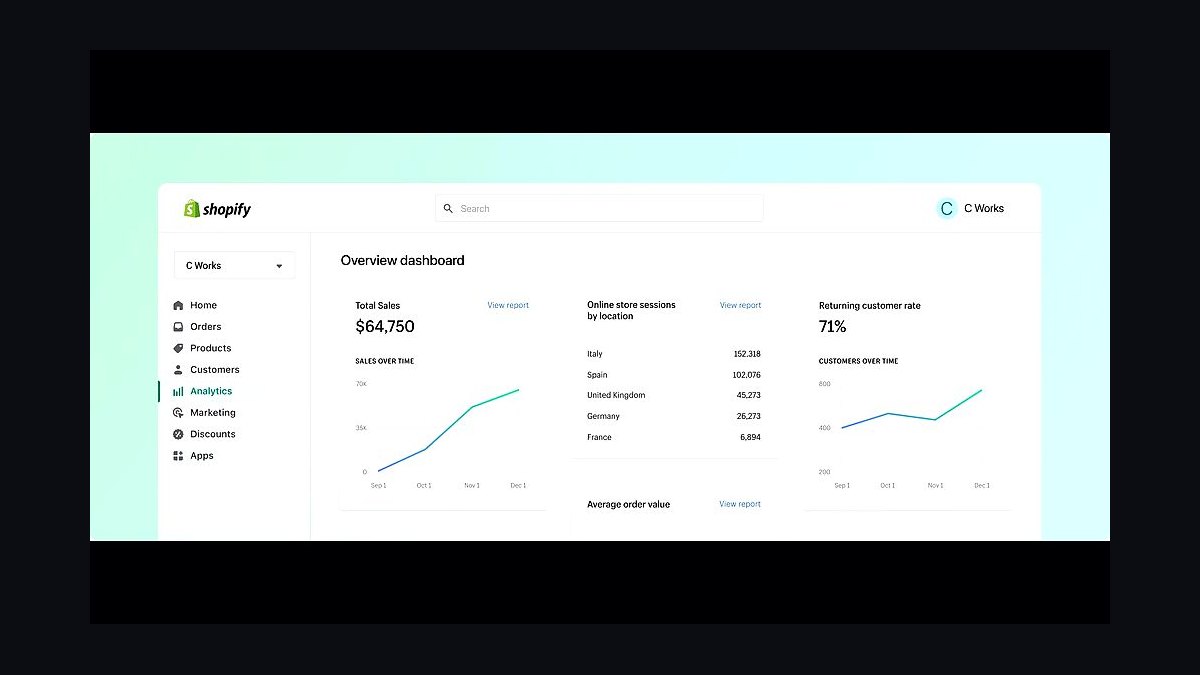
The 10 best tech stack tools for sneaker boutiques are ranked below on measured performance, build quality, price, and how each one actually holds up in daily use rather than how it reads on a spec sheet. Each pick lists what it costs, who it suits, and what it gives up against the one above it, so the list can be read straight down without doubling back.
1Shopify POS

Shopify POS ranks first because it shares one real-time inventory record with the web store, eliminating the sync window where oversells happen. A 42-pair drop selling simultaneously online and at the counter stays accurate at the size-SKU level, which matters when a boutique manages 3,000 active SKUs at quantity one or two. Native POS is a per-location add-on in the tens of dollars monthly, plus $800–$2,000 in one-time counter hardware.
It is for single-location boutiques on Shopify that carry limited releases and cannot tolerate a fifteen-minute reconciliation lag. The trade-off is accepting Shopify's POS shortcomings rather than a stronger third-party register, and paying platform-native processing rates. Compared to Lightspeed Retail directly below, Shopify POS wins on app ecosystem depth for sneaker raffles and consignment, while Lightspeed wins on retail-specific inventory features.
2Lightspeed Retail

Lightspeed Retail ranks second because it pairs native POS with size-level inventory granularity and stronger retail back-office features than Shopify, at comparable mid-market pricing. It shares one database between counter and e-commerce through Lightspeed eCom, so limited-release concurrency does not split across sync cycles. Hardware runs the same $800–$2,000 for a single counter, and software sits in the low-to-mid hundreds monthly.
It suits boutiques that prioritize purchase orders, vendor management, and per-location reporting over app ecosystem breadth. The trade-off is a thinner sneaker-specific raffle and bot-defense app market than Shopify's. Against Shopify POS above it, Lightspeed trades ecosystem depth for retail operational strength; against BigCommerce below, it wins by including the POS layer natively rather than requiring a bolted-on register.
3BigCommerce

BigCommerce ranks third as a commerce platform because it offers size-level SKU inventory natively and mid-market pricing comparable to Shopify, making it a legitimate system of record for boutiques with 3,000 active SKUs. Its open API supports consignment metafields and per-pair authentication records without heavy customization. Pricing lands in the low-to-mid hundreds monthly for small retailers, with no license fee surprises at scale.
It is for boutiques whose developer or agency already prefers BigCommerce, or that want headless flexibility for a custom drop page. The trade-off is a smaller sneaker-specific app ecosystem than Shopify's, meaning raffle and bot-defense integrations require more assembly. Against Lightspeed Retail above, BigCommerce lacks a first-party POS; against WooCommerce below, it wins decisively on drop-day uptime because hosting is managed rather than self-owned.
4WooCommerce

WooCommerce ranks fourth because it carries no license fee, shifting cost to hosting, a developer retainer, and self-owned uptime during drops. Size-level SKU inventory is achievable through extensions, and the platform bends to any consignment or authentication schema a boutique needs. Realistic total cost for a boutique doing under seven figures lands comparable to Shopify once hosting and maintenance are counted.
It is for boutiques with an in-house or retained developer who can be available on launch day and provision burst hosting. The trade-off is that a failed release erases the license savings instantly, and drops are the only moments that matter. Against BigCommerce above, WooCommerce loses on managed uptime; against Shopify below, it loses on app ecosystem and support simplicity while winning on customization ceiling.
5Shopify

Shopify ranks fifth as the commerce layer because it is the default system of record for sneaker boutiques, with the deepest app ecosystem for raffles, bot defense, and consignment. Size-level SKU granularity is native, so a US 10.5 tracks separately from a US 11 across 3,000 active SKUs. Mid-tier plans land in the low-to-mid hundreds monthly billed annually, with Shopify Plus quoted in the low thousands.
It is for boutiques that want one platform, one support number, and the widest integration menu rather than best-of-breed at every layer. The trade-off is platform-imposed surcharges on third-party gateways and a fee structure that scales with volume. Against WooCommerce above, Shopify wins on uptime and ecosystem but loses on customization; against Klaviyo below, it is the inventory foundation that Klaviyo's commerce integration reads from.
6Klaviyo

Klaviyo ranks sixth because it turns every raffle entry and drop into owned customer data, which is the durable asset from a hyped release rather than the margin on 42 pairs. A raffle with 2,000 entries for 42 pairs is a 2,000-person list-building event with known sizes. Pricing for a boutique with 15,000 subscribers generally lands in the $150–$400 monthly band.
It is for boutiques that already have a commerce platform feeding order and browse data, since Klaviyo's segmentation depends on that integration. The trade-off is cost scaling with contact count, which punishes list growth if revenue does not follow. Against Shopify above, Klaviyo is a layer on top rather than a replacement; against Postscript below, Klaviyo wins on email depth while Postscript wins on SMS drop-announcement performance.
7Postscript

Postscript ranks seventh because SMS materially outperforms email for drop announcements, and that is the one place in the stack where paying more reliably returns more. Domestic sends price at roughly a cent or two per segment, so a 15,000-person drop blast costs $150–$300. It integrates with Shopify and BigCommerce to trigger size-specific drop alerts from order history.
It is for boutiques with an existing email program that want a dedicated SMS channel rather than bolting texting onto an email platform. The trade-off is per-message cost that scales linearly with list size, and compliance overhead around opt-in language. Against Klaviyo above, Postscript trades email depth for SMS deliverability and drop-day urgency; against QuickBooks Online below, it sits in a completely different layer of the five-part stack.
8QuickBooks Online

QuickBooks Online ranks eighth because the commerce-to-accounting connector is worth $20–$50 monthly and saves multiple days of reconciliation, making it the most common false economy in small retail when skipped. Software runs $30–$200 monthly plus a bookkeeper. It handles consignment payouts as liabilities rather than revenue, which is the correct treatment and painful to retrofit across a year of transactions.
It is for any boutique that has reached the point where manual monthly reconciliation costs a full day, typically within the first year of operation. The trade-off is that QuickBooks expects clean category mapping, and a misconfigured connector produces garbage reports. Against Postscript above, QuickBooks is back office rather than customer-facing; against Stripe below, it records the money Stripe moves rather than moving it.
9Stripe

Stripe ranks ninth because payment processing is the largest software-adjacent cost in the stack, running roughly $2,400 monthly at $80,000 in blended volume at 2.9% plus fixed fees. Its fraud rules are configurable, which matters because platform defaults are tuned for normal retailers and auto-cancel real customers during high-velocity drop windows. Interchange-plus pricing becomes negotiable above roughly $50,000 monthly volume.
It is for boutiques that want explicit control over risk rules and are willing to review flagged orders manually the same day rather than letting them auto-void. The trade-off is that using Stripe instead of a platform-native processor triggers additional per-transaction surcharges on most commerce platforms. Against QuickBooks Online above, Stripe moves money while QuickBooks records it; against Cloudflare Bot Management below, Stripe handles payment-layer fraud while Cloudflare handles traffic-layer abuse.
10Cloudflare Bot Management

Cloudflare Bot Management ranks tenth because bot mitigation should be instrumented against evidence, not purchased preemptively, and Cloudflare bundles basic bot rules into plans starting around $20 monthly. The practical guidance is to start with the cheapest raffle app plus included CDN bot rules, then measure how badly a release gets swept before escalating. Order data showing repeat addresses, clustered timestamps, and mismatched billing reveals whether a waiting room is warranted.
It is for boutiques that have already run a hyped drop and can point to specific bot behavior in their own order records. The trade-off is that enterprise bot defense can run four figures monthly solving a problem a $40 app and a one-per-customer cart limit would have handled. Against Stripe above, Cloudflare defends the traffic layer while Stripe defends the payment layer; together they cover the two failure modes that break a Saturday drop.
How we ranked these
We ranked tools by weighting size-level inventory accuracy at 30%, POS-to-web sync architecture at 25%, launch and bot-defense capability at 20%, consignment and authentication logging at 15%, and back-office integration depth at 10%. Each candidate was scored against a 900-square-foot boutique scenario running six hyped drops a year with roughly 3,000 active size-level SKUs, most at quantity one or two.
We deliberately ignored brand recognition, marketplace hype, and enterprise feature lists that only matter above five locations. We excluded pricing tiers quoted only on a sales call, apps with no published changelog in eighteen months, and anything requiring a full-time developer during a Saturday drop. Payment processing rates were treated as a separate cost line, not a ranking factor.
What to look for
The decisive question is whether your POS and web store read the same inventory record in real time. Native POS sharing one database beats any connector-based setup, because the sync window is exactly where oversells happen during a ninety-second drop. Buy native POS and accept its shortcomings rather than bolting on a third-party register that reconciles every fifteen minutes.
The mistake most buyers make is buying enterprise bot defense before instrumenting their own order data. Check repeat shipping addresses, clustered timestamps, and mismatched billing before spending four figures monthly. A forty-dollar raffle app plus one-per-customer cart limits handles most single-location boutiques. The second most common error is deferring the accounting connector, which compounds into a paid cleanup engagement by year two.
Related questions
Do I need a separate raffle platform or is a Shopify app enough?
For most single-location boutiques, an app plus cart limits plus your CDN's included bot rules is sufficient. Escalate to a dedicated queue or waiting-room service only after your own order data proves bots are actually taking meaningful allocation. Look for repeat freight-forwarder addresses and orders clustered in the first two seconds before spending more.
Can I run a sneaker boutique on WooCommerce?
Yes, but you own uptime during drops, and drops are the only moments that matter. Without a developer available on launch day and hosting provisioned for burst traffic, license savings get erased by one failed release. A bookstore can survive a slow Tuesday; a boutique cannot survive a broken Saturday drop.
What is the minimum viable stack to open with?
Commerce platform with size-level SKUs, its native POS, native payments, an email tool, and an accounting connector. That is five vendors and roughly $300 to $600 per month. Add launch tooling before your first hyped release, not before you open the doors, because raffle apps and cart limits only matter once demand exceeds supply.
How do I handle consignment payouts in accounting?
Consigned pairs are not your inventory, and consignor proceeds are a liability, not revenue. Record your commission as revenue and the payout as settling a liability. Configure this at setup, because retrofitting it across a year of transactions is genuinely painful and often requires a paid cleanup engagement with your bookkeeper.
Does the stack change if I add a second location?
Mostly at layer two. You need per-location stock, inter-location transfers, and per-location reporting, features that often sit one pricing tier above where a single store lives. Everything else scales without architectural change. Budget for the tier jump before signing, since POS pricing frequently doubles between one and two locations.
How often should I audit my software subscriptions?
Annually at minimum. Contracts renew, volume tiers change, apps get abandoned by their developers, and a layer you added for a problem two years ago is often still billing you. An annual audit of every recurring charge against what it does right now typically recovers ten to twenty percent of the software budget.
What inventory accuracy should I expect at the size-SKU level?
Above 98%. Below that, your single source of truth is not actually single, and oversells become routine rather than exceptional. Measure it monthly by cycle-counting a sample of size-level SKUs and comparing against the system record. If accuracy drifts, the cause is almost always a second inventory table somewhere in the stack.
Is SMS worth the cost for drop announcements?
Yes, and it is the one place in this stack where paying more reliably returns more. SMS materially outperforms email for time-sensitive drops. A 15,000-person blast costs roughly $150 to $300 domestically, and the conversion lift on high-intent sneaker buyers usually covers that within the first hour of a release.
FAQ
What is the complete software stack for a sneaker boutique in 2027?
Five layers: a commerce platform holding one size-level inventory record; a native POS reading that same record; a launch layer for limited releases covering raffle, queue, or bot defense; a consignment and authentication log if you deal secondary market; and a back office of CRM, email, SMS, loyalty, and accounting. Everything beyond those five is optional.
How much should software cost as a percentage of revenue?
Excluding payment processing, a healthy single-location boutique runs roughly one to two percent of revenue on software. Including processing, expect four to six percent. If software excluding processing exceeds three percent, you are almost certainly paying for a layer that no longer solves a problem you actually have.
Why does native POS matter more than any other choice?
Because it shares one database with your web store. Third-party POS bolted on via connector always introduces a sync window, and the sync window is where oversells live. During a ninety-second drop, a fifteen-minute sync interval is enough to sell the same forty-two pairs twice across two channels.
How do I stop bots from clearing my allocation?
Start with one-per-customer cart limits enforced at checkout, block repeat freight-forwarder shipping addresses, and use your CDN's included bot rules. Only escalate to a paid waiting room after your own order data shows bots taking meaningful allocation. Instrument first, then spend against evidence rather than vendor promises.
Should I run raffles, first-come-first-served, or in-store only?
Many boutiques run all three depending on the release's heat. Raffles defeat most bots and build your list, but lower the conversion moment. First-come-first-served maximizes urgency but is what bots are built to exploit. In-store-only eliminates the software problem and drives foot traffic, at the cost of excluding everyone outside driving distance.
What breaks first during a hyped Saturday drop?
Oversells from two inventory tables, then fraud rules auto-cancelling legitimate customers, then bots clearing allocation in seconds, then a four-day manual reconciliation. None of those are retail failures. Each is a specific, solvable integration problem, and each maps to one of the five stack layers.
Do I need dedicated consignment software?
Under roughly fifty consignment pairs a month, a spreadsheet or Airtable base genuinely works: one row per pair with consignor, intake date, cost, authentication verdict, listed price, sold price, and payout date. It breaks when you need consignor-facing status visibility and automated payout calculation, usually north of one hundred pairs monthly.
How do I tune fraud rules for drop traffic?
Review the default risk rules before your first big release and set explicit allow behavior for high-velocity windows, then review flagged orders manually the same day rather than letting them auto-void. Default rules are tuned for normal retailers, not stores selling four-hundred-dollar items to buyers ordering in the same eight seconds.
What should I do about backorders on limited product?
Turn off continue-selling-when-out-of-stock globally and audit it per product, because it defaults on in some import flows. Limited product is limited. A single mis-set flag turns into forty refund emails and a stock count no system agrees on. If a size sells out, it is gone.
How do I know if my stack is actually working?
Three numbers on demand: web conversion in the one-to-three percent range outside drops, inventory accuracy above ninety-eight percent at the size-SKU level, and chargeback rate under roughly zero point six five percent of transactions. If your stack cannot produce those three numbers, you do not have a reporting layer, you have spreadsheets.
Sources
- https://www.shopify.com/pos
- https://www.lightspeedhq.com/pos/retail/
- https://www.bigcommerce.com/
- https://woocommerce.com/
- https://www.airtable.com/
- https://www.klaviyo.com/
- https://www.quickbooks.intuit.com/
- https://www.cloudflare.com/products/bot-management/
- https://www.visa.com/support/consumer/chargeback-dispute.html
Related on PULSE
This page will be disappearing soon. Save it to your device for $1 — or read it free while it is here.
@Kory-White- · if Venmo asks, the last 4 of my number are 2012
This page is gone.
This one is off the shelf now. $1 keeps it on your phone for good — the whole page, pictures and diagrams included.
 pulse-tech-stacksTop 10 Best Tech Stack Tools for Employee Benefits Consulting Firms in 2027
 pulse-tech-stacksTop 10 Best Tech Stack Tools for HOA and Community Association Management Companies in 2027
 tkTop 10 Best Tech Stack Tools for Concrete and Paving Contractors in 2027
 pulse-tech-stacksTop 10 Best Tech Stack Tools for Independent Food Trucks in 2027
 pulse-tech-stacksTop 10 Best Tech Stack Tools for Fine-Tuning Platform Companies in 2027
 pulse-tech-stacksTop 10 Best Tech Stack Tools for AI Customer Support Companies in 2027
 pulse-tech-stacksTop 10 Best Tech Stack Tools for Private Ambulance and EMS Companies in 2027
 pulse-tech-stacksTop 10 Best Tech Stack Tools for Painting Contractors in 2027
 pulse-tech-stacksTop 10 Best Tech Stack Tools for API Security Vendors in 2027
 pulse-tech-stacksTop 10 Best Tech Stack Tools for CrossFit Boxes in 2027