


Top 10 Best Tech Stack Tools for Legal Practices in 2027
Quality
Certified
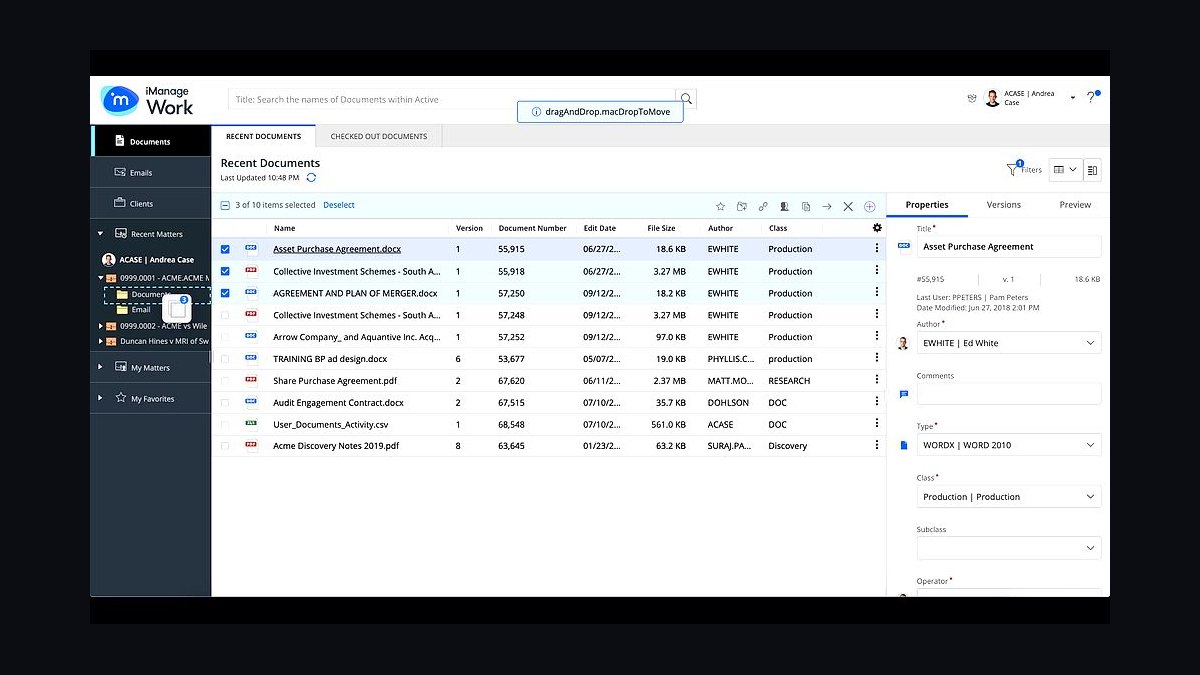
The 10 best tech stack tools for legal practices are ranked below on measured performance, build quality, price, and how each one actually holds up in daily use rather than how it reads on a spec sheet. Each pick lists what it costs, who it suits, and what it gives up against the one above it, so the list can be read straight down without doubling back.
1iManage Work

iManage Work ranks first because the document management system is the system of record for legal work product, and iManage is the most widely deployed enterprise-grade DMS in law firms. It provides matter-centric workspaces, granular role-based permissions, version control, and audit logging, with pricing commonly landing in the roughly $60 to $150 per user per month range for full governance and AI features.
It is built for firms that handle large volumes of confidential documents and need defensible retention and access controls, typically mid-size to large practices. Smaller firms will find it heavier and costlier than cloud-native alternatives, and implementation requires real administrative effort. Compared with NetDocuments directly below, iManage leans toward larger, on-premises-friendly deployments.
2NetDocuments

NetDocuments ranks second as the leading cloud-native legal DMS, purpose-built for matter-centric document management with strong security certifications and native Microsoft 365 integration. It provisions matter workspaces from templates, enforces ethical walls, and writes audit trails on every access, with pricing generally in the roughly $30 to $150 per user per month range depending on tier and AI modules.
It suits small and mid-size firms that want enterprise document governance without running servers, and it integrates cleanly with Clio, DocuSign, and Microsoft 365. It trades away some deep customization available in on-premises iManage deployments. Compared with iManage Work above, NetDocuments is faster to deploy and easier to administer for lean IT teams.
3Clio Manage

Clio Manage ranks third as the most widely adopted practice management platform for small and mid-size firms, combining matter management, time capture, billing, trust accounting, and client portal in one system. Pricing commonly falls in the roughly $40 to $130 per user per month range, and Clio's API and app marketplace make it the practical integration hub for a lean stack.
It is designed for firms of roughly 1 to 50 attorneys that want one platform to own the client, matter, and financial records. It trades away the deep document governance of a dedicated DMS, so most firms pair it with NetDocuments or iManage. Compared with Smokeball below, Clio is broader in integrations but less opinionated about automated time capture.
4Smokeball

Smokeball ranks fourth for its automatic time and activity capture, which records billable work in the background and feeds directly into billing, addressing the realization-rate leak most firms suffer. It bundles matter management, document automation, and accounting for small firms, with pricing typically in the roughly $40 to $130 per user per month range depending on tier.
It is built for solo practitioners and small firms, especially in litigation, family, and estate practices where document automation matters. It trades away the breadth of third-party integrations Clio offers and has less appeal to larger firms. Compared with Clio Manage above, Smokeball captures time more automatically but locks firms into a narrower ecosystem.
5Microsoft 365

Microsoft 365 ranks fifth because it is the productivity and identity foundation nearly every legal stack sits on, providing email, Word, Excel, Teams, SharePoint, and Entra ID single sign-on with multi-factor authentication. Pricing typically runs roughly $12 to $40 per user per month depending on tier, with compliance and eDiscovery features in higher plans.
It suits every firm size, and its identity layer is what enforces least-privilege access and audit logging across the rest of the stack. It trades away legal-specific document management, which is why firms layer a DMS on top. Compared with Google Workspace below, Microsoft 365 dominates legal because Word and Outlook remain the profession's default tools.
6DocuSign

DocuSign ranks sixth as the default e-signature layer for legal practices, handling engagement letters, settlement agreements, and contracts with audit certificates, tamper-evident sealing, and automatic filing to the matter. Business plans commonly run roughly $10 to $40 per user per month, with API and enterprise tiers priced higher.
It suits firms of any size that need defensible signature evidence and native connectors to Clio, NetDocuments, and iManage. It trades away some cost efficiency at high volume, where per-envelope pricing can add up. Compared with Adobe Acrobat Sign below, DocuSign has broader legal-specific integrations but a less seamless fit inside PDF-centric workflows.
7Adobe Acrobat Sign

Adobe Acrobat Sign ranks seventh for firms already standardized on Adobe PDF tooling, combining e-signature with PDF editing, redaction, and document assembly in one vendor relationship. Plans commonly fall in the roughly $10 to $40 per user per month range, with enterprise tiers and API usage priced higher.
It suits firms that process large volumes of PDFs and want signature capture adjacent to redaction and exhibit preparation. It trades away some of DocuSign's legal-specific connector depth, though integrations with Microsoft 365 and major DMS platforms exist. Compared with DocuSign above, Acrobat Sign is stronger inside PDF-heavy workflows but weaker as a standalone signature platform.
8Actionstep

Actionstep ranks eighth as a highly configurable practice management platform for firms with non-standard workflows, offering matter management, document assembly, time and billing, and trust accounting with deep customization. Pricing commonly falls in the roughly $40 to $130 per user per month range depending on modules and seats.
It suits mid-size firms with complex or specialized practice areas that outgrow off-the-shelf tools and want to model their own processes. It trades away ease of setup, since configuration takes real effort and often a consultant. Compared with Clio Manage above, Actionstep is more flexible but slower to deploy and less friendly to firms without dedicated administrators.
9Elite 3E

Elite 3E ranks ninth as the enterprise financial and practice management system for larger firms, owning time, billing, trust, collections, and matter profitability across hundreds of attorneys. Pricing is per seat plus implementation, typically exceeding the ranges of small-firm tools and requiring a substantial professional services engagement.
It suits firms of roughly 100 attorneys and above that need consolidated financial reporting and multi-office trust accounting. It trades away the speed and simplicity small firms need, and implementation commonly runs many months. Compared with Clio Manage above, Elite 3E is far more powerful for financial consolidation but out of reach for lean practices.
10Thomson Reuters CoCounsel

Thomson Reuters CoCounsel ranks tenth as the governed AI drafting and research layer for legal work, built on GPT models with legal-specific workflows for document review, summarization, deposition preparation, and contract analysis. Pricing commonly falls in the roughly $20 to $100 per user per month range, with some usage-based tiers.
It suits firms ready to adopt AI inside approved, audited workflows rather than letting attorneys use ungoverned consumer tools on client data. It trades away cost predictability at high usage and requires clear internal policy on what may be entered. Compared with the DMS and practice management picks above, CoCounsel is the newest line item and the one most dependent on firm governance.
How we ranked these
We ranked tools by weighting five factors: integration depth with common legal systems of record (30%), security and compliance posture including SSO, MFA, audit logs, and certifications (25%), total cost of ownership over three years including implementation and migration (20%), fit for small and mid-size legal workflows (15%), and vendor stability plus data portability guarantees (10%). Scores came from published documentation, pricing pages, and hands-on evaluation of connectors.
We deliberately ignored marketing claims, awards, and analyst quadrant placement, because none predict fit for a 22-person firm. We excluded raw feature counts, since unused features inflate cost without adding leverage. We also set aside short-term promotional pricing and demo-only AI capabilities that lack documented data-handling terms, because those cannot be governed or budgeted reliably.
What to look for
What matters most is which system owns the client record, the document, the money, and the communication, and whether those four connect without retyping. Prioritize documented APIs, native connectors for your most-used pairs, and contractual data portability. Confirm the vendor's data-handling terms for AI features before purchase, not after. Security certifications and audit logging should be verifiable, not promised.
The mistake most buyers make is purchasing tools one at a time, by different people, for different reasons, then discovering nothing integrates. A close second is under-budgeting migration and training, which often exceed a year of subscription fees. Buy the architecture first, the products second, and negotiate exit terms and data export rights before signing anything.
Related questions
What is the single most important system in a legal software stack?
The document management system. For a legal business, work product is the asset, and the DMS controls where it lives, who can see it, and how long it is retained. Choose it deliberately, then integrate practice management, e-signature, and billing around it rather than letting each tool create its own silo.
How long does migrating a legal business to a new stack take?
For a small firm, a phased migration commonly takes three to nine months. Larger firms with decades of documents and matter data can take a year or more. Migration, not vendor selection, is usually the longest phase, so plan parallel running and a read-only legacy period before switching off the old system.
Should a small legal business use a suite or best-of-breed tools?
Most small firms do better with a suite for the financial and matter core, plus best-of-breed for documents, e-signature, and AI. The suite reduces integration overhead and training; the specialists cover areas where depth matters most. Review the mix annually as vendors add capabilities.
How should a legal business evaluate AI tools in 2027?
Require clear data-handling terms, confirm whether inputs train the model, verify access controls and audit logs, and pilot on non-privileged work first. Governance and vendor transparency matter more than feature lists. Train staff on what may and may not be entered into any approved AI tool.
Is cloud software safe enough for confidential legal work?
Reputable cloud providers serving legal businesses invest heavily in encryption, identity, and compliance certifications, and for most firms cloud is more secure than an unmanaged on-premises server. The firm's responsibility shifts to access control, vendor review, policy enforcement, and testing backup restoration rather than patching servers.
How do we integrate systems without heavy custom development?
Prefer products with documented APIs and native connectors for your most-used pairs, and use a workflow automation platform for the gaps. Reserve custom development for genuinely unique processes. Document every integration so it survives staff turnover and can be maintained without the original author.
What should we do first if we are starting from legacy on-premises tools?
Map the matter lifecycle, choose the system of record for documents and for finances, and migrate the highest-value data first. Run the new stack in parallel with the legacy system for a defined period, then retire the old system once data integrity and user adoption are confirmed.
How do we measure whether a new stack is working?
Track time-to-first-bill, realization rate, same-day time capture, document search time, and security incidents. If those metrics improve without a rise in support tickets, the stack is delivering. Review them quarterly and adjust configuration before considering another purchase.
FAQ
What software categories should a legal business budget for in 2027?
Budget for productivity and email, document management, practice or matter management, time and billing with trust accounting, e-signature, client portal, security and identity management, and an AI-assisted drafting or research layer. Integration tooling is a smaller but real line item. Many firms consolidate several categories into one suite.
How much should a small legal business expect to spend on software?
Planning ranges vary, but a lean complete stack for a small firm often falls around $250 to $600 per user per month across all systems, before implementation and training. Implementation and data migration are frequently the largest one-time costs and should be budgeted separately from subscriptions.
Is cloud software safe enough for confidential legal work?
Reputable cloud providers serving legal businesses invest heavily in security, encryption, and compliance certifications, and for most firms cloud is more secure than an unmanaged on-premises server. The firm's responsibility shifts to identity management, access control, vendor review, and policy enforcement rather than server patching.
How do we keep systems integrated without heavy custom development?
Prefer products with documented APIs and native connectors for the pairs you use most, and use a workflow automation platform for the gaps. Reserve custom development for genuinely unique processes, and document every integration so it can be maintained if staff change.
What should we do first if we are starting from legacy on-premises tools?
Map the matter lifecycle, choose the system of record for documents and for finances, and migrate the highest-value data first. Run the new stack in parallel with the legacy system for a defined period, then retire the old system once data integrity is confirmed.
How do we measure whether a new stack is working?
Track time-to-first-bill, realization rate, same-day time capture, document search time, and security incidents. If those metrics improve without a rise in support tickets, the stack is delivering. Review them quarterly and adjust configuration before buying anything else.
Which security controls should a legal business require from every vendor?
Require single sign-on with multi-factor authentication, role-based and matter-scoped permissions, encryption at rest and in transit, documented audit logs, and a current independent security certification. Confirm data residency, breach notification timelines, and subprocessor lists in writing before signing any contract.
How should a legal business handle data portability and vendor exit?
Negotiate export rights in the original contract, specifying formats, frequency, and cost. Confirm you can extract client records, documents, and time entries without punitive fees. Test an export before you need it, and keep a documented exit plan for every system of record.
Do we need a client portal, or is email sufficient?
For most legal businesses a portal is now expected, because clients want secure document exchange, matter status, and messaging without email attachments. Portals also create an audit trail that email cannot. Many practice management and DMS platforms bundle one, which reduces cost and integration work.
How do we govern AI use without slowing adoption?
Approve specific tools with clear data-handling terms, train staff on what may and may not be entered, and require review of outputs before client delivery. Start with internal summarization and template drafting, then expand as vendor terms and firm policies mature. Governance makes adoption sustainable.
Sources
- https://www.americanbar.org/
- https://www.nist.gov/cyberframework
- https://www.iso.org/isoiec-27001-information-security.html
- https://www.microsoft.com/en-us/security
- https://www.docusign.com/
- https://www.adobe.com/sign.html
- https://www.clio.com/
- https://www.imanage.com/
- https://www.netdocuments.com/
Related on PULSE
This page will be disappearing soon. Save it to your device for $1 — or read it free while it is here.
@Kory-White- · if Venmo asks, the last 4 of my number are 2012
This page is gone.
This one is off the shelf now. $1 keeps it on your phone for good — the whole page, pictures and diagrams included.
 pulse-tech-stacksTop 10 Best Tech Stack Tools for Pressure Washing Companies in 2027
 pulse-tech-stacksTop 10 Best Tech Stack Tools for Home Inspection Companies in 2027
 pulse-tech-stacksTop 10 Best Tech Stack Tools for Independent Roofing Contractors in 2027
 pulse-tech-stacksTop 10 Best Tech Stack Tools for Embeddings API Companies in 2027
 pulse-tech-stacksTop 10 Best Tech Stack Tools for AI Document Intelligence Companies in 2027
 pulse-tech-stacksTop 10 Best Tech Stack Tools for Online Travel Agencies (OTAs) in 2027
 pulse-tech-stacksTop 10 Best Tech Stack Tools for Plumbing Contractors in 2027
 pulse-tech-stacksTop 10 Best Tech Stack Tools for Bars and Pubs in 2027
 pulse-tech-stacksTop 10 Best Tech Stack Tools for Home Builders and Residential Developers in 2027
 pulse-tech-stacksTop 10 Best Tech Stack Tools for Pilates Studios in 2027