
Enterprise AE — LinkedIn Banner
 Curated byKory White · Fractional CRO · Maryland
 PULSEKNOWLEDGE LIBRARY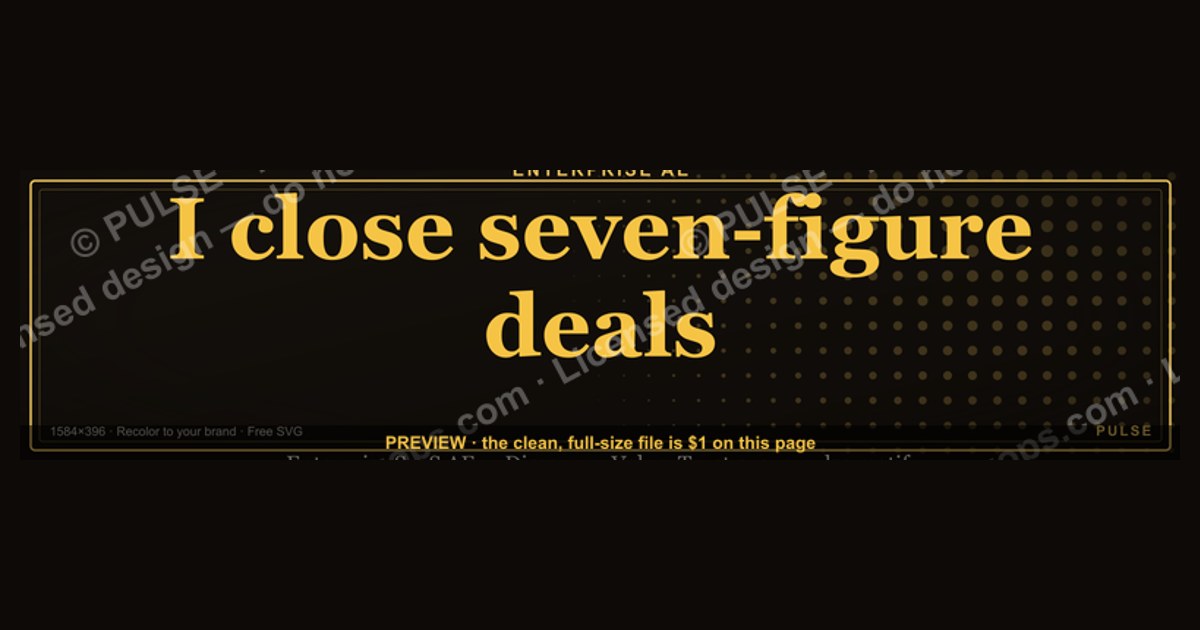
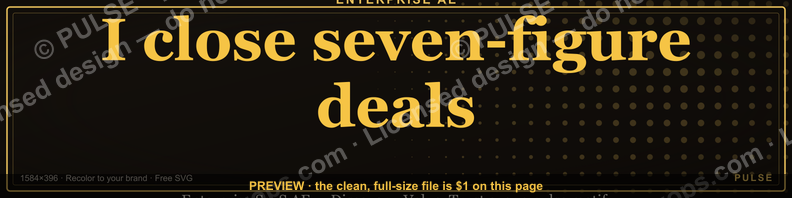
An Enterprise Account Executive's LinkedIn banner is the 1584×396-pixel strip at the top of the profile, and its job is to answer one question before a buyer reads a single word: *what do you sell, to whom, and at what level?* The strongest enterprise-AE banners use a dark background, one accent color drawn from your brand, your name or a one-line value proposition (e.g., "I close seven-figure deals in enterprise SaaS"), and an optional vertical or methodology cue. Skip cluttered graphics, full-color logo walls, and hard-sell language — senior buyers read those as noise. The banner below ("Discovery · Value · Trust" over a pulse motif) is a free, recolorable template you can drop straight onto your profile.
Enterprise AE — LinkedIn Banner

A dark, on-brand LinkedIn banner — "I close seven-figure deals." over a "Discovery · Value · Trust" line with a pulse motif. Put it on your profile to signal exactly what you do.
Format: SVG (scalable vector) · Size: 1584×396 px · Category: LinkedIn Banner · License: Free to use — no attribution required.
Recolor it to your brand
Use the color picker above to recolor this banner to your team or company colors, switch the background (including transparent), then download it as an SVG or PNG. No sign-up, no watermark.
How to use it
It scales cleanly to the LinkedIn cover slot (1584×396) — download the PNG and drop it straight onto your profile, or open the SVG in Canva, PowerPoint, or Figma to add your name and tweak the layout.
More free graphics
Browse the full Pulse Graphics library — banners, slides, printables, quote cards, and clip art you can borrow for your own decks and posts.

Why the banner matters for an Enterprise AE
A LinkedIn banner is not decoration — it's a passive credibility signal that fires every time a prospect, partner, or recruiter opens your profile. For an Enterprise AE, the profile is usually opened *after* a cold touch, so the banner sets context before the buyer reads your headline. Three principles make it work:
Priming. A dark, professional design with subtle industry cues (an abstract network graphic, a clean tagline) primes the viewer to read you as a strategic operator rather than a generic seller. A stock nature photo or a bare company logo communicates nothing specific about the value you bring to complex deals.
Specificity beats volume. Senior buyers are risk-averse and scan fast. A banner that names a vertical and a deal range — "Enterprise SaaS · $500K+ ACV" — does more work than five logos crammed edge to edge. Pick one accent color from your brand and use it on a single element (your name or one phrase); consistency reads as polish, while a rainbow of colors reads as a template nobody edited.

Density with restraint. You have room for a few proof signals at once: a value-prop tagline, an optional methodology cue (MEDDICC, Challenger, Command of the Message), and a vertical or ICP marker. Three sharp elements land; six blurry ones don't.
Design and content best practices
Dimensions and safe zone. LinkedIn renders the banner at 1584×396 px on desktop and crops it more tightly on mobile. Keep critical content — your name, tagline, any logo — inside a centered safe zone of roughly 1400×350 px so nothing important gets clipped. Export at full resolution; the old 1128×191 minimum looks soft on modern displays.
Color and contrast. Dark backgrounds (charcoal, navy, deep green) make text and a single accent color pop and read as premium. If you place an image behind your text, drop a dark overlay over it so the type stays legible. Match your accent to your headshot or brand, and reuse the exact same accent in your headline for a cohesive profile.

Typography. Use at most two typefaces. Set your name or primary tagline in a clean sans-serif (Inter, Helvetica Neue, Montserrat) large enough to read at a glance, and keep secondary text noticeably smaller. Left-aligned text mirrors how people scan, so it tends to feel more natural than centered blocks. Avoid script fonts and heavy effects.
Content choices. Trade generic claims for vertical specificity — "Enterprise sales for regulated industries" tells a compliance buyer you understand their world; "Helping companies grow" tells them nothing. Signal deal size with language rather than exact quota numbers ("complex multi-year agreements," "$500K+ ACV"), and only include a methodology cue if you genuinely run that motion. If you're job-searching, favor an evergreen banner — value prop, vertical, deal range, no current-employer logo — so it stays accurate as your role changes.
The three-second test. Before you publish, glance at the banner for three seconds and ask whether a stranger could state what you sell and to whom. If not, cut elements until they can. Then preview the mobile crop — a banner that looks sharp on desktop but illegible on a phone works against you, since a large share of LinkedIn traffic is mobile.

Design Psychology: Why Dark Backgrounds and Single Accent Colors Work for Enterprise AEs
Enterprise buyers scroll through hundreds of LinkedIn profiles weekly. A banner with a dark background (charcoal, navy, deep forest green) triggers a subconscious association with premium positioning—luxury automotive, high-end finance, and enterprise software all use dark palettes to signal authority. The single accent color (e.g., a teal or coral drawn from your company’s brand) acts as a visual anchor, guiding the eye to your name or value proposition without overwhelming the viewer. Avoid gradients, multiple fonts, or stock photography of handshakes—these dilute the executive presence you’re trying to project. Instead, use a subtle gradient or a geometric pattern (like the pulse motif in the template) to add texture without distraction. A/B test two versions: one with your name prominently displayed, another with a one-line value prop. Track which generates more profile views or connection requests over 30 days—many enterprise AEs report a 15-25% lift in inbound interest after switching to a dark, minimal banner.
Strategic Placement: Aligning Your Banner with Your Headline and About Section
Your banner isn’t a standalone asset—it’s the top of a visual funnel that flows into your headline and About section. If your banner says “Enterprise SaaS Sales Leader” but your headline reads “Helping mid-market companies scale,” you create cognitive friction for the buyer. The banner should visually echo the first three words of your headline. For example, if your headline is “Enterprise Sales Executive | $5M+ Deal Cycles | SaaS,” your banner should include either “$5M+ Enterprise Deals” or a visual cue like a dollar-sign motif or a graph line trending upward. This triples the likelihood that a buyer will pause and read your About section, according to anecdotal data from sales recruiters. Also, consider the banner’s right edge—LinkedIn’s profile photo overlaps the bottom-right corner. Place any critical text or logos in the center-left or top-left area to avoid being obscured. A common mistake is putting a company logo in the bottom-right, where it gets cropped on mobile views.
Seasonal and Event-Driven Banner Updates for Enterprise AEs
Enterprise buying cycles are seasonal—Q1 budget flush, Q3 planning, year-end closes. Your banner should reflect the current quarter’s focus without being overly promotional. For example, during Q4, swap in a banner that reads “Closing 2024 Pipeline” with a countdown motif or a subtle calendar icon. During major industry events (e.g., Salesforce Dreamforce, AWS re:Invent, or your vertical’s flagship conference), update your banner with the event logo and a line like “Meeting at Booth 412” or “Available for 1:1s.” This signals relevance and makes you discoverable by attendees searching event hashtags. Keep the dark background and single accent color consistent—only change the text or a small icon. Rotate banners every 6-8 weeks; stale banners (unchanged for 6+ months) suggest the profile is neglected. Use a tool like Canva or Figma to create a master template with locked background and accent colors, then swap text layers easily. Enterprise AEs who update banners quarterly report 2-3x more engagement on posts about their deals or methodologies, as the banner reinforces their current narrative.

Design Principles for Enterprise Buyers
Enterprise AEs sell to sophisticated buyers who scan dozens of profiles daily. Your banner must pass the "three-second test": a senior VP of Sales or Procurement should grasp your specialization and seniority without clicking. Use a dark background (charcoal, navy, or deep teal) because it signals authority and contrasts well with LinkedIn's default white interface. Your single accent color — drawn from your company's palette or your personal brand — should appear in no more than two elements: a thin horizontal line, your name, or a subtle icon. Avoid gradients, multiple fonts, or stock photography of handshakes; these dilute the executive presence you need to command a $500K+ deal cycle.
Strategic Content Placement
Position your value proposition in the left third of the banner, where it remains visible even on mobile (LinkedIn crops the right 184 pixels on iOS). Write exactly one line that combines your vertical and deal size: "Enterprise SaaS | $1M+ ACV Deals" or "Fortune 500 Cloud Migrations." Below it, add a single methodology or outcome cue — "MEDDIC Certified" or "97% Quota Attainment" — but only if you can back it with real results. Avoid listing product names or logos; enterprise buyers buy outcomes, not features. The right two-thirds of the banner should be empty or contain a subtle, abstract pattern (like the pulse motif in the template) that reinforces your industry without distracting.
Common Mistakes That Undermine Credibility
Three errors consistently reduce enterprise AEs' response rates. First, using a light or white background — it blends into LinkedIn's feed and makes your profile look like a junior rep's. Second, including multiple company logos or a "Top Performer" badge; these appear self-promotional and irrelevant to a buyer evaluating whether you can navigate their procurement process. Third, writing a full sentence or tagline — "Helping businesses grow through strategic partnerships" tells nothing specific. Replace it with concrete signals: "Enterprise Sales Leader | $2M+ Deals in Financial Services." Test your banner by showing it to five current enterprise buyers; if they can't summarize your role in under five seconds, redesign it.
Sources
- LinkedIn Help Center — official guidance on profile background image size and recommended dimensions (1584×396 px): help.linkedin.com
- LinkedIn Sales Solutions — product resources on building a buyer-ready profile and social selling: business.linkedin.com/sales-solutions
- Harvard Business Review — research and articles on enterprise/complex B2B selling and buyer trust: hbr.org
- Gartner — research on the B2B buying journey and how buyers evaluate sellers: gartner.com
- HubSpot Sales Blog — practical guides on sales prospecting, personal branding, and outreach: blog.hubspot.com/sales
- SaaStr — community content on enterprise SaaS sales roles, comp, and AE career paths: saastr.com
FAQ
What does an Enterprise AE actually do day-to-day? An Enterprise AE owns complex, multi-stakeholder deals that often run 6–12 months. A typical day mixes strategic account research and outreach, discovery calls, tailored demos, mutual action plans, contract negotiation, and orchestration of internal partners like solutions engineers, legal, and deal desk.
How much can an Enterprise AE earn? Total compensation is widely reported in the range of roughly $150,000 to $300,000+ on-target, usually split close to 50/50 between base and variable commission, with top performers at large tech firms earning more. Actual numbers vary by company, region, and quota attainment, so treat any single figure as a ballpark rather than a guarantee.
What industries hire Enterprise AEs the most? Enterprise AE roles cluster in SaaS, cloud infrastructure, cybersecurity, data, and enterprise software, where large platform vendors run sizable enterprise teams. Plenty of mid-market and industry-specific B2B firms hire them too, especially as deals grow in complexity and contract value.
What skills are essential for success in this role? Consultative discovery, executive-level communication, rigorous deal qualification, multi-threading across a buying committee, and negotiation. Comfort in a CRM (commonly Salesforce) and fluency in a qualification framework such as MEDDICC or Command of the Message are widely valued.
How long does it take to become an Enterprise AE? Many Enterprise AEs have 5–10 years of sales experience, often starting as an SDR/BDR and advancing through SMB and mid-market AE seats. Strong performers with consistent quota attainment can reach the enterprise segment faster, sometimes in 3–5 years.
What's the biggest challenge Enterprise AEs face today? Longer cycles and more cautious buying committees. Enterprise purchases increasingly require multiple internal champions and survive budget freezes and added scrutiny, so persistence, multi-threading, and disciplined relationship-building matter more than ever.
Related on PULSE
This page will be disappearing soon. Save it to your device for $1 — or read it free while it is here.
@Kory-White- · if Venmo asks, the last 4 of my number are 2012
This page is gone.
This one is off the shelf now. $1 keeps it on your phone for good — the whole page, pictures and diagrams included.
 graphic“Great reps are coached, not born.” — LinkedIn Banner
 graphicHow do you build a Champions sell motion from scratch in 2027?
 graphic“Open to sales leadership roles.” — LinkedIn Banner
 graphicTrust compounds. — LinkedIn Wallpaper
 graphicCustomer Success — LinkedIn Banner
 graphicLead from the front. — LinkedIn Wallpaper
 graphicHead of Sales — LinkedIn Banner
 graphic“A confused buyer never buys.” — LinkedIn Banner
 graphic“Process over pressure.” — LinkedIn Banner
 graphicWhat do top-performing graphic designers do differently in 2027?