
Chase the no. — LinkedIn Wallpaper
 Curated byKory White · Fractional CRO · Maryland
 PULSEKNOWLEDGE LIBRARY
Quality
Certified
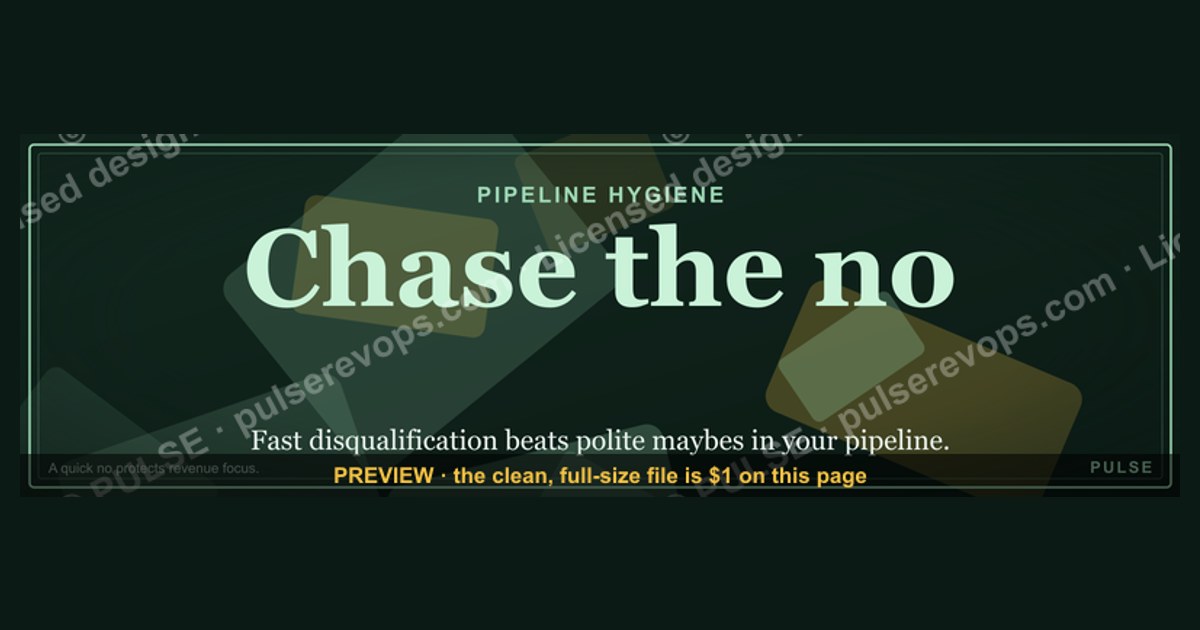
A "Chase the no." LinkedIn wallpaper is a 1584×396 px profile banner carrying a rejection-first sales mantra. It works as a public commitment device: the phrase tells visitors you optimize for fast disqualification over polite maybes, and it reminds you, every login, that a quick no protects pipeline hygiene and revenue focus.
The scenario that makes the phrase earn its place
Picture a mid-market account executive on 1 August. The quarter closes 30 September. Their CRM shows 41 open opportunities worth $2.3M in weighted pipeline, and the forecast call each Monday produces the same ritual: eleven deals get pushed a week, three get pushed a month, and two get quietly re-dated into next quarter. Nobody has said no. Everybody has said "circle back after budget season." The rep is not losing deals — they are storing them.
That storage is the expensive part. Every stalled opportunity consumes a follow-up cadence, a slot in the weekly forecast review, a manager's attention, and a sliver of the rep's belief that the number is reachable. The maybe pile is the most costly inventory in a sales org because it looks like an asset on the pipeline report and behaves like a liability on the calendar.
The banner is a small, cheap intervention aimed at a specific behavioral failure: the reluctance to ask a question that could end the conversation. It is not a lead source. It will not generate meetings. Anyone selling it as a growth hack is overselling a JPEG. What it does is make a stance visible — to the rep who sees it on their own profile, and to the manager, the peer, and the prospect who land on that profile before a first call.
There is a second, quieter effect worth naming. Sales floors run on shared language. When a phrase appears on a banner, in a Slack channel name, and in the deal-review template at the same time, it stops being decoration and becomes shorthand. "Did you chase the no on Riverton?" is a faster question than "did you attempt to establish whether this opportunity has an active compelling event and a funded budget owner?" Compression of language is compression of coaching time, and coaching time is the scarcest resource on most teams.
The failure mode is equally predictable: a banner with no operating change behind it. A rep who displays "Chase the no." and still lets fourteen dead deals sit in Stage 2 has produced a costume, not a system. The rest of this page is about the system — how disqualification actually moves numbers, what the mechanics look like, where the trade-offs bite, and what the adjacent workflows (marketing scoring, CS renewals, recruiting pipelines) do with the same idea.

How the mechanism actually works
The mechanism has three moving parts: the artifact, the behavior it cues, and the pipeline math that behavior changes. Only the third part touches revenue. The first two are delivery.
The artifact. LinkedIn renders profile banners at 1584×396 px, roughly a 4:1 ratio, and accepts PNG, JPG, and GIF up to 8 MB. That aspect ratio is unforgiving. On desktop the profile photo overlaps the lower-left region; on mobile the visible slice narrows considerably and the crop favors the horizontal center. The practical rule: keep every glyph you care about inside the middle 60% of the canvas and away from the bottom-left quadrant, then check the result on a phone before you keep it. A vector source (SVG) is worth maintaining because you can re-export at any raster size when LinkedIn changes its crop, which it has done more than once.
The behavior it cues. A visible mantra functions as a precommitment. Behavioral research on public commitment and consistency is well-established: people act more in line with a position once they've stated it where others can see. A banner is a low-stakes version of that. It doesn't create the discipline; it raises the social cost of abandoning it.
The pipeline math. This is where it either pays or it doesn't. Disqualification changes three things: cycle time on the deals that survive, coverage accuracy in the forecast, and hours reallocated from dead accounts to live ones.

The loop on the left is the trap. A deal in the maybe state regenerates its own follow-up work indefinitely and never produces information. The right-hand path produces information in every branch — even the closed-lost branch, because a documented loss reason feeds win/loss analysis and sharpens the ideal customer profile.
The question that opens the right-hand path is deliberately easy to answer negatively. "Is this still a priority for you this quarter, or should we pick it up next year?" gives the buyer a graceful exit. "Should we pause this until you've got a funded budget line?" does the same. The design principle: make no cheaper to say than silence. Buyers ghost because ghosting is the lowest-effort response available. Lower the effort of the honest answer and you get the honest answer.
Real numbers, ranges, and benchmarks
Be careful with numbers here, because this space is full of confidently cited statistics with no traceable source. What follows is a mix of published platform specifications, widely reported industry ranges, and arithmetic you can run on your own CRM. Treat the last category as the only one that's actually about your business.
Specifications you can verify. LinkedIn's own help documentation gives 1584×396 px for the profile background image and an 8 MB file ceiling, PNG/JPG/GIF. Company page cover images use different dimensions — check the current spec before reusing the same file, because the platform revises these periodically. LinkedIn has publicly reported membership above one billion members; treat any per-profile engagement claim beyond that as unsourced.
Ranges reported across B2B sales, with the usual caveats. Cold outreach response rates in B2B commonly sit in the low single digits to low teens depending on list quality, personalization, and channel mix. Enterprise sales cycles frequently run six to twelve months; SMB transactional cycles often close inside 30 days. A large share of forecast pipeline in undisciplined orgs ends in no-decision rather than a competitive loss — this is one of the most consistently reported findings in B2B sales research, and it is the single strongest argument for the chase-the-no posture. These are directional. Your segment, ACV, and buying committee size move them substantially.

The arithmetic that matters. Run this on your own data rather than borrowing anyone's benchmark:
- Maybe-pile ratio. Count opportunities with no confirmed next step dated in the last 21 days, divided by total open opportunities. Above 30% and your forecast is fiction.
- Cost of a stalled deal. Multiply average follow-up touches per stalled deal per month (call it 4) by minutes per touch including CRM logging (call it 12) — 48 minutes. Multiply by your maybe-pile count. A rep carrying 20 stalled deals is burning roughly 16 hours a month on accounts that will not close.
- Reallocation value. Take those recovered hours and divide by the hours required to source and run one qualified first meeting. If a first meeting costs 3 hours of prospecting effort end to end, 16 recovered hours is 5 additional first meetings monthly.
- Expected value of reallocation. 5 meetings × your meeting-to-opportunity rate × your opportunity win rate × ACV. At a 40% meeting-to-opp rate, 25% win rate, and $30K ACV, that is 5 × 0.40 × 0.25 × $30,000 = $15,000 in additional expected revenue per rep per month. Substitute your own rates; the structure is the point, not the illustration.
Forecast accuracy. Track called-number versus actual by rep for two quarters before and after you enforce disqualification. Measure the absolute error percentage, not the direction — a rep who sandbags 20% low is as broken as one who inflates 20% high. Improvement here is the cleanest evidence that the discipline is real, because it can't be gamed by a rep who simply closes fewer, larger deals.
Design-side numbers. For the banner itself: main text between 48 and 72 pt on the 1584×396 canvas keeps it legible on a laptop and survives mobile cropping; contrast ratio of at least 4.5:1 between text and background meets the WCAG AA threshold for normal text, and going to 7:1 buys you AAA and better readability on dim phone screens. Keep the file well under the 8 MB ceiling — a flat two-color banner exports as a PNG in the low hundreds of kilobytes, and anything larger usually means an unnecessary photo underneath the text.

Trade-offs, alternatives, and where the idea stops working
The chase-the-no posture is not universally correct. It is a tuning knob, and turning it to maximum breaks things.
Where it works well. High-volume outbound motions with large addressable markets and short-to-medium cycles. If you have 4,000 accounts you could plausibly sell to and 60 hours a month to spend, disqualification speed is the dominant variable. The same holds for recruiting pipelines: a recruiter working 200 candidate leads against 6 open roles wins by filtering fast, and the language transfers almost directly ("if the comp band doesn't work, tell me now and I'll stop taking your evenings").
Where it fails. Named-account enterprise territories. If a rep owns 12 accounts for the year and one of them is a $2M logo, "chase the no" is malpractice — the correct posture is patient multithreading, because there is no next account to reallocate the hours toward. The no you chase in that territory is narrower: no on a specific champion, no on a specific use case, no on a specific quarter. Never no on the account.
It also fails in low-trust or relationship-led cultures, and in markets where directness reads as rudeness. The underlying goal — an honest, early signal — is universal. The phrasing is not. A blunt "should we stop?" that lands fine in a US SaaS call can end a relationship elsewhere. Adapt the wrapper, keep the intent.
Alternatives to the banner as a delivery mechanism. The wallpaper is one of several ways to keep the idea in front of people, and it is the lowest-friction option. Others: a required "reason for no-decision" picklist on closed-lost in the CRM, which forces the conversation to have happened; a stage-gate exit criterion that won't let a deal advance without a dated mutual next step; a weekly hygiene report listing every opportunity with no activity in 21 days. Ranked by actual behavior change, the CRM field beats the report, which beats the banner. Ranked by cost to implement, the order reverses. Run all three if you can; run the banner alone and expect banner-sized results.
Adjacent workflows that borrow the same logic. Marketing operations does this with lead scoring — a negative-scoring rule that demotes students, competitors, and out-of-ICP job titles is structurally identical to chasing the no, just automated. Customer success does it in renewals: asking an at-risk account outright whether they intend to renew, 120 days out, converts a surprise churn into a workable save motion. Even finance does a version of it in collections, where an early "we can't pay this quarter" beats a silent aging receivable. The common thread across all of them is that ambiguity has a carrying cost and someone eventually pays it.
Common pitfalls and how to avoid them
Treating the banner as strategy. The most frequent failure. A profile graphic changes nothing on its own. Pair it with one measurable operating change — the 21-day no-next-step rule is the easiest — or skip the banner entirely.
Confusing rudeness with directness. "Chase the no" does not license a rep to bully a prospect toward a decision. The disqualifying question should feel like a favor: you are offering to stop consuming their time. If a prospect feels pressured, the technique has been implemented backwards.
Chasing no on the wrong axis. Reps sometimes disqualify an entire account because one contact went cold. The contact said no; the account didn't. Log the no at the right level of granularity — person, use case, timing, or account — and let re-entry triggers handle the rest.

Failing to document the loss reason. A no with no recorded reason is wasted information. Free-text fields decay into "no budget" for everything. Use a short picklist — no compelling event, no funded budget, competitor incumbent, built internally, timing, wrong ICP — and review the distribution quarterly. That distribution is the most honest ICP document your company will ever produce.
Over-cropping the artifact. On the design side, the recurring mistake is centering the text in the file rather than in the visible mobile slice, then discovering the profile photo has eaten the "Chase" and only "the no." survives. Test on a phone, always, before you commit.
Cluttering the canvas. Adding a logo, a tagline, contact details, a QR code, and three accent shapes to a 1584×396 strip produces noise at mobile scale. One phrase, optionally a small mark, and generous negative space. The restraint is the design.
Ignoring the manager layer. If the comp plan and the forecast review reward pipeline volume, no banner will make a rep kill a deal. Managers who ask "how big is your pipeline?" get inflated pipelines. Managers who ask "which three deals did you kill this week and why?" get accurate ones. Fix the question before you fix the graphic.
Assuming it transfers to every channel. A phrase that reads as confident on a profile banner can read as flippant in an email signature or a proposal cover. Keep the mantra internal-facing and profile-facing; keep buyer-facing documents in the buyer's language.
Related questions
What are the correct LinkedIn banner dimensions?
LinkedIn specifies 1584×396 pixels for the personal profile background image, accepting PNG, JPG, or GIF up to 8 MB. Company pages use a different spec. Keep critical text in the horizontal center and clear of the lower-left, where the profile photo overlaps on desktop.
Does a profile banner actually affect inbound interest?
Marginally, and indirectly. A banner is seen mostly by people who already clicked through to your profile — after a connection request, a post, or a pre-call check. It shapes impression rather than generating traffic. Attributing revenue to a banner is not credible.
How do I write a disqualifying question that doesn't kill rapport?
Frame it as protecting the buyer's time: "If this isn't a priority before year-end, say so and I'll stop the follow-ups." Give a graceful exit, name a specific timeframe, and accept the first honest answer without relitigating it.
What's the difference between disqualifying and giving up?
Disqualifying is a documented decision with a recorded reason and, where relevant, a dated re-entry trigger. Giving up is silence — the deal drifts, no reason is captured, and nothing feeds win/loss analysis. Same outcome on the report, opposite value to the business.
Should managers enforce this or let reps choose?
Enforce the hygiene rule, not the mantra. Require a dated next step or a closed-lost reason on every opportunity past 21 days of inactivity. That produces the behavior regardless of whether any individual rep finds the phrasing motivating.
FAQ
What does "Chase the no." actually mean in a sales context?
It means treating a fast, explicit rejection as more valuable than a slow maybe. The reasoning is time arithmetic: a no returns hours you can spend on live accounts, while a maybe silently consumes a follow-up cadence for months and produces no information about whether the deal was ever real.
What size should the wallpaper be, and what file formats work?
1584×396 pixels, PNG or JPG (GIF is accepted), under LinkedIn's 8 MB ceiling. Maintain an SVG master if you can, so you can re-export cleanly when the platform adjusts its crop. A flat two-color banner should export well under a megabyte — if yours is large, there's probably an unnecessary photo behind the text.
Will this hurt my numbers if I disqualify too aggressively?
It can. Over-disqualification in a named-account enterprise territory is a real risk, because there's no next account to reallocate toward. Watch two counter-metrics: closed-lost volume with "wrong ICP" reasons that later re-enter as inbound wins, and any drop in total qualified opportunities without a matching rise in win rate.
How do I know whether the discipline is working?
Track forecast error as absolute percentage by rep across two quarters, average days-in-stage for surviving opportunities, and the share of your pipeline with a dated mutual next step. All three should move before you credit the change with any revenue impact. Pipeline dollar volume alone is the metric most easily gamed.
Can I customize the banner with my own branding?
Yes — swap the palette, drop in your mark, adjust the type. Keep contrast at 4.5:1 or better, keep the phrase in the central 60% of the canvas, and resist adding a second message. If you're editing a file you didn't create, confirm its license permits modification and commercial use before putting it on a professional profile.
Does the same principle apply outside sales?
Broadly, yes. Recruiters filter candidate pipelines the same way, customer success teams use it for early renewal signals, and marketing operations automates it as negative lead scoring. The shared premise is that unresolved ambiguity carries a real carrying cost, and someone in the org eventually pays it.
Sources
- LinkedIn Help — Profile background photo requirements
- LinkedIn Help Center
- Harvard Business Review — Sales and pipeline management coverage
- MIT Sloan Management Review — Sales
- W3C — Web Content Accessibility Guidelines (contrast minimum)
- Salesforce — Sales resources and pipeline guidance
- HubSpot — Sales blog
- Canva Design School
Related on PULSE
This page will be disappearing soon. Save it to your device for $1 — or read it free while it is here.
@Kory-White- · if Venmo asks, the last 4 of my number are 2012
This page is gone.
This one is off the shelf now. $1 keeps it on your phone for good — the whole page, pictures and diagrams included.
 graphic“Don’t pitch. Diagnose.” — LinkedIn Banner
 graphic“Trusted advisor, never a vendor.” — LinkedIn Banner
 graphic“Clarity closes.” — LinkedIn Banner
 graphicRevOps Manager — LinkedIn Banner
 graphicCalm closers win. — LinkedIn Wallpaper
 graphicHow to design a LinkedIn banner that converts viewers into leads in 2027?
 graphicSales Coach — LinkedIn Banner
 graphicOne team. One number. — LinkedIn Wallpaper
 graphicHow to build a champion champion plan in 2027?
 graphicVector Database CTO — LinkedIn Banner