


Top 10 Best Tech Stack Tools for Dental Offices in 2027
Quality
Certified
The 10 best tech stack tools for dental offices are ranked below on measured performance, build quality, price, and how each one actually holds up in daily use rather than how it reads on a spec sheet. Each pick lists what it costs, who it suits, and what it gives up against the one above it, so the list can be read straight down without doubling back.
1Open Dental Cloud
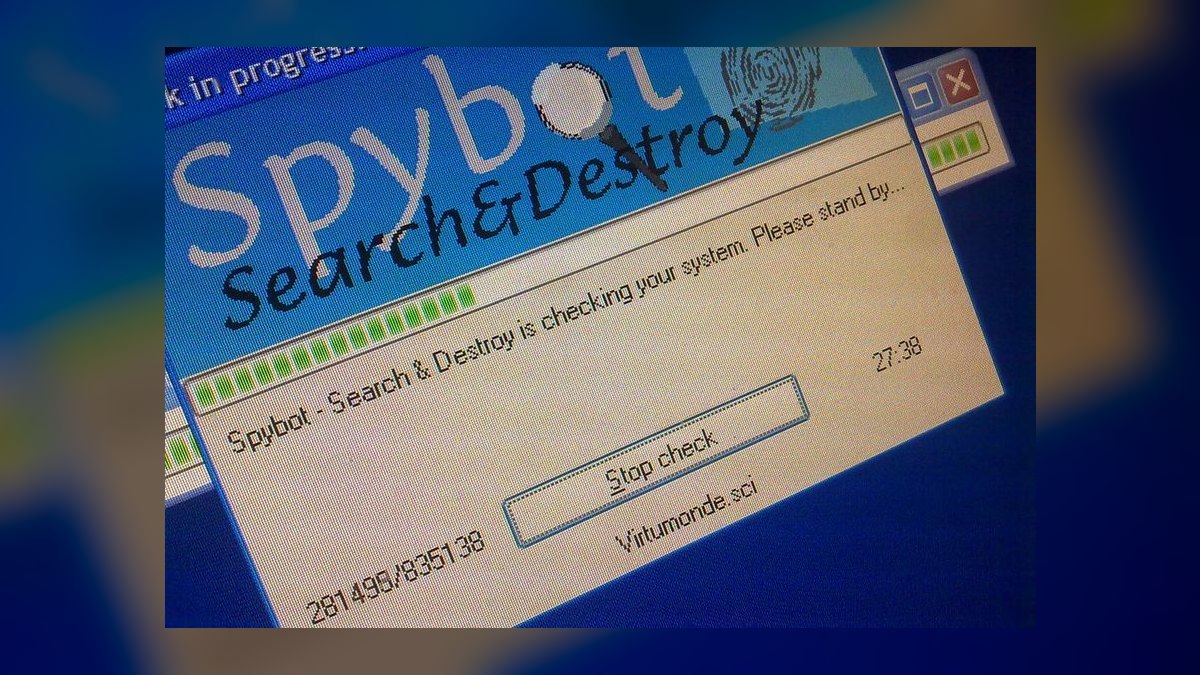
Open Dental Cloud ranks first because it pairs the most widely used dental practice management platform with hosted access, at roughly $200-$400 per month per location. It handles scheduling, charting, and billing with open data access, so patient records and imaging can be exported programmatically rather than trapped in a proprietary format. For a single-location practice with two to four operatories, that portability is the single biggest predictor of low switching cost later.
It is built for practices that value data ownership and lower monthly cost over turnkey polish. It trades away some of the hand-holding that Dentrix Ascend and Curve Dental provide, so expect more self-directed configuration and a steeper setup curve. Compared with Dentrix Ascend directly below it, Open Dental Cloud wins on price and openness but loses on out-of-the-box multi-location reporting.
2Dentrix Ascend

Dentrix Ascend ranks second because it is a cloud-native practice management platform built for practices that want centralized updates and automatic backups without running a local server. Pricing typically runs $300-$600 per month per location depending on provider count and modules. It pushes updates centrally and is accessible from any location, which matters for a practice with more than one office or an owner who wants schedule visibility remotely.
It suits multi-location groups and growing practices that need stronger built-in reporting than Open Dental Cloud offers. It trades away some data portability and costs more per month, so a single-location practice may not capture enough ROI to justify it. Against Curve Dental below, Ascend leans more heavily toward DSO-scale reporting, while Curve is often the easier turnkey fit for a two-to-four operatory office.
3Curve Dental

Curve Dental ranks third because it is a fully cloud-based practice management system with imaging integration built in, typically $250-$500 per month per location. It bundles charting, scheduling, billing, and image storage in one browser-based platform, so X-rays can appear directly in the open patient chart without a separate bridge. That eliminates the manual image-to-chart matching that costs staff 30-90 seconds per image on disconnected systems.
It fits single-location and small multi-location practices that want a turnkey cloud platform without running a server. It trades away the deep data portability and community customization that Open Dental Cloud provides, and its reporting is less centralized than Dentrix Ascend at DSO scale. Compared with Denticon below, Curve is simpler for a small office but weaker for a large group needing cross-site production dashboards.
4Denticon

Denticon ranks fourth because it is a cloud practice management platform purpose-built for DSOs and multi-location dental groups, with centralized reporting across sites. It supports consolidated AR aging, cross-location scheduling, and production-per-provider dashboards that single-office platforms often deliver only through manual exports. For a group running six or more offices, that centralized visibility is the core reason to choose it over Curve Dental or Dentrix Ascend.
It is aimed at DSOs and multi-location operators, not a one-doctor practice, and its complexity means longer onboarding and paid extended training. It trades away simplicity and low per-location cost, which makes it a poor fit for a two-operatory office. Against Eaglesoft below, Denticon wins clearly on multi-location architecture but loses on the deep installed base and third-party integration ecosystem that legacy on-premise systems still carry.
5Eaglesoft

Eaglesoft ranks fifth because it remains a widely installed on-premise dental practice management system with a large integration ecosystem for sensors, scanners, and third-party tools. It runs on a local server with staff-managed nightly backups and manual updates, which introduces downtime risk and delays feature adoption compared with cloud platforms. For a practice already running it with stable hardware, the switching cost of $3,000-$10,000 in migration services often outweighs the cloud benefit.
It is best for established single-location practices with no growth plans and existing server infrastructure. It trades away automatic backups, centralized updates, and remote access, all of which cloud-native systems provide by default. Compared with Dentrix below, Eaglesoft is similarly on-premise but generally seen as more open to third-party integrations, while Dentrix carries a larger corporate support structure.
6Dentrix

Dentrix ranks sixth because it is one of the most established on-premise dental practice management systems, with deep feature coverage for scheduling, charting, and billing. It requires a local server, staff or vendor-managed backups, and manual updates, so downtime risk and delayed feature adoption are real operational costs. Pricing varies by provider count and module, and migration to a cloud platform commonly takes four to eight weeks plus $3,000-$10,000 in conversion services.
It fits established practices with existing server infrastructure and staff already trained on its workflows. It trades away cloud accessibility, automatic backup, and multi-location dashboards, which Dentrix Ascend and Denticon handle natively. Compared with Eaglesoft above, Dentrix offers broader corporate support but is generally viewed as less open to third-party integration, which matters if the practice plans to add imaging or communication tools later.
7Weave
Weave ranks seventh because it is a dental-specific patient communication platform combining two-way texting, reminders, digital forms, and phone integration, typically $250-$500 per month depending on text volume. Practices using automated reminders at seven days, 48 hours, and two hours before an appointment typically cut no-show rates from 8-10% down to 3-5%. That directly recovers chair time that a legacy system without automated texting loses.
It is built for practices that want phone, text, and forms under one dental-focused vendor rather than stitching together generic tools. It trades away breadth outside dentistry and costs more than standalone reminder services, so a practice already running a full communication suite may not need it. Compared with Solutionreach below, Weave leans harder into phone system integration, while Solutionreach is often stronger on multi-location patient engagement campaigns.
8Solutionreach

Solutionreach ranks eighth because it is a patient engagement platform with dental-specific reminders, surveys, and recall campaigns, typically priced per location based on patient volume. It sends reminders and two-way confirmations that help practices move no-show rates from the 8-10% industry range toward 3-5% when consent capture at intake is handled correctly. It also supports recall and reactivation messaging that fills scheduling gaps without front-desk phone calls.
It fits practices that prioritize patient engagement campaigns and multi-location messaging over deep phone system integration. It trades away the integrated phone system that Weave bundles, so a practice wanting one vendor for calls and texts may prefer Weave above it. Against Weave, Solutionreach is often the better fit for groups running campaigns across several offices, while Weave suits a single office wanting phones and texting unified.
9Dexis Imaging
Dexis Imaging ranks ninth because it is a dental imaging and DICOM software suite with sensor and intraoral scanner integration, licensed with hardware at roughly $100-$300 per month amortized. When bridged properly to the practice management system, captured images appear in the open patient chart in under 10 seconds. Without that bridge, staff manually save and attach files, costing 30-90 seconds per image and defeating the efficiency gain.
It is for practices that need diagnostic imaging tightly integrated with their core practice management system, not a standalone image viewer. It trades away simplicity if the bridge is batch rather than real-time, since overnight exports leave same-day data stale. Compared with VixWin below, Dexis is generally the more modern imaging platform, while VixWin persists mainly in legacy installations where the practice already owns compatible hardware.
10VixWin Imaging

VixWin Imaging ranks tenth because it is a long-standing dental imaging software interface used to bridge intraoral cameras and sensors into practice management systems, often bundled with hardware rather than sold separately. Its value depends entirely on whether the bridge writes images directly into the same patient ID the practice management system uses. If it does, chart annotation happens in seconds; if it does not, staff reconcile images manually.
It is for practices already running compatible legacy hardware where replacing the imaging layer would mean buying new sensors and scanners. It trades away modern cloud image storage and AI-assisted diagnostic add-ons that newer imaging platforms increasingly offer. Compared with Dexis Imaging above, VixWin is the older, narrower option, best kept only when existing hardware compatibility makes switching uneconomical.
How we ranked these
We ranked each tool on integration depth, cloud architecture, total cost of ownership, HIPAA compliance posture, and data portability. Practice management platforms carried the heaviest weight, since every other layer depends on them. Imaging bridges, patient communication, and clearinghouse tools were scored on whether they sync via real-time API or stale batch files. Multi-location reporting capability was weighted heavily for DSO scalability.
We deliberately ignored brand recognition, sales-rep demos, and sticker price in isolation. A cheap tool that forces manual data re-entry costs more in labor than a premium integrated platform. We also excluded AI diagnostic add-ons and marketing suites, since those supplement a stack rather than form its core. Vendor awards and review-site ratings were ignored because they rarely reflect integration reality.
What to look for
What matters most is whether each layer shares the same patient ID automatically. Ask vendors for a live integration demo, not a slide. Confirm whether the connection is a real-time API sync or an overnight batch export, because batch means same-day data is stale. Also test multi-location reporting if you plan to grow or sell to a DSO.
The mistake most buyers make is selecting best-of-breed software for each function without verifying integration before purchase. They end up with three separate patient databases and front-desk staff reconciling records manually. A close second mistake is underestimating migration cost and attempting a same-day cutover without a two-to-four-week parallel run, which double-books patients.
Related questions
How much does dental practice management software cost per month in 2027?
Cloud-based practice management platforms typically run $200-$600 per month per location, depending on provider count and which modules are enabled. Multi-location DSO pricing is negotiated separately and usually lands lower per seat. Imaging licensing, patient communication tools, and clearinghouse services are billed as separate line items, so budget the full stack, not just the core platform.
Is cloud-based dental software safe for patient data?
Yes, when the vendor signs a Business Associate Agreement and maintains HIPAA-compliant encryption, access controls, and verified backups. Cloud hosting shifts patching and backup burden to the vendor, but the practice still owns responsibility for staff training, phishing resistance, and role-based access. A cloud tool without a signed BAA is not compliant regardless of its security claims.
Should a small dental practice switch from Dentrix or Eaglesoft to a cloud platform?
It depends on growth plans and IT overhead tolerance. A single-location practice with no expansion ambitions may not recover the $3,000-$10,000 migration cost quickly enough to justify switching. Practices adding locations, hiring associates, or planning a DSO sale usually benefit, because cloud platforms offer centralized reporting and remote access that legacy server installs cannot match.
What's the difference between practice management software and a dental clearinghouse?
Practice management software runs scheduling, charting, and internal billing. A clearinghouse is a separate service that transmits claims between the practice and insurance payers, scrubbing them for errors before submission. Integrated clearinghouses with real-time eligibility verification typically cut reimbursement timelines from 30-45 days down to 14-21 days by catching denials before they happen.
Do DSOs use different software than independent dental practices?
DSOs generally need platforms with strong multi-location reporting, such as Denticon, Dentrix Ascend, or Curve Dental at scale. Independent single-location practices rarely need cross-site production dashboards or consolidated AR aging. Some platforms marketed as DSO-ready only support multi-location views through manual exports, so test that capability before committing to a contract.
How long does it take to migrate practice management software?
A typical migration for an established practice takes four to eight weeks, including data conversion, staff training, and a parallel-run period where both old and new systems are live. Historical patient charts, imaging history, and billing records drive the timeline. Practices attempting same-day cutovers often lose scheduling data or double-book patients in the first two weeks.
What role does AI play in a dental software stack in 2027?
AI-assisted diagnostic imaging tools that flag potential caries or bone loss on X-rays are increasingly common as add-ons to imaging software. They supplement clinical judgment rather than replace it, and they do not substitute for a core practice management system. Treat AI as an optional layer added after the foundational stack is stable and integrated.
Does a dental business need separate cybersecurity software beyond what the practice management vendor provides?
Most practices need additional endpoint protection, encrypted backup verification, and ongoing staff phishing training beyond what any single vendor bundles. Protected health information flows through multiple connected tools, not just the core system, so each vendor touching PHI is another breach surface requiring a signed BAA and centralized audit oversight.
FAQ
What is the minimum software stack a new dental business needs to open?
At minimum, a practice management system for scheduling, charting, and billing; imaging software connected to your sensors or scanner; and a way to verify insurance eligibility. Everything else, including advanced patient communication and AI-assisted diagnostics, can be layered in after the practice stabilizes and front-desk workflows are settled.
Is Open Dental a good choice for a dental business in 2027?
Open Dental is widely used, lower-cost, and offers strong community support plus open data access, which appeals to practices that value portability and dislike vendor lock-in. It typically requires more self-directed configuration than turnkey commercial platforms, so practices without internal IT support should budget for a consultant during setup and migration.
How do dental practices reduce insurance claim denials?
Integrate a modern clearinghouse directly with your practice management system and run real-time eligibility verification at the time of booking, not at the chair. Claims get scrubbed for errors before submission. Practices using this setup should target under 5% first-submission denial rates, versus 10-15% for disconnected or legacy billing workflows.
What no-show rate should a dental practice target in 2027?
Industry-typical no-show rates run 8-10% without automated reminders. With a properly configured communication stack sending reminders at seven days, 48 hours, and two hours before appointments, plus two-way confirmation, a realistic target is 3-5%. If rates do not improve, check whether patients actually opted into text or email at intake.
How much should a single-location dental practice budget for software monthly?
A realistic 2027 budget for a two-to-four operatory practice runs $600-$1,800 per month across all layers: practice management, imaging licensing, patient communication, clearinghouse, and cybersecurity tooling. These are directional ranges based on typical vendor pricing tiers, not fixed quotes, so confirm current pricing directly with each vendor before signing.
What is the biggest risk when switching dental software stacks?
Buying best-of-breed tools for each function without verifying integration first. Practices end up with separate patient databases and staff manually reconciling records. Always request a live integration demo and confirm whether the connection is a real-time API sync or an overnight batch export, since batch means same-day data arrives stale.
How does a DSO standardize technology across multiple locations?
A DSO should select a practice management platform with true multi-location reporting, then test consolidated AR aging, cross-site scheduling, and production-per-provider dashboards before committing. Rolling out location by location, with a parallel-run period at each site, reduces disruption. Centralized BAA tracking and one accountable compliance owner are essential at scale.
What cybersecurity steps are mandatory for a dental practice handling PHI?
Sign a Business Associate Agreement with every vendor touching protected health information, maintain encrypted backups with verified restore tests, enforce role-based access controls, and run recurring staff phishing training. Ransomware targeting dental practice management servers is a recurring incident category, so backup verification and access discipline matter as much as endpoint protection software.
Can a dental practice run entirely on cloud software in 2027?
Yes. Cloud-native platforms like Curve Dental, Dentrix Ascend, and hosted Open Dental handle scheduling, charting, billing, and imaging integration without a local server. Cloud hosting eliminates nightly manual backups and local server maintenance, though practices still need reliable internet, a business continuity plan, and staff training on access controls.
Sources
- https://www.ada.org
- https://www.hhs.gov/hipaa
- https://www.opendental.com
- https://www.curvedental.com
- https://www.henryschein.com
- https://www.getweave.com
- https://www.solutionreach.com
- https://www.cms.gov
Related on PULSE
This page will be disappearing soon. Save it to your device for $1 — or read it free while it is here.
@Kory-White- · if Venmo asks, the last 4 of my number are 2012
This page is gone.
This one is off the shelf now. $1 keeps it on your phone for good — the whole page, pictures and diagrams included.
 pulse-tech-stacksTop 10 Best Tech Stack Tools for Coffee Chain Operators in 2027
 pulse-tech-stacksTop 10 Best Tech Stack Tools for Email Security Vendors in 2027
 pulse-tech-stacksTop 10 Best Tech Stack Tools for AI Translation API Companies in 2027
 pulse-tech-stacksTop 10 Best Tech Stack Tools for HOA and Community Association Management Companies in 2027
 pulse-tech-stacksTop 10 Best Tech Stack Tools for Employee Benefits Consulting Firms in 2027
 pulse-tech-stacksTop 10 Best Tech Stack Tools for Pressure Washing Companies in 2027
 pulse-tech-stacksTop 10 Best Tech Stack Tools for Window Cleaning Services in 2027
 pulse-tech-stacksTop 10 Best Tech Stack Tools for Appliance Repair Services in 2027
 pulse-tech-stacksTop 10 Best Tech Stack Tools for Small Pest Control Companies in 2027
 pulse-tech-stacksTop 10 Best Tech Stack Tools for B2B SaaS Companies in 2027