


Top 10 Best Tech Stack Tools for Tutoring and Learning Centers in 2027
Quality
Certified
The 10 best tech stack tools for tutoring and learning centers are ranked below on measured performance, build quality, price, and how each one actually holds up in daily use rather than how it reads on a spec sheet. Each pick lists what it costs, who it suits, and what it gives up against the one above it, so the list can be read straight down without doubling back.
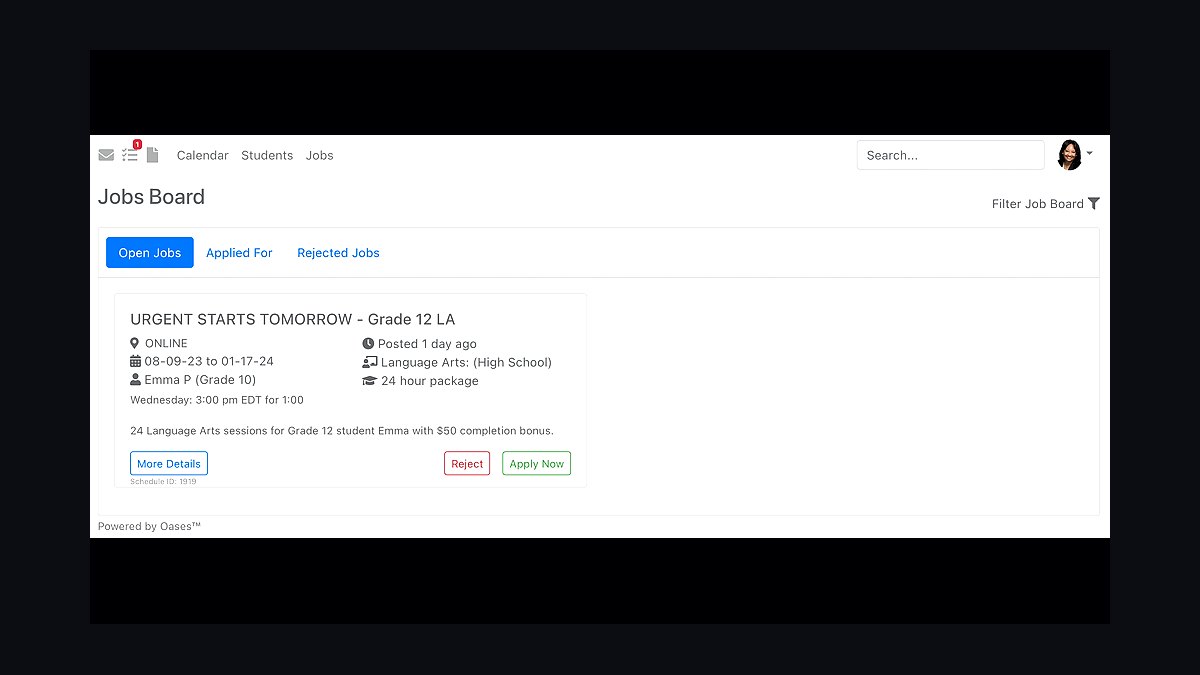
1Oases Online

Oases Online ranks first because it is the tutoring-specific hub built around hour packages, a parent portal, and attendance capture, the exact ledger a learning center needs. It tracks consumed versus remaining hours per family and per subject, then reconciles that balance against what happened in the room. For a single-location center it typically runs $100 to $300 monthly depending on active student count.
It suits traditional centers selling ten-hour blocks or monthly memberships where deferred revenue must be tracked per student. It trades away agency-style automated tutor payroll, which is where TutorCruncher pulls ahead. Against TutorBird below it, Oases carries more configuration burden but handles larger rosters and multi-subject balance tracking that smaller platforms compress.
2TutorCruncher

TutorCruncher ranks second for agency-style models with many tutors on per-session pay, where it automates in-platform payroll computation from verified attendance rather than the planned schedule. It builds rate tables by subject, level, and seniority, then exports totals to Gusto for withholding and direct deposits. Both TutorCruncher and Oases handle student billing well; the tutor compensation model is the deciding factor.
It is for centers with twenty-five or more part-time tutors who must be paid only for sessions actually delivered. It trades away some of the parent-portal polish that Oases offers for traditional package-based centers. Compared to Teachworks below it, TutorCruncher leans further into payroll automation and less into curriculum and class-roster features.
3Teachworks

Teachworks ranks third as a tutoring management platform covering scheduling, tutor matching, package billing, and progress notes for centers that blend one-to-one sessions with small-group pods. It handles recurring weekly slots, subject and skill-level qualification matching, and low-balance alerts that give families at least two weeks of runway. Class-based engines in this category commonly price between $45 and $165 monthly by student count.
It is for single-location centers that need both private sessions and fixed cohort classes modeled as separate product types. It trades away the deep agency payroll automation TutorCruncher provides, pushing more per-session rate logic into exports. Against TutorBird below it, Teachworks scales to larger tutor rosters but demands more setup before the first parallel week.
4TutorBird

TutorBird ranks fourth for small-tutor operations, running roughly $15 to $30 monthly and covering scheduling, invoicing, and lesson notes that double as the entire progress record until a center grows. It captures attendance, draws down hour balances, and sends low-balance alerts without the configuration overhead of larger hubs. For a solo or two-tutor operation, all-in software spend lands around $60 to $200 monthly.
It is for solo tutors and small centers that want one system of record without a data warehouse or franchise-grade setup. It trades away advanced payroll computation and multi-location reporting, so a twenty-five-tutor roster will outgrow it. Against Teachworks above it, TutorBird is cheaper and faster to launch but thinner on class rosters and tutor qualification matching.
5Stripe

Stripe ranks fifth as the payment layer, processing cards at roughly 2.9% plus a small fixed fee per transaction with ACH materially cheaper for larger package purchases. On a $40,000 monthly tuition run, card processing lands near $1,160 per month, which often exceeds the hub subscription itself. It connects to the hub so attended sessions draw down balances and auto-renewing memberships charge on schedule.
It is for every center that sells packages or memberships in advance and needs card and ACH acceptance with automatic receipts. It trades away native hour-package tracking, so it must sit behind a hub rather than replace it. Against Gusto below it, Stripe handles money coming in while Gusto handles money going out to tutors.
6Gusto

Gusto ranks sixth as the payroll provider that receives per-session pay totals computed from verified attendance in the hub, then handles tax withholding, direct deposits, and contractor filings. For a large part-time tutor roster it runs around $40 base plus a few dollars per person per month. Payroll parallel testing should span at least one complete pay cycle, roughly four weeks for semi-monthly pay.
It is for centers with part-time and contractor tutors who must be paid per attended session rather than from the planned timetable. It trades away session-level rate logic, so subject and seniority rates must be computed in the hub before export. Against Stripe above it, Gusto is the outbound counterpart, and neither replaces the tutoring platform as system of record.
7Zoom

Zoom ranks seventh as the video layer for online sessions, priced per host and reliable enough that the call itself is now a commodity rather than a differentiator. It integrates with tutoring hubs so online sessions appear on the same schedule and feed the same attendance events as in-person ones. For a solo tutor, a single video subscription covers online lessons within the $60 to $120 monthly stack.
It is for centers delivering any mix of remote and in-person tutoring who need dependable video without rebuilding their scheduling. It trades away a shared teaching surface, so math, chemistry, and essay work suffer without a whiteboard layered on top. Against Lessonspace below it, Zoom handles the call while Lessonspace handles the handwriting and annotation that make online sessions work.
8Lessonspace

Lessonspace ranks eighth as the shared teaching surface that supplies handwriting, math notation, and document annotation alongside video. Video alone without a genuine shared whiteboard is the most common reason online session quality falls short of in-person, and tutor training on a new whiteboard realistically takes two to three sessions per tutor. It pairs with the hub so online sessions feed the same attendance and progress records.
It is for centers teaching math, chemistry, and essay work online where annotation and notation matter as much as the call. It trades away the ubiquity and device familiarity that Zoom already has, so tutors must learn a new surface. Against Zoom above it, Lessonspace is the layer that closes the quality gap between remote and in-room instruction.
9HubSpot

HubSpot ranks ninth as the enrollment-funnel CRM, routing inquiries from web forms, phone, and ads into one record that carries lead source alongside lifetime revenue. A Starter tier is inexpensive, and call tracking adds roughly $45 monthly, making cost per enrolled student by channel a decision rather than a guess. It automates booking of the free diagnostic or trial session that converts inquiries.
It is for centers whose phone inquiries are never attributed and whose free diagnostics are never automatically booked, leaking leads quietly. It trades away tutoring-specific scheduling, so it must hand off to the hub once a student enrolls. Against QuickBooks below it, HubSpot owns the front of the funnel while QuickBooks owns month-end close.
10QuickBooks

QuickBooks ranks tenth as the accounting layer, syncing processor payouts and payroll totals into the general ledger so month-end close is a review rather than a rebuild. It holds deferred revenue from prepaid hour packages and memberships, matching the liability balance per family against what the hub reports as consumed. A self-employed tier covers solo tutors inside the $60 to $120 monthly stack.
It is for centers that need clean books tying Stripe payouts and Gusto payroll runs back to tuition revenue. It trades away session-level detail, so attendance and package balances stay in the hub and arrive only as summarized totals. Against HubSpot above it, QuickBooks closes the loop on money already collected rather than generating new inquiries.
How we ranked these
We ranked tools by weighting five criteria: attendance-to-billing integrity (30%), attendance-to-payroll computation (25%), hour-package and deferred-revenue ledger depth (20%), tutor matching and qualification enforcement (15%), and parent-facing progress reporting (10%). Each platform was scored against a single-location center with 25 part-time tutors, mixed in-person and online delivery, and package-based tuition.
We deliberately ignored marketing polish, mobile app aesthetics, and free-tier generosity because none of those survive contact with a real pay cycle. We also excluded generic calendar and invoicing tools from the ranking entirely, since they cannot express per-session pay rates or consumption ledgers. Video quality was ignored because it is now a commodity across every vendor we evaluated.
What to look for
What matters most is whether one system can simultaneously decrement a student's hour balance, compute a tutor's per-session pay, and produce a parent-facing progress record from the same attendance event. If any of those three flows requires a spreadsheet, the platform is not a hub and you will pay for that gap in front-desk labor every week.
The mistake most buyers make is choosing on scheduling features and price, then discovering three months in that payroll must be rebuilt manually because the platform pays from the planned timetable rather than verified attendance. Run one full pay cycle in parallel before cutting over, and confirm the platform can express different rates for the same session length across subjects and tutor seniority.
Related questions
Do I need a tutoring-specific platform or will Calendly plus Stripe work?
For a true solo tutor with no hour packages, generic tools can work briefly. Once you have package balances, multiple tutors, attendance-driven pay, and parent progress expectations, generic tools break. A purpose-built platform pays for itself in reconciliation time alone, and the spreadsheet workaround costs more than the subscription within a quarter.
Should the hub be Oases Online or TutorCruncher?
Choose Oases Online for a traditional center built on hour packages, a parent portal, and attendance. Choose TutorCruncher for an agency-style model with many tutors on per-session pay and automated in-platform payroll. Both handle student billing well; your tutor compensation model is the deciding factor, not the scheduling interface.
How should payroll work across twenty-five part-time tutors?
Compute pay from verified attendance, never from the planned schedule. Set per-subject and per-seniority rates inside the platform, let it calculate pay only for attended sessions, then export totals to your payroll provider for withholding and deposits. Paying from the timetable silently funds no-shows and late cancellations every period.
What does online tutoring require beyond the normal stack?
Two things: reliable video and a genuine shared teaching surface with handwriting, math notation, and document annotation. Video alone without a shared whiteboard is the most common reason online session quality falls short of in-person, especially for algebra, chemistry, and essay revision work.
How do I prove tutoring is working so families renew?
Record a diagnostic baseline for every new student, capture a short structured note each session, track mastery against the baseline, and send a parent-facing report on a fixed cadence. Renewal conversations should reference that record rather than impressions, because parents who see written evidence churn far less often.
What is the realistic all-in software budget for one location?
Plan on roughly $500 to $1,500 per month before ad spend and card processing. The hub runs $100 to $300 depending on active students, payroll software adds about $40 base plus a few dollars per person, and CRM, call tracking, and reviews tools fill the remainder. Processing is usually the largest single line.
When should a center add a BI layer or data warehouse?
Add one when a specific recurring decision is blocked by data you cannot assemble in native reports, or when you open a second location and need a consistent model across sites. A single-location center with three tutors does not need a warehouse and will not maintain one.
How do cancellations and make-up sessions get handled in the stack?
Model them as explicit product and policy rules rather than ad hoc adjustments. Define the cancellation window, whether the session consumes the package, and whether the tutor is paid, then configure the platform to apply those rules automatically so the front desk is not adjudicating each case by hand.
FAQ
What is the smallest responsible stack for a solo tutor?
A small-tutor platform for scheduling and invoicing, a payment processor for cards, a video tool plus a whiteboard for online lessons, and a self-employed accounting tier. That lands around $60 to $120 per month, and the platform's lesson notes serve as your entire progress record until you grow.
How long does it take to migrate to a new hub?
For a single location, plan two to four weeks for selection and data loading, two weeks of parallel running, and at least one full pay cycle of parallel payroll testing. A ninety-day window from kickoff to fully instrumented reporting is realistic and rarely beaten.
Can I run the center on spreadsheets instead?
You can, and many centers do, but the cost shows up as front-desk labor, billing disputes, and payroll errors. Spreadsheets also cannot enforce tutor qualification matching, which is where scheduling mistakes originate, and they cannot reliably decrement hour packages across multiple tutors.
What is the biggest single cost in the stack?
Payment processing typically is. At roughly 2.9% plus a fixed per-transaction fee on a substantial monthly tuition run, processing often exceeds the hub subscription, which is why ACH adoption for larger package purchases is worth actively encouraging with a small incentive.
Do I need a BI tool at one location?
Usually not at first. Native platform reports cover retention, utilization, and hours delivered adequately for a single site. Add a BI layer when a specific recurring decision is blocked by data you cannot assemble, or when you open a second location.
How do I handle make-up sessions and cancellations in the stack?
Model them as explicit product and policy rules rather than ad hoc adjustments. Define the cancellation window, whether the session consumes the package, and whether the tutor is paid, then configure the platform to apply those rules automatically so the front desk is not adjudicating each case by hand.
Which platform handles hour packages best?
Oases Online and Teachworks both maintain a per-student consumption ledger that decrements on attended sessions and supports expiration and auto-renew rules. TutorBird handles simpler package models well. The test is whether a cancelled session leaves the balance untouched without manual correction.
How important is the parent portal really?
More than most buyers expect. A portal that shows remaining hours, upcoming sessions, and progress notes reduces inbound phone calls substantially and gives families a reason to trust the center between renewal conversations. It also shifts balance-checking from your front desk to the parent.
What breaks first when a center scales past one location?
Configuration consistency. Each site drifts into its own product names, rate tables, and cancellation rules, and cross-site reporting becomes impossible. Standardize the hub configuration centrally before opening site two, so a new location is a template rather than a rebuild.
Should I buy the franchise-grade stack on day one?
No. A three-tutor center does not need a data warehouse or a multi-site BI layer. Buying ahead of enrollment volume adds configuration burden and distracts from teaching quality. Match the stack to current student count and add layers when a specific decision is blocked by missing data.
Sources
- https://www.tutorbird.com/
- https://www.teachworks.com/
- https://tutorcruncher.com/
- https://www.oases.online/
- https://stripe.com/pricing
- https://gusto.com/pricing
- https://www.zoom.com/en/pricing/
- https://lessonspace.com/
- https://quickbooks.intuit.com/online/
- https://www.hubspot.com/pricing
Related on PULSE
This page will be disappearing soon. Save it to your device for $1 — or read it free while it is here.
@Kory-White- · if Venmo asks, the last 4 of my number are 2012
This page is gone.
This one is off the shelf now. $1 keeps it on your phone for good — the whole page, pictures and diagrams included.
 tkTop 10 Best Tech Stack Tools for Fencing and Deck Contractors in 2027
 pulse-tech-stacksTop 10 Best Tech Stack Tools for Bars and Pubs in 2027
 pulse-tech-stacksTop 10 Best Tech Stack Tools for Tree Services in 2027
 pulse-tech-stacksTop 10 Best Tech Stack Tools for AI Document Intelligence Companies in 2027
 pulse-tech-stacksTop 10 Best Tech Stack Tools for B2B SaaS Companies in 2027
 pulse-tech-stacksTop 10 Best Tech Stack Tools for RV Dealerships in 2027
 pulse-tech-stacksTop 10 Best Tech Stack Tools for Data Loss Prevention (DLP) Software Vendors in 2027
 pulse-tech-stacksTop 10 Best Tech Stack Tools for Commercial HVAC Contractors in 2027
 pulse-tech-stacksTop 10 Best Tech Stack Tools for Window Cleaning Services in 2027
 pulse-tech-stacksTop 10 Best Tech Stack Tools for Embeddings API Companies in 2027